SpringMVC-04

SpringMVC-04

文件上传

文件上传在SpringMVC中如何实现:

准备工作前端控制器 , SpringMVC两个标配

1、准备一个文件上传的表单

2、导入文件上传需要的jar包

commons-fileupload-1.2.1.jar、commons-io-1.4.jar

3、配置文件上传解析器 CommonsMultipartResolver

4、配置Controller控制器的代码

准备一个文件上传的表单

1
2
3
4
5
6
<form action="${pageContext.request.contextPath}/upload" 
method="post" enctype="multipart/form-data">
用户名:<input type="text" name="username" ><br/>
头像:<input type="file" name="photo" ><br/>
<input type="submit">
</form>

导入文件上传需要的jar包

commons-fileupload-1.2.1.jar

commons-io-1.4.jar

spring-aop-5.2.5.RELEASE.jar

spring-aspects-5.2.5.RELEASE.jar

spring-beans-5.2.5.RELEASE.jar

spring-context-5.2.5.RELEASE.jar

spring-core-5.2.5.RELEASE.jar

spring-expression-5.2.5.RELEASE.jar

spring-jcl-5.2.5.RELEASE.jar

spring-web-5.2.5.RELEASE.jar

spring-webmvc-5.2.5.RELEASE.jar

配置文件上传解析器

1
2
3
4
5
6
7
8
9
10
11
<!--
配置文件上传的解析器
id值必须是: multipartResolver (否则无法使用)
-->
<bean id="multipartResolver"
class="org.springframework.web.multipart.commons.CommonsMultipartResolver">
<!--
defaultEncoding是配置解决中文乱码问题
-->
<property name="defaultEncoding" value="UTF-8" />
</bean>

编写文件上传的Controller控制器中的代码

1
2
3
4
5
6
7
8
9
10
11
12
13
14
15
16
17
18
19
20
21
22
23
24

@Controller
public class LastController {

@RequestMapping(value = "/upload")
public String upload(
@RequestParam("username") String username,
@RequestParam("photo") MultipartFile photo){

System.out.println("用户名 => " + username);

try {
//上传的文件名
String fileName = photo.getOriginalFilename();
//上传文件保存
photo.transferTo(new File("e:/" + fileName));
} catch (Exception e) {
e.printStackTrace();
}

return "redirect:/index.jsp";
}

}

使用ResponseEntity返回值处理文件下载

ResponseEntity类可以设置响应的内容。分别包含,响应行,响应体,响应头。

1
2
3
4
5
6
7
8
9
10
11
12
13
14
15
16
17
18
19
20
21
22
23
24
25
26
27
28
29
30
31
32
@RequestMapping(value = "/download")
public ResponseEntity<byte[]> download(HttpSession session) throws IOException {

String fileName = "commons-io-1.4.jar";

ServletContext servletContext = session.getServletContext();

//在响应头中,我们需要设置两个内容,分别是返回的数据类型MIME,设置响应头让浏览器知道收到数据用于下载<br/>
MultiValueMap headers = new HttpHeaders();
// 获取下载的文件类型
String mimeType = servletContext.getMimeType("/file/" + fileName);
// 设置返回的数据类型
headers.add("Content-Type",mimeType);
// 设置收到的数据如何处理
headers.add("Content-Disposition","attachment; filename="+fileName);

// 读取指定路径的文件,以流的形式返回<br/>
InputStream resourceAsStream = servletContext.getResourceAsStream("/file/" + fileName);

// toByteArray()读取输入流中所有数据,转换为byte[]数组返回
byte[] body = IOUtils.toByteArray(resourceAsStream);

//创建一个ResponseEntity返回响应的所有数据
/**
* 第一个参数是响应体 ( 下载的文件的字节数组 ) <br/>
* 第二个参数是响应头<br/>
* 第三个参数是,响应状态码 <br/>
*/
ResponseEntity<byte[]> responseEntity = new ResponseEntity<>(body,headers, HttpStatus.OK);

return responseEntity;
}

使用@ResponseBody将返回的数据转成json

使用的步骤如下

1、导入json相关的包到web工程中

​ jackson-annotations-2.1.5.jar

​ jackson-core-2.1.5.jar

​ jackson-databind-2.1.5.jar

2、编写一个请求的方式接收请求,并返回数据对象

3、在方法上添加注解@ResponseBody自动将返回值json化

Controller中的代码:

1
2
3
4
5
6
7
8
9
10
11
12
13
14
15
16
17
18
19
20
21
22
23
24
25
26
27
28
29
30
31
32
/**
* @ResponseBody 告诉SpringMVC将返回的数据转换为json字符串返回给客户端。
* @return
*/
@ResponseBody
@RequestMapping(value = "/queryPersonById")
public Person queryPersonById(){
return new Person(100,"国哥好帅");
}

@ResponseBody
@RequestMapping(value = "/queryPersons")
public List<Person> queryPersons(){
List<Person> personList = new ArrayList<>();
personList.add(new Person(1, "沙老师"));
personList.add(new Person(2, "国哥"));
personList.add(new Person(3,"大牛"));
return personList;
}

@ResponseBody
@RequestMapping(value = "/queryForMap")
public Map<String,Object> queryForMap(){
Map<String,Object> map = new HashMap<>();

map.put("key1", "国哥好帅!");
map.put("key2", "国哥帅呆!");
map.put("key3", "宇宙第一帅");
map.put("key4", "帅到掉渣的国哥");

return map;
}

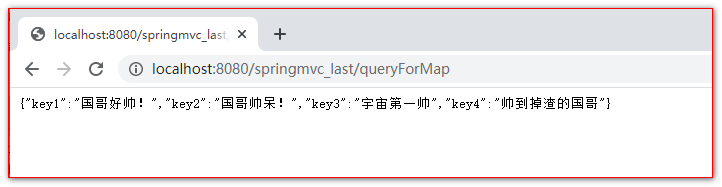
打开浏览器测试如下

使用@RequestBody将客户端的json转换为Java对象

1
<a href="#">添加一个Person</a> <br>

js代码:

1
2
3
4
5
6
7
8
9
10
11
12
13
14
15
16
17
18
19
20
21
22
23
24
25
/**
* 如果客户端,Ajax请求,要给服务器发json数据 <br/>
* 1 必须是post请求<br/>
* 2 发的json数据一定是json的字符串 <br/>
* 3 告诉服务器发送的数据格式不再是之前的 name=value&name=value,发送的是json格式contentType:"application/json" <br/>
* 4 在服务器Controller代码中。使用 @RequestBody注解接收json数据 <br/>
*/
$("a:eq(3)").click(function () {

var personJson = {
id:100,
name:"ajax请求"
};

$.ajax({
url:"${pageContext.request.contextPath}/addPerson",
type:"post",
data:JSON.stringify(personJson),
success:function (data) {

},
dataType:"json",
contentType:"application/json"
});
});

Controller中的代码:

1
2
3
4
5
6
7
8
9
10
11
12
13
14
15
16
17
18
19
20
/**
* @ResponseBody将返回的对象转换为json字符串返回<br/>
* @RequestBody Person person 是告诉SpringMVC去请求体中获取json数据。将这个json字符串。转换为Person对象
* @param person
* @return
*/
@ResponseBody
@RequestMapping(value = "/addPerson")
public Map<String,Object> addPerson(@RequestBody Person person){
System.out.println(" 保存用户 : " + person);

Map<String,Object> map = new HashMap<>();

map.put("key1", "国哥好帅!");
map.put("key2", "国哥帅呆!");
map.put("key3", "宇宙第一帅");
map.put("key4", "帅到掉渣的国哥");

return map;
}

HttpMessageConverter原理

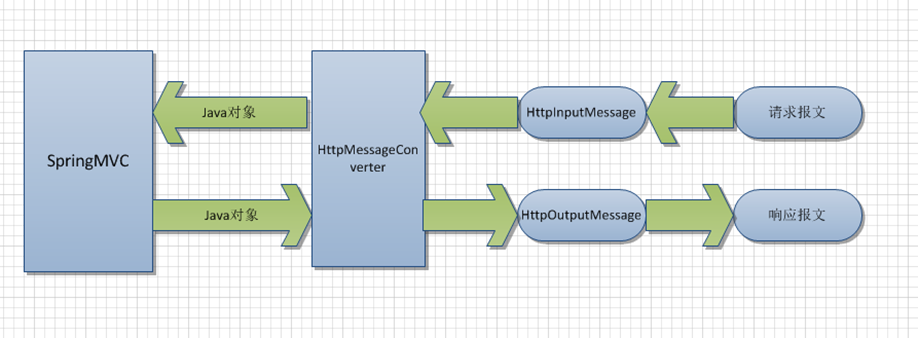
HttpMessageConverter

1) HttpMessageConverter 是 Spring3.0 新添加的一个接口,负责将请求信息转换为一个对象(类型为 T),将对象(类型为T)输出为响应信息

2) HttpMessageConverter接口定义的方法:

① Boolean canRead(Class<?> clazz,MediaType mediaType): 指定转换器可以读取的对象类型,即转换器是否可将请求信息转换为 clazz 类型的对象,同时指定支持 MIME 类型(text/html,applaiction/json等)

② Boolean canWrite(Class<?> clazz,MediaType mediaType):指定转换器是否可将 clazz 类型的对象写到响应流中,响应流支持的媒体类型在MediaType 中定义。

③ List getSupportMediaTypes():该转换器支持的媒体类型。

④ T read(Class<? extends T> clazz,HttpInputMessage inputMessage):将请求信息流转换为 T 类型的对象。

⑤ void write(T t,MediaType contnetType,HttpOutputMessgae outputMessage):将T类型的对象写到响应流中,同时指定相应的媒体类型为 contentType。

3) 如果需要自定义HttpMessageConverter消息转换器,可以通过继承 org.springframework.http.converter.AbstractHttpMessageConverter 类来实现

a) T readInternal(Class<? **extends** Person> clazz, HttpInputMessage inputMessage) 将客户端消息转换成为服务器需要的类型

b) boolean supports(Class<?> clazz) 判断是否支持对指定类型的处理

c) void writeInternal(Person person, HttpOutputMessage outputMessage) 将Controller控制器返回类型转换为客户端需要的数据
异常处理

使用@ExceptionHandler注解处理异常

1
2
3
4
5
6
7
8
9
10
11
12
13
14
15
16
17
18
19
20
21
22
23
24
25
26
27
28
29
30
31
32
33
34
35
/**
* @ExceptionHandler 标识的方法,在产生抛出后,会自动调用 <br/>
* Exception e 参数会接收抛出的异常 <br/>
*/
@ExceptionHandler
public String exceptionHandler(Exception e){
System.out.println(" exceptionHandler() => " + e);
// 返回值是跳转的页面
return "error";
}


/**
* @ExceptionHandler 标识的方法,在产生抛出后,会自动调用 <br/>
* Exception e 参数会接收抛出的异常 <br/>
*/
@ExceptionHandler
public String exceptionHandler1(RuntimeException e){
System.out.println(" exceptionHandler1() => " + e);
// 返回值是跳转的页面
return "error";
}


/**
* @ExceptionHandler 标识的方法,在产生抛出后,会自动调用 <br/>
* Exception e 参数会接收抛出的异常 <br/>
*/
@ExceptionHandler
public String exceptionHandler2(ArithmeticException e){
System.out.println(" exceptionHandler2() => " + e);
// 返回值是跳转的页面
return "error";
}

当有多个注解@ExceptionHandler标识的异常处理方法时,异常类越精确越优先调用

@ExceptionHandler标识的方法是局部异常处理方法,它只对所在的Controller中抛出的异常有效。

使用@ControllerAdvice注解处理异常

1
2
3
4
5
6
7
8
9
10
11
12
13
14
15
16
17
18
19
20
21
22
23
24
25
26
27
28
29
30
31
32
33
34
35
36
37
38
39
40
41
42
43
44
/**
* @ControllerAdvice 表示我当前当中的异常处理方法是全局异常处理方法
*/
@ControllerAdvice
public class ExceptionController {

/**
* @ExceptionHandler 标识的方法,在产生抛出后,会自动调用 <br/>
* Exception e 参数会接收抛出的异常 <br/>
*/
@ExceptionHandler
public String exceptionHandler(Exception e){
System.out.println(" ExceptionController#exceptionHandler() => " + e);
// 返回值是跳转的页面
return "error";
}


/**
* @ExceptionHandler 标识的方法,在产生抛出后,会自动调用 <br/>
* Exception e 参数会接收抛出的异常 <br/>
*/
@ExceptionHandler
public String exceptionHandler1(RuntimeException e){
System.out.println(" ExceptionController#exceptionHandler1() => " + e);
// 返回值是跳转的页面
return "error";
}


/**
* @ExceptionHandler 标识的方法,在产生抛出后,会自动调用 <br/>
* Exception e 参数会接收抛出的异常 <br/>
*/
@ExceptionHandler
public String exceptionHandler2(ArithmeticException e){
System.out.println(" ExceptionController#exceptionHandler2() => " + e);
// 返回值是跳转的页面
return "error";
}


}

异常处理优先顺序

在局部异常处理和全局异常处理同时存在的时候,优先顺序是:

1、局部优先 —->>>> 2、精确优化

使用SimpleMappingExceptionResolver类映射异常跳转

1
2
3
4
5
6
7
8
9
10
11
12
13
<!--
简单的异常映射解决器( 配置什么异常跳转到什么页面 )
-->
<bean class="org.springframework.web.servlet.handler.SimpleMappingExceptionResolver">
<property name="exceptionMappings">
<props>
<!-- key里是异常全类名,后面是跳转的路径或视图名 -->
<prop key="java.lang.Exception">error</prop>
<prop key="java.lang.RuntimeException">error2</prop>
<prop key="java.lang.ArithmeticException">error3</prop>
</props>
</property>
</bean>

三大框架ssm(Spring+SpringMVC+Mybatis)的整合

测试数据库

1
2
3
4
5
6
7
8
9
10
11
12
13
14
15
16
17
18
19
20
21
22
23
24
25
26
27
28
29
30
31
32
33
34
35
36
37
38
39
40
41
42
43
44
45
46
47
48
49
50
51
52
53
54
55
56
57
58
59
60
61
62
63
64
65
66
67
68
69
70
71
72
73
74
75
76
77
78
79
80
81
82
drop database if exists ssm;

create database ssm;

use ssm;

##创建图书表
create table t_book(
`id` int(11) primary key auto_increment, ## 主键
`name` varchar(50) not null, ## 书名
`author` varchar(50) not null, ## 作者
`price` decimal(11,2) not null, ## 价格
`sales` int(11) not null, ## 销量
`stock` int(11) ## 库存
);


## 插入初始化测试数据
insert into t_book(`id` , `name` , `author` , `price` , `sales` , `stock`)
values(null , 'java从入门到放弃' , '国哥' , 80 , 9999 , 9 );

insert into t_book(`id` , `name` , `author` , `price` , `sales` , `stock`)
values(null , '数据结构与算法' , '严敏君' , 78.5 , 6 , 13 );

insert into t_book(`id` , `name` , `author` , `price` , `sales` , `stock`)
values(null , '怎样拐跑别人的媳妇' , '龙伍' , 68, 99999 , 52 );

insert into t_book(`id` , `name` , `author` , `price` , `sales` , `stock`)
values(null , '木虚肉盖饭' , '小胖' , 16, 1000 , 50 );

insert into t_book(`id` , `name` , `author` , `price` , `sales` , `stock`)
values(null , 'C++编程思想' , '刚哥' , 45.5 , 14 , 95 );

insert into t_book(`id` , `name` , `author` , `price` , `sales` , `stock`)
values(null , '蛋炒饭' , '周星星' , 9.9, 12 , 53 );

insert into t_book(`id` , `name` , `author` , `price` , `sales` , `stock`)
values(null , '赌神' , '龙伍' , 66.5, 125 , 535 );

insert into t_book(`id` , `name` , `author` , `price` , `sales` , `stock`)
values(null , 'Java编程思想' , '阳哥' , 99.5 , 47 , 36 );

insert into t_book(`id` , `name` , `author` , `price` , `sales` , `stock`)
values(null , 'JavaScript从入门到精通' , '婷姐' , 9.9 , 85 , 95 );

insert into t_book(`id` , `name` , `author` , `price` , `sales` , `stock`)
values(null , 'cocos2d-x游戏编程入门' , '国哥' , 49, 52 , 62 );

insert into t_book(`id` , `name` , `author` , `price` , `sales` , `stock`)
values(null , 'C语言程序设计' , '谭浩强' , 28 , 52 , 74 );

insert into t_book(`id` , `name` , `author` , `price` , `sales` , `stock`)
values(null , 'Lua语言程序设计' , '雷丰阳' , 51.5 , 48 , 82 );

insert into t_book(`id` , `name` , `author` , `price` , `sales` , `stock`)
values(null , '西游记' , '罗贯中' , 12, 19 , 9999 );

insert into t_book(`id` , `name` , `author` , `price` , `sales` , `stock`)
values(null , '水浒传' , '华仔' , 33.05 , 22 , 88 );

insert into t_book(`id` , `name` , `author` , `price` , `sales` , `stock`)
values(null , '操作系统原理' , '刘优' , 133.05 , 122 , 188 );

insert into t_book(`id` , `name` , `author` , `price` , `sales` , `stock`)
values(null , '数据结构 java版' , '封大神' , 173.15 , 21 , 81 );

insert into t_book(`id` , `name` , `author` , `price` , `sales` , `stock`)
values(null , 'UNIX高级环境编程' , '乐天' , 99.15 , 210 , 810 );

insert into t_book(`id` , `name` , `author` , `price` , `sales` , `stock`)
values(null , 'javaScript高级编程' , '国哥' , 69.15 , 210 , 810 );

insert into t_book(`id` , `name` , `author` , `price` , `sales` , `stock`)
values(null , '大话设计模式' , '国哥' , 89.15 , 20 , 10 );

insert into t_book(`id` , `name` , `author` , `price` , `sales` , `stock`)
values(null , '人月神话' , '刚哥' , 88.15 , 20 , 80 );


## 查看表内容
select id,name,author,price,sales,stock from t_book;

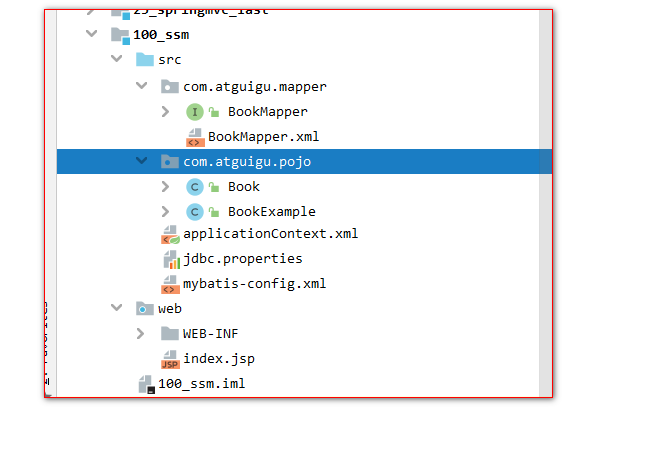
创建一个动态Web工程, 并mybatis逆向工程生成代码

根据以上的数据库表,使用 Mybatis 逆向工程生成**JavaBean** 、 Mapper**接口** 、 Mapper.xml 配置文件

直接生成到此web模块下, 并创建jdbc.properties属性配置文件 ,mybatis-config.xml核心配置文件
然后导入整合Spring+SpringMVC+Mybatis的所有jar包

aop 切入点表达式jar包:

com.springsource.org.aspectj.weaver-1.6.8.RELEASE.jar

数据库连接池:

druid-1.1.9.jar

json的包:

jackson-annotations-2.10.3.jar

jackson-core-2.10.3.jar

jackson-databind-2.10.3.jar

原生Junit测试:

junit_4.12.jar

org.hamcrest.core_1.3.0.jar

Mybatis的包:

mybatis-3.5.1.jar

Mybatis到Spring的整合包:

mybatis-spring-2.0.4.jar

数据库驱动包:

mysql-connector-java-5.1.37-bin.jar

Spring切面包:

spring-aop-5.2.5.RELEASE.jar

spring-aspects-5.2.5.RELEASE.jar

Spring核心包:

spring-beans-5.2.5.RELEASE.jar

spring-context-5.2.5.RELEASE.jar

spring-core-5.2.5.RELEASE.jar

spring-expression-5.2.5.RELEASE.jar

spring-jcl-5.2.5.RELEASE.jar

Spring数据库访问包:

spring-jdbc-5.2.5.RELEASE.jar

spring-orm-5.2.5.RELEASE.jar

spring-tx-5.2.5.RELEASE.jar

Spring测试包:

spring-test-5.2.5.RELEASE.jar

SpringMVC需要的包:

spring-web-5.2.5.RELEASE.jar

spring-webmvc-5.2.5.RELEASE.jar

开始整合Spring + Mybatis

jdbc.properties属性配置文件

1
2
3
4
5
6
jdbc.user=root
jdbc.password=root
jdbc.url=jdbc:mysql://localhost:3306/ssm
jdbc.driver=com.mysql.jdbc.Driver
jdbc.initialSize=5
jdbc.maxActive=10

Mybatis核心配置文件

1
2
3
4
5
6
7
8
9
10
11
12
13
14
15

<?xml version="1.0" encoding="UTF-8" ?>
<!DOCTYPE configuration
PUBLIC "-//mybatis.org//DTD Config 3.0//EN"
"http://mybatis.org/dtd/mybatis-3-config.dtd">
<configuration>

<settings>
<!-- 打开延迟加载的开关 -->
<setting name="lazyLoadingEnabled" value="true" />
<!-- 将积极加载改为消极加载 按需加载 -->
<setting name="aggressiveLazyLoading" value="false" />
</settings>

</configuration>

applicationContext.xml配置文件:

1
2
3
4
5
6
7
8
9
10
11
12
13
14
15
16
17
18
19
20
21
22
23
24
25
26
27
28
29
30
31
32
33
34
35
36
37
38
39
40
41
42
43
44
<?xml version="1.0" encoding="UTF-8"?>
<beans xmlns="http://www.springframework.org/schema/beans"
xmlns:xsi="http://www.w3.org/2001/XMLSchema-instance"
xmlns:context="http://www.springframework.org/schema/context"
xmlns:mybatis="http://mybatis.org/schema/mybatis-spring" xmlns:tx="http://www.springframework.org/schema/tx"
xmlns:aop="http://www.springframework.org/schema/aop"

xsi:schemaLocation="http://www.springframework.org/schema/beans http://www.springframework.org/schema/beans/spring-beans.xsd http://www.springframework.org/schema/context https://www.springframework.org/schema/context/spring-context.xsd http://mybatis.org/schema/mybatis-spring http://mybatis.org/schema/mybatis-spring.xsd http://www.springframework.org/schema/tx http://www.springframework.org/schema/tx/spring-tx.xsd http://www.springframework.org/schema/aop https://www.springframework.org/schema/aop/spring-aop.xsd">

<!-- 配置包扫描 -->
<context:component-scan base-package="com"></context:component-scan>

<!-- 配置加载jdbc.properties属性配置文件 -->
<context:property-placeholder location="classpath:jdbc.properties"/>

<!-- 配置数据库连接池 -->
<bean id="dataSource" class="com.alibaba.druid.pool.DruidDataSource">
<property name="username" value="${jdbc.user}" />
<property name="password" value="${jdbc.password}" />
<property name="driverClassName" value="${jdbc.driverClassName}" />
<property name="url" value="${jdbc.url}" />
<property name="initialSize" value="${jdbc.initialSize}" />
<property name="maxActive" value="${jdbc.maxActive}" />
</bean>

<!-- 开始整合Spring+Mybatis -->
<bean id="sqlSessionFactory" class="org.mybatis.spring.SqlSessionFactoryBean">
<!-- 使用Spring中的数据库连接池 -->
<property name="dataSource" ref="dataSource" />
<!-- 配置Mybatis的核心配置文件 -->
<property name="configLocation" value="classpath:mybatis-config.xml" />
<!-- 配置加载Mapper.xml配置文件 -->
<property name="mapperLocations" value="classpath:com/atguigu/mapper/*.xml" />
</bean>

<!--
是把Mybatis中的Mapper接口都扫描到Spring容器中
-->
<mybatis:scan base-package="com.atguigu.mapper" />


</beans>

测试Mybatis和Spring整合成功

只要能成功注入BookMapper**说明Mybatis**中的Mapper**接口已经注入到Spring**容器中了。说明整合成功!!!

1
2
3
4
5
6
7
8
9
10
11
12
13
14
15
16
17
18
19
20
21
22
23
24
25
26
27
28
29
30
31
32

package com.atguigu.ssm.test;

import com.atguigu.mapper.BookMapper;
import org.junit.Test;
import org.junit.runner.RunWith;
import org.springframework.beans.factory.annotation.Autowired;
import org.springframework.test.context.ContextConfiguration;
import org.springframework.test.context.junit4.SpringJUnit4ClassRunner;

import javax.sql.DataSource;
import java.sql.SQLException;

@ContextConfiguration(locations = "classpath:applicationContext.xml")
@RunWith(SpringJUnit4ClassRunner.class)
public class SpringTest {

@Autowired
DataSource dataSource;

@Autowired
BookMapper bookMapper;

@Test
public void test1() throws SQLException {
System.out.println(dataSource.getConnection());
System.out.println( bookMapper );
}

}


Spring添加事务管理

编写BookService

1
2
3
4
5
6
7
8
9
10
11
12
13
14
public interface BookService {

public void saveBook(Book book);

public void updateBook(Book book);

public void deleteBookById(Integer id);

public Book queryBookById(Integer id);

public List<Book> queryBooks();

}

BookServiceImpl实现类

1
2
3
4
5
6
7
8
9
10
11
12
13
14
15
16
17
18
19
20
21
22
23
24
25
26
27
28
29
30
31
32
33
34
@Service
public class BookServiceImpl implements BookService {

@Autowired
BookMapper bookMapper;

@Override
public void saveBook(Book book) {
bookMapper.insertSelective(book);
// 只是为了测试使用 测试完了之后。记得删除掉下面两行
int i = 12 / 0;
bookMapper.insertSelective(book);
}

@Override
public void updateBook(Book book) {
bookMapper.updateByPrimaryKeySelective(book);
}

@Override
public void deleteBookById(Integer id) {
bookMapper.deleteByPrimaryKey(id);
}

@Override
public Book queryBookById(Integer id) {
return bookMapper.selectByPrimaryKey(id);
}

@Override
public List<Book> queryBooks() {
return bookMapper.selectByExample(null);
}
}

在applicationContext.xml配置文件中添加事务管理

1
2
3
4
5
6
7
8
9
10
11
12
13
14
15
16
17
18
19
20
21
22
23
24
25
26
27
28
29
30
31
32
33
34
35
36
37
38
39
40
41
42
43
44
45
46
47
48
49
50
51
52
53
54
55
56
57
58
59
60
61
62
63
<?xml version="1.0" encoding="UTF-8"?>
<beans xmlns="http://www.springframework.org/schema/beans"
xmlns:xsi="http://www.w3.org/2001/XMLSchema-instance"
xmlns:context="http://www.springframework.org/schema/context"
xmlns:mybatis="http://mybatis.org/schema/mybatis-spring" xmlns:tx="http://www.springframework.org/schema/tx"
xmlns:aop="http://www.springframework.org/schema/aop"

xsi:schemaLocation="http://www.springframework.org/schema/beans http://www.springframework.org/schema/beans/spring-beans.xsd http://www.springframework.org/schema/context https://www.springframework.org/schema/context/spring-context.xsd http://mybatis.org/schema/mybatis-spring http://mybatis.org/schema/mybatis-spring.xsd http://www.springframework.org/schema/tx http://www.springframework.org/schema/tx/spring-tx.xsd http://www.springframework.org/schema/aop https://www.springframework.org/schema/aop/spring-aop.xsd">

<!-- 配置包扫描 -->
<context:component-scan base-package="com"></context:component-scan>

<!-- 配置加载jdbc.properties属性配置文件 -->
<context:property-placeholder location="classpath:jdbc.properties"/>

<!-- 配置数据库连接池 -->
<bean id="dataSource" class="com.alibaba.druid.pool.DruidDataSource">
<property name="username" value="${user}" />
<property name="password" value="${password}" />
<property name="driverClassName" value="${driverClassName}" />
<property name="url" value="${url}" />
<property name="initialSize" value="${initialSize}" />
<property name="maxActive" value="${maxActive}" />
</bean>

<!-- 开始整合Spring+Mybatis -->
<bean id="sqlSessionFactory" class="org.mybatis.spring.SqlSessionFactoryBean">
<!-- 使用Spring中的数据库连接池 -->
<property name="dataSource" ref="dataSource" />
<!-- 配置Mybatis的核心配置文件 -->
<property name="configLocation" value="classpath:mybatis-config.xml" />
<!-- 配置加载Mapper.xml配置文件 -->
<property name="mapperLocations" value="classpath:com/atguigu/mapper/*.xml" />
</bean>

<!--
是把Mybatis中的Mapper接口都扫描到Spring容器中
-->
<mybatis:scan base-package="com.atguigu.mapper" />

<!-- 配置事务管理器 -->
<bean class="org.springframework.jdbc.datasource.DataSourceTransactionManager"
id="transactionManager">
<property name="dataSource" ref="dataSource"></property>
</bean>
<!--事务属性 -->
<tx:advice id="tx_advice" transaction-manager="transactionManager">
<tx:attributes>
<tx:method name="save*" propagation="REQUIRED"/>
<tx:method name="delete*" propagation="REQUIRED"/>
<tx:method name="update*" propagation="REQUIRED"/>
<tx:method name="insert*" propagation="REQUIRED"/>
<tx:method name="*" read-only="true"/>
</tx:attributes>
</tx:advice>
<!--代理-->
<aop:config>
<aop:advisor advice-ref="tx_advice"
pointcut="execution(public * com.atguigu..*Service*.*(..))"
/>
</aop:config>

</beans>

BookService的测试

1
2
3
4
5
6
7
8
9
10
11
12
13
14
15
16
17
18
19
20
21
22
23
24
25
26
27
28
29
30
31
32
33
34
35
36
37
38
@ContextConfiguration(locations = "classpath:applicationContext.xml")
@RunWith(SpringJUnit4ClassRunner.class)
public class BookServiceTest {

@Autowired
BookService bookService;

@Test
public void saveBook() {
bookService.saveBook(new Book(null,"把班主任,拉出去糟蹋了",
"SZ王灿侨", new BigDecimal(1000), 10000,10000));
}

@Test
public void updateBook() {
bookService.updateBook(new Book(21,"把国哥,拉出去糟蹋了",
"SZ王灿侨", new BigDecimal(1000), 10000,10000));
}

@Test
public void deleteBookById() {
bookService.deleteBookById(21);
}

@Test
public void queryBookById() {
Book book = bookService.queryBookById(1);
System.out.println(book);
}

@Test
public void queryBooks() {
for (Book queryBook : bookService.queryBooks()) {
System.out.println(queryBook);
}
}
}

开始整合Spring+SpringMVC框架

创建springmvc的配置文件springmvc.xml配置文件,内容如下:

1
2
3
4
5
6
7
8
9
10
11
12
13
14
15
16
17
18
19
20
21
22
<?xml version="1.0" encoding="UTF-8"?>
<beans xmlns="http://www.springframework.org/schema/beans"
xmlns:xsi="http://www.w3.org/2001/XMLSchema-instance"
xmlns:context="http://www.springframework.org/schema/context"
xmlns:mvc="http://www.springframework.org/schema/mvc"
xsi:schemaLocation="http://www.springframework.org/schema/beans http://www.springframework.org/schema/beans/spring-beans.xsd http://www.springframework.org/schema/context https://www.springframework.org/schema/context/spring-context.xsd http://www.springframework.org/schema/mvc https://www.springframework.org/schema/mvc/spring-mvc.xsd">

<!-- 配置包扫描 -->
<context:component-scan base-package="com"
use-default-filters="false">
<context:include-filter type="annotation"
expression="org.springframework.stereotype.Controller"/>
<context:include-filter type="annotation"
expression="org.springframework.web.bind.annotation.ControllerAdvice"/>
</context:component-scan>

<!-- SpringMVC的标配 -->
<mvc:default-servlet-handler></mvc:default-servlet-handler>
<mvc:annotation-driven></mvc:annotation-driven>

</beans>

修改applicationContext.xml中包扫描的配置

1
2
3
4
5
6
7
<!-- 配置包扫描 -->
<context:component-scan base-package="com">
<context:exclude-filter type="annotation"
expression="org.springframework.stereotype.Controller"/>
<context:exclude-filter type="annotation"
expression="org.springframework.web.bind.annotation.ControllerAdvice"/>
</context:component-scan>

在web.xml中添加如下配置:

web.xml中的配置:

1
2
3
4
5
6
7
8
9
10
11
12
13
14
15
16
17
18
19
20
21
22
23
24
25
26
27
28
29
30
31
32
33
<?xml version="1.0" encoding="UTF-8"?>
<web-app xmlns:xsi="http://www.w3.org/2001/XMLSchema-instance"
xmlns="http://java.sun.com/xml/ns/javaee"
xsi:schemaLocation="http://java.sun.com/xml/ns/javaee http://java.sun.com/xml/ns/javaee/web-app_2_5.xsd"
id="WebApp_ID" version="2.5">

<!-- 整合Spring到Web的监听器 -->
<context-param>
<param-name>contextConfigLocation</param-name>
<param-value>classpath:applicationContext.xml</param-value>
</context-param>
<listener>
<listener-class>org.springframework.web.context.ContextLoaderListener</listener-class>
</listener>

<!-- SpringMVC的前端控制器 -->
<servlet>
<servlet-name>springDispatcherServlet</servlet-name>
<servlet-class>org.springframework.web.servlet.DispatcherServlet</servlet-class>
<init-param>
<param-name>contextConfigLocation</param-name>
<param-value>classpath:springmvc.xml</param-value>
</init-param>
<load-on-startup>1</load-on-startup>
</servlet>

<servlet-mapping>
<servlet-name>springDispatcherServlet</servlet-name>
<url-pattern>/</url-pattern>
</servlet-mapping>

</web-app>

编写BookController测试三大框架整合是否成功

1
2
3
4
5
6
7
8
9
10
11
12
13
14
15
16
@RequestMapping(value = "/book")
@Controller
public class BookController {

@Autowired
BookService bookService;

@RequestMapping("/save")
public String save(){
bookService.saveBook(new Book(null,"把国哥,拉出去糟蹋了",
"班主任", new BigDecimal(1000), 10000,10000));
return "redirect:/index.jsp";
}

}


SpringMVC-04
http://www.kju147.com/2021/07/23/SpringMVC-04/
作者
个人学习
发布于
2021年7月23日
许可协议