SpringMVC-03 10、Restful风格 10.1、Restful 风格的介绍 Restful 一种软件架构风格、设计风格,而不是标准,只是提供了一组设计原则和约束条件 。它主要用于客户端和服务器交互类的软件。基于这个风格设计的软件可以更简洁,更有层次,更易于实现缓存等机制。
REST(英文:Representational State Transfer,简称REST)描述了一个架构样式的网络系统,比如 web 应用程序。它首次出现在 2000 年 Roy Fielding 的博士论文中,他是 HTTP 规范的主要编写者之一。在目前主流的三种Web服务交互方案中,REST相比于SOAP(Simple Object Access protocol,简单对象访问协议)以及XML-RPC更加简单明了,无论是对URL的处理还是对Payload的编码,REST都倾向于用更加简单轻量的方法设计和实现。值得注意的是REST并没有一个明确的标准,而更像是一种设计的风格。
####原则条件
REST 指的是一组架构约束条件 和原则。满足这些约束条件和原则的应用程序或设计就是 RESTful。
Web 应用程序最重要的 REST 原则是,客户端和服务器之间的交互在请求之间是无状态的。从客户端到服务器的每个请求都必须包含理解请求所必需的信息。如果服务器在请求之间的任何时间点重启,客户端不会得到通知。此外,无状态请求可以由任何可用服务器回答,这十分适合云计算 之类的环境。客户端可以缓存数据以改进性能。
在服务器端,应用程序状态和功能可以分为各种资源。资源是一个有趣的概念实体,它向客户端公开。资源的例子有:应用程序对象、数据库记录、算法等等。每个资源都使用 URI (Universal Resource Identifier) 得到一个唯一的地址。所有资源都共享统一的接口,以便在客户端和服务器之间传输状态。使用的是标准的 HTTP 方法,比如 GET、PUT、POST 和 DELETE 。Hypermedia 是应用程序状态的引擎 ,资源表示通过超链接 互联。
干货(简单明了): Restful是一种设计风格。对于我们Web开发人员来说。就是使用一个url地址表示一个唯一的资源。然后把原来的请求参数加入到请求资源地址中。然后原来请求的增,删,改,查操作。改为使用HTTP协议中请求方式GET、POST、PUT、DELETE表示。
1、把请求参数加入到请求的资源地址中
2、原来的增,删,改,查。使用HTTP请求方式,POST、DELETE、PUT、GET分别一一对应。
10.2、如何学习restful风格,这里需要明确两点 10.2.1、就是把传统的请求参数加入到请求地址是什么样子? 传统的方式是:
比如:http://ip:port/工程名/资源名?请求参数
举例:http://127.0.0.1:8080/springmvc/book?action=delete&id=1
restful风格是:
比如:http://ip:port/工程名/资源名/请求参数/请求参数
举例:http://127.0.0.1:8080/springmvc/book/1
请求的动作删除由请求方式delete决定
10.2.2、restful风格中请求方式GET、POST、PUT、DELETE分别表示查、增、改、删 GET请求 对应 查询
http://ip:port/工程名/book/1 HTTP请求GET 表示要查询id为1的图书
http://ip:port/工程名/book HTTP请求GET 表示查询全部的图书
POST请求 对应 添加
http://ip:port/工程名/book HTTP请求POST 表示要添加一个图书
PUT请求 对应 修改
http://ip:port/工程名/book/1 HTTP请求PUT 表示要修改id为1的图书信息
DELETE请求 对应 删除
http://ip:port/工程名/book/1 HTTP请求DELETE 表示要删除id为1的图书信息
10.2.3、SpringMVC中如何发送GET请求、POST请求、PUT请求、DELETE请求。 我们知道发起GET请求和POST请求,只需要在表单的form标签中,设置method=”get” 就是GET请求。
设置form标签的method=”post”。就会发起POST请求。而PUT请求和DELETE请求。要如何发起呢。
1、要有post请求的form标签
2、在form表单中,添加一个额外的隐藏域_method=”PUT”或_method=”DELETE”
3、在web.xml中配置一个Filter过滤器org.springframework.web.filter.HiddenHttpMethodFilter(注意,这个Filter一定要在处理乱码的Filter后面 )
10.3、Restful风格的crud如何实现 表单:
1 2 3 4 5 6 7 8 9 10 11 12 13 14 15 16 17 18 19 20 21 22 23 24 25 <body>1 的图书 --%>"${pageContext.request.contextPath}/book" method="post" >"submit" value="添加图书" >1 先有一个post表单2 在表单中有一个隐藏域,name值是:_method,value是:PUT( put请求,值是put,delete请求,值是DELETE )3 在服务器中,配置一个支持restful风格请求的Filter( 将请求参数_method=put改为put请求 )"${pageContext.request.contextPath}/book/1" method="post" >"hidden" name="_method" value="PUT" >"submit" value="修改图书" >"${pageContext.request.contextPath}/book/1" method="post" >"hidden" name="_method" value="DELETE" >"submit" value="删除图书" >
BookController代码:
1
2
3
4
5
6
7
8
9
10
11
12
13
14
15
16
17
18
19
20
21
22
23
24
25
26
27
28
29
30
31
32
33
34
35
36
37
38
39
40
41
42
package com.atguigu.controller;import org.springframework.stereotype.Controller;import org.springframework.web.bind.annotation.RequestMapping;import org.springframework.web.bind.annotation.RequestMethod;@Controller public class BookController @RequestMapping(value = "/book/1", method = RequestMethod.GET) public String queryBookById () " 查询id为1的图书 " );return "redirect:/index.jsp" ;@RequestMapping(value = "/book", method = RequestMethod.GET) public String queryBooks () " 查询全部图书 " );return "redirect:/index.jsp" ;@RequestMapping(value = "/book", method = RequestMethod.POST) public String addBook () "添加图书" );return "redirect:/index.jsp" ;@RequestMapping(value = "/book/1", method = RequestMethod.PUT) public String updateBook () "修改图书" );return "redirect:/index.jsp" ;@RequestMapping(value = "/book/1", method = RequestMethod.DELETE) public String deleteBookById () "删除图书" );return "redirect:/index.jsp" ;
web.xml中的配置:
1
2
3
4
5
6
7
8
9
10
11
12
13
14
15
16
17
18
19
20
21
22
23
24
25
26
27
28
<?xml version="1.0" encoding="UTF-8"?> <web-app xmlns ="http://xmlns.jcp.org/xml/ns/javaee" xmlns:xsi ="http://www.w3.org/2001/XMLSchema-instance" xsi:schemaLocation ="http://xmlns.jcp.org/xml/ns/javaee http://xmlns.jcp.org/xml/ns/javaee/web-app_4_0.xsd" version ="4.0" > <servlet > <servlet-name > dipsatcher</servlet-name > <servlet-class > org.springframework.web.servlet.DispatcherServlet</servlet-class > <load-on-startup > 1</load-on-startup > </servlet > <servlet-mapping > <servlet-name > dipsatcher</servlet-name > <url-pattern > /</url-pattern > </servlet-mapping > <filter > <filter-name > HiddenHttpMethodFilter</filter-name > <filter-class > org.springframework.web.filter.HiddenHttpMethodFilter</filter-class > </filter > <filter-mapping > <filter-name > HiddenHttpMethodFilter</filter-name > <url-pattern > /*</url-pattern > </filter-mapping > </web-app >
10.4、Restful风格在高版本Tomcat中无法转发到jsp页面 在Tomcat8之后的一些高版本,使用restful风格访问然后转发到jsp页面。就会有如下的错误提示:
JSPs only permit GET POST or HEAD
第一种解决方案: 换回低版本的Tomcat(影响性能)
第二种解决方案:isErrorPage=”true”
10.5、@PathVariable 路径参数获取 前面我们已经知道如何编写和配置restful风格的请求和控制器。
那么 现在的问题是。如何接收restful风格请求的参数。比如前面的id值。
1 2 3 4 5 6 7 8 9 10 11 12 13 14 @RequestMapping(value = "/book/{id}/{abc}", method = RequestMethod.GET) public String queryBookById ( @PathVariable("id") Integer id, @PathVariable("abc") String abc) " 查询id为" + id + "的图书 " );" abc 参数值为: " + abc);return "redirect:/index.jsp" ;
11、Restful风格实现的CRUD图书 把前面的传统请求方式的图书的CRUD换成刚刚讲的Restful风格的图书模块的CRUD。只需要修改页面端的请求方式和地址,以及服务器端Controller的接收。
11.2、列表功能实现 记得删除BookController类上的@RequestMapping注解
Controller中的修改:
1 2 3 4 5 6 7 8 9 10 11 12 @RequestMapping(value = "/book",method = RequestMethod.GET) public String queryAll (Map<String, Object> map) "books" , books);return "bookList" ;
页面端的修改:
11.4、添加功能实现 Controller中的代码:
1 2 3 4 5 6 7 8 9 10 @RequestMapping(value = "/book",method = RequestMethod.POST) public String add (Book book) return "redirect:/book" ;
bookEdit.jsp页面中的修改:
1 2 3 4 5 6 7 8 9 10 11 12 13 14 15 16 17 18 19 20 21 22 23 24 25 26 27 28 29 30 31 32 "${pageContext.request.contextPath}/book" "post" >"hidden" name="id" value="${requestScope.book.id}" >"center" colspan="2" >"submit" />
11.3、删除功能实现 BookController中的修改:
1
2
3
4
5
6
@RequestMapping(value = "/book/{id}",method = RequestMethod.DELETE) public String delete (@PathVariable("id") Integer id) return "redirect:/book" ;
bookList.jsp页面中的修改:
1
2
3
4
5
6
7
8
9
10
11
12
13
14
15
16
<c:forEach items="${requestScope.books}" var ="book" >"${pageContext.request.contextPath}/book/${book.id}" method="post" >"hidden" name="_method" value="DELETE" />
修改确认提示代码:
1
2
3
4
5
6
7
8
9
10
11
12
13
14
15
16
<script type="text/javascript" src="${pageContext.request.contextPath}/script/jquery-1.7.2.js"></script>"text/javascript" >"a.deleteClass" ).click(function () {var name = $(this ).parent().parent().find("td:first" ).text();if (confirm("你确定要删除 【" + name + "】吗?" )){this ).prev("form" ).submit();return false ;
11.5、更新功能实现 更新图书分为两个步骤:
1、查询需要更新的图书,填充到更新页面
2、提交请求,发送数据给服务器更新保存修改。
11.5.1、查询需要更新的图书,填充到更新页面 BookController中的代码:
1
2
3
4
5
6
@RequestMapping(value = "/book/{id}",method = RequestMethod.GET) public String queryBookById (@PathVariable("id") Integer id, Map<String, Object> map) "book" , book);return "bookEdit" ;
修改bookList.jsp页面中【修改】的请求地址:
11.5.2、提交请求,发送数据给服务器更新保存修改。 BookController中的代码:
1
2
3
4
5
6
@RequestMapping(value = "/book/{id}",method = RequestMethod.PUT) public String update (Book book) return "redirect:/book" ;
bookEdit.jsp页面的修改:
1
2
3
4
5
6
7
8
9
10
11
12
13
14
15
16
17
18
19
20
21
22
23
24
25
26
27
28
29
30
31
32
33
34
35
36
37
38
39
40
41
42
43
44
45
46
47
48
49
50
51
52
53
54
55
56
57
58
59
60
61
62
63
64
65
<%@ taglib prefix="c" uri="http://java.sun.com/jsp/jstl/core" %>"java" contentType="text/html; charset=UTF-8" "UTF-8" %>"-//W3C//DTD HTML 4.01 Transitional//EN" "http://www.w3.org/TR/html4/loose.dtd" >"Content-Type" content="text/html; charset=UTF-8" >"://" ":" "/" ;"<%=basePath %>" />if test="${empty requestScope.book}" >"${pageContext.request.contextPath}/book" "post" >if test="${not empty requestScope.book}" >"${pageContext.request.contextPath}/book/${requestScope.book.id}" "post" >"hidden" name="id" value="${requestScope.book.id}" >"hidden" name="_method" value="PUT" >"center" colspan="2" >"submit" />
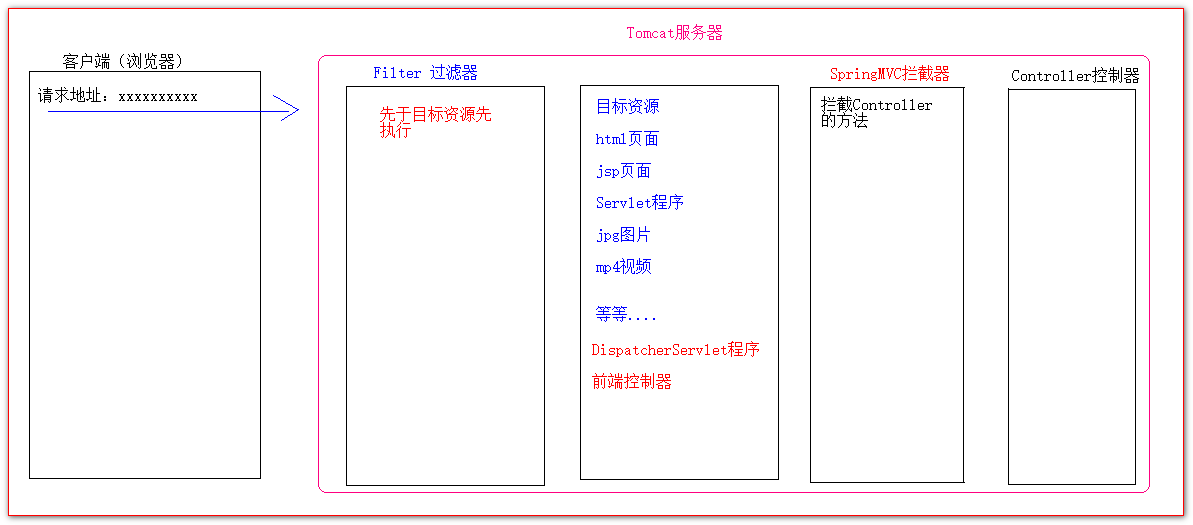
12、HandlerInterceptor拦截器 12.1、HandlerInterceptor拦截器的介绍 SpringMVC中的拦截器,跟JavaWeb的Filter过滤器都非常接近。
都可以拦截资源的请求,调用。
SpringMVC中的拦截器,使用步骤:
1 编写一个类去实现接口
2 实现其中的方法
3 到springmvc中的配置文件中去配置
12.2、单个HandlerInterceptor拦截器的示例 1、编写一个类去实现HandlerInterceptor接口
2、到Spring的容器配置文件中去配置拦截器,让SpringMVC知道都拦截哪些目标方法
1
2
3
4
5
6
7
8
9
10
11
12
13
14
15
16
17
18
19
20
21
22
23
24
25
26
27
28
29
30
31
32
33
34
35
36
package com.atguigu.interceptor;import org.springframework.web.servlet.HandlerInterceptor;import org.springframework.web.servlet.ModelAndView;import javax.servlet.http.HttpServletRequest;import javax.servlet.http.HttpServletResponse;public class FirstHandlerInterceptor implements HandlerInterceptor @Override public boolean preHandle (HttpServletRequest request, HttpServletResponse response, Object handler) throws Exception "FirstHandlerInterceptor preHandle() " );return false ;public void postHandle (HttpServletRequest request, HttpServletResponse response, Object handler, ModelAndView modelAndView) throws Exception "FirstHandlerInterceptor postHandle() " );public void afterCompletion (HttpServletRequest request, HttpServletResponse response, Object handler, Exception ex) throws Exception "FirstHandlerInterceptor afterCompletion() " );
springmvc.xml配置文件中的内容
1
2
3
4
5
6
7
8
9
10
11
12
13
14
15
16
17
18
19
20
21
22
23
24
25
26
27
28
29
30
31
32
33
34
35
36
<?xml version="1.0" encoding="UTF-8"?> <beans xmlns ="http://www.springframework.org/schema/beans" xmlns:xsi ="http://www.w3.org/2001/XMLSchema-instance" xmlns:context ="http://www.springframework.org/schema/context" xmlns:mvc ="http://www.springframework.org/schema/mvc" xsi:schemaLocation ="http://www.springframework.org/schema/beans http://www.springframework.org/schema/beans/spring-beans.xsd http://www.springframework.org/schema/context https://www.springframework.org/schema/context/spring-context.xsd http://www.springframework.org/schema/mvc https://www.springframework.org/schema/mvc/spring-mvc.xsd" > <context:component-scan base-package ="com" > </context:component-scan > <bean class ="org.springframework.web.servlet.view.InternalResourceViewResolver" > <property name ="prefix" value ="/pages/" /> <property name ="suffix" value =".jsp" /> </bean > <mvc:interceptors > <mvc:interceptor > <mvc:mapping path ="/hello" /> <bean class ="com.atguigu.interceptor.FirstHandlerInterceptor" /> </mvc:interceptor > </mvc:interceptors > <mvc:default-servlet-handler > </mvc:default-servlet-handler > <mvc:annotation-driven > </mvc:annotation-driven > </beans >
SpringMVC拦截器和JavaWeb过滤器的不同:
12.3、单个拦截器异常时的执行顺序 一:目标方法前返回false的情况:
1、目标方法前执行 返回false
2、这是目标方法 不执行
3、目标方法之后 不执行
4、这是渲染页面 不执行
5、页面渲染完成! 不执行
二:目标方法前返回true的情况,目标方法异常
1、目标方法前执行 返回true
2、这是目标方法 异常
3、目标方法之后 不执行
4、这是渲染页面 渲染异常页面
5、页面渲染完成! 执行
三:目标方法前返回true的情况,目标方法后异常
1、目标方法前执行 返回true
2、这是目标方法 执行
3、目标方法之后 异常
4、这是渲染页面 渲染异常页面
5、页面渲染完成! 执行
四:目标方法前返回true的情况,渲染页面异常
1、目标方法前执行 返回true
2、这是目标方法 执行
3、目标方法之后 执行
4、这是渲染页面 异常
5、页面渲染完成! 执行
多个拦截器的执行介绍: FirstHandlerInterceptor 代码:
1
2
3
4
5
6
7
8
9
10
11
12
13
14
15
16
17
18
19
20
21
22
23
24
25
26
27
28
29
30
31
32
33
34
35
36
package com.atguigu.interceptor;import org.springframework.web.servlet.HandlerInterceptor;import org.springframework.web.servlet.ModelAndView;import javax.servlet.http.HttpServletRequest;import javax.servlet.http.HttpServletResponse;public class FirstHandlerInterceptor implements HandlerInterceptor @Override public boolean preHandle (HttpServletRequest request, HttpServletResponse response, Object handler) throws Exception "FirstHandlerInterceptor preHandle() " );return true ;public void postHandle (HttpServletRequest request, HttpServletResponse response, Object handler, ModelAndView modelAndView) throws Exception "FirstHandlerInterceptor postHandle() " );public void afterCompletion (HttpServletRequest request, HttpServletResponse response, Object handler, Exception ex) throws Exception "FirstHandlerInterceptor afterCompletion() " );
SecondHandlerInterceptor 代码:
1
2
3
4
5
6
7
8
9
10
11
12
13
14
15
16
17
18
19
20
21
22
23
24
25
26
27
28
public class SecondHandlerInterceptor implements HandlerInterceptor @Override public boolean preHandle (HttpServletRequest request, HttpServletResponse response, Object handler) throws Exception "SecondHandlerInterceptor preHandle() " );return true ;public void postHandle (HttpServletRequest request, HttpServletResponse response, Object handler, ModelAndView modelAndView) throws Exception "SecondHandlerInterceptor postHandle() " );public void afterCompletion (HttpServletRequest request, HttpServletResponse response, Object handler, Exception ex) throws Exception "SecondHandlerInterceptor afterCompletion() " );
springmvc.xml配置文件配置:
1 2 3 4 5 6 7 8 9 10 11 12 13 14 15 16 17 18 19 20 21 22 <mvc:interceptors > <mvc:interceptor > <mvc:mapping path ="/hello" /> <bean class ="com.atguigu.interceptor.FirstHandlerInterceptor" /> </mvc:interceptor > <mvc:interceptor > <mvc:mapping path ="/hello" /> <bean class ="com.atguigu.interceptor.SecondHandlerInterceptor" /> </mvc:interceptor > </mvc:interceptors >
多个SpringMVC拦截器的细节说明:
1、当有多个拦截器的时候,他们的执行顺序是由他们在springmvc配置文件中从上到下的配置顺序决定
2、如果有异常的情况下。只要preHandler方法返回了true的拦截器,它的afterCompletion();
视图源码解析 什么是视图?
SpringMVC为了让整个程序的代码有更好的封装性,把最后程序执行完给用户的结果,封装成为一个View接口。这个接口就叫视图
视图就是程序执行完之后用户收到的结果。
渲染视图是啥?
执行用户收到的结果的代码。就叫渲染。
执行页面的代码(大多数情况下,是请求转发,重定向。)
View 视图
获取视图的类型
String getContentType();
渲染视图页面
void render(Map<String, ?> model, HttpServletRequest request, HttpServletResponse response) throws Exception;
AbstractView 抽象类实现
具体实现页面的渲染
protected abstract void renderMergedOutputModel(
Map<String, Object> model, HttpServletRequest request, HttpServletResponse response) throws Exception;
把隐含模型中的数据,同步到Reqeust域中
protected void exposeModelAsRequestAttributes(Map<String, Object> model, HttpServletRequest request)
ViewResolver 视图解析器
根据给定的视图名解析得到相应的视图View对象
View resolveViewName(String viewName, Locale locale) throws Exception;