Spring-03
1.AOP切面编程
1、什么是AOP
AOP是面向切面编程。全称:Aspect Oriented Programming
面向切面编程指的是:程序是运行期间,动态地将某段代码插入到原来方法代码的某些位置中。这就叫面向切面编程。
2、一个简单计算数功能加日记
准备计算器相关类
计算接口
1
2
3
4
5
6
7
8
9
10
| public interface Calculate {
public int add(int num1, int num2);
public int mul(int num1, int num2);
public int div(int num1, int num2);
public int sub(int num1, int num2);
}
|
计算机类
1
2
3
4
5
6
7
8
9
10
11
12
13
14
15
16
17
18
19
20
21
| public class Calculator implements Calculate {
public int add(int num1, int num2) {
System.out.println("日记 :【add】 方法调用前 。参数1是:" + num1 + " , 参数2是:" + num2);
return num1 + num2;
}
public int mul(int num1, int num2) {
System.out.println("日记 :【mul】 方法调用前 。参数1是:" + num1 + " , 参数2是:" + num2);
return num1 * num2;
}
public int div(int num1, int num2) {
System.out.println("日记 :【div】 方法调用前 。参数1是:" + num1 + " , 参数2是:" + num2);
return num1 / num2;
}
public int sub(int num1, int num2) {
System.out.println("日记 :【sub】 方法调用前 。参数1是:" + num1 + " , 参数2是:" + num2);
return num1 - num2;
}
}
|
测试的代码
1
2
3
4
5
6
7
8
9
10
11
| public class CalculatorTest {
public static void main(String[] args) {
Calculate calculate = new Calculator();
int result = calculate.add(12, 12);
System.out.println("相加的结果:" + result);
result = calculate.mul(12, 12);
System.out.println("相乘的结果:" + result);
}
}
|
上面这种方法加日记处理操作。日记的代码就会耦合到业务代码中。而且后期如果需要修改日记就需要去指的修改所有方法中的日记操作。这个维护操作非常不方便。
可以说是一个很失败的例子。
3、原始方法统一日记处理
把日记的内容封装到一个类去中集中处理。
编写一个日记处理工具类
1
2
3
4
5
6
| public class LogUtil {
public static void log(String method, int num1, int num2) {
System.out.println("日记 :【" + method + "】 方法调用前 。参数1是:" + num1 + " , 参数2是:" + num2);
}
}
|
修改原来Calculator中的日记代码
1
2
3
4
5
6
7
8
9
10
11
| @Override
public int add(int num1, int num2) {
LogUtil.log("add", num1, num2);
return num1 + num2;
}
@Override
public int mul(int num1, int num2) {
LogUtil.log("mul", num1, num2);
return num1 * num2;
}
|
但是这种方式的不足之处是,每有一个需要加日记的类,都需要到类的代码中去添加日记功能代码。
无法做到所有对象都统一处理
4、使用代理实现日记
4.1、使用jdk动态代理统一日记
创建一个计算器代理工具类
1
2
3
4
5
6
7
8
9
10
11
12
13
14
15
16
17
18
19
20
21
22
23
24
25
26
27
28
29
30
31
32
33
34
35
36
37
38
39
40
| public class CalculateProxyFactory {
public static Calculate getProxy(Calculate target) {
class CalculateInvocationHandler implements InvocationHandler {
Calculate target;
public CalculateInvocationHandler(Calculate calculate) {
this.target = calculate;
}
@Override
public Object invoke(Object proxy, Method method, Object[] args) throws Throwable {
if (method.getDeclaringClass().equals(Object.class)) {
return method.invoke(target, args);
}
LogUtil.log(method.getName(), (int) args[0], (int) args[1]);
Object result = null;
try {
result = method.invoke(target, args);
System.out.println("后置日记");
} catch (Exception e) {
System.out.println("异常日记");
} finally {
System.out.println("finally日记");
}
return result;
}
}
return (Calculate) Proxy.newProxyInstance(target.getClass().getClassLoader(), target.getClass()
.getInterfaces(), new CalculateInvocationHandler(target));
}
}
|
修改原来计算器中的日记代码
1
2
3
4
5
6
7
8
9
10
11
12
13
14
15
16
17
18
19
20
21
| public class Calculator implements Calculate {
@Override
public int add(int num1, int num2) {
return num1 + num2;
}
@Override
public int mul(int num1, int num2) {
return num1 * num2;
}
@Override
public int div(int num1, int num2) {
return num1 / num2;
}
@Override
public int sub(int num1, int num2) {
return num1 - num2;
}
}
|
测试代码调整
1
2
3
4
5
6
7
8
9
| public static void main(String[] args) {
Calculate calculate = CalculateProxyFactory.getProxy( new Calculator() );
int result = calculate.add(12, 12);
System.out.println("相加的结果:" + result);
result = calculate.mul(12, 12);
System.out.println("相乘的结果:" + result);
}
|
优点:这种方式已经解决我们前面所有日记需要的问题。非常的灵活。而且可以方便的在后期进行维护和升级。
缺点:当然使用jdk动态代理,需要有接口。如果没有接口。就无法使用jdk动态代理。
4.2、使用cglib代理
1
2
3
4
5
6
7
8
9
10
11
12
13
14
15
16
17
18
19
20
21
22
23
24
25
26
27
28
29
30
31
32
33
34
|
public class CGLibProxyFactory implements MethodInterceptor {
public static Object getCGLibProxy(Object target, Callback callback) {
Enhancer enhancer = new Enhancer();
enhancer.setSuperclass(target.getClass());
enhancer.setCallback(callback);
return enhancer.create();
}
@Override
public Object intercept(Object proxy, Method method, Object[] params, MethodProxy methodProxy)
throws Throwable {
LogUtil.log(method.getName(), (int) params[0], (int) params[1]);
Object result = methodProxy.invokeSuper(proxy, params);
System.out.println("这是后置代码");
return result;
}
public static void main(String[] args) {
Calculator calculator = (Calculator) CGLibProxyFactory.getCGLibProxy(new Calculator(),
new CGLibProxyFactory());
calculator.add(12, 13);
}
}
|
优点:在没有接口的情况下,同样可以实现代理的效果。
缺点:同样需要自己编码实现代理全部过程。
但是为了更好的整合Spring框架使用。所以我们需要学习一下Spring 的AOP 功能。也就是学习Spring提供的AOP功能。
5、AOP编程的专业术语
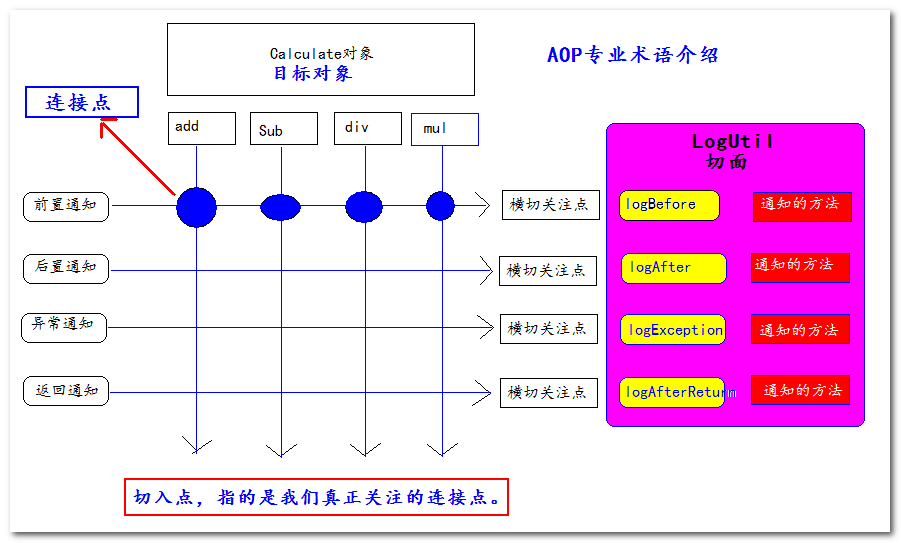
通知(Advice)
通知就是增强的代码。比如前置增强的代码。后置增强的代码。异常增强代码。这些就叫通知
切面(Aspect)
切面就是包含有通知代码的类叫切面。
横切关注点
横切关注点,就是我们可以添加增强代码的位置。比如前置位置,后置位置,异常位置。和返回值位置。这些都叫横切关注点。
目标(Target)
目标对象就是被关注的对象。或者被代理的对象。
代理(Proxy)
为了拦截目标对象方法,而被创建出来的那个对象,就叫做代理对象。
连接点(Joinpoint)
连接点指的是横切关注点和程序代码的连接,叫连接点。
切入点(pointcut)
切入点指的是用户真正处理的连接点,叫切入点。
在Spring中切入点通过org.springframework.aop.Pointcut 接口进行描述,它使用类和方法作为连接点的查询条件。
图解AOP专业术语:
6、使用Spring实现AOP简单切面编程
需要导入工程的jar包:
Spring的核心包
spring-beans-4.0.0.RELEASE.jar
spring-context-4.0.0.RELEASE.jar
spring-core-4.0.0.RELEASE.jar
spring-expression-4.0.0.RELEASE.jar
Spring的测试包
spring-test-4.0.0.RELEASE.jar
Spring日记相关包
commons-logging-1.1.3.jar
log4j-1.2.17.jar
Spring的AOP切面相关的包
spring-aop-4.0.0.RELEASE.jar
spring-aspects-4.0.0.RELEASE.jar
com.springsource.net.sf.cglib-2.2.0.jar
com.springsource.org.aopalliance-1.0.0.jar
com.springsource.org.aspectj.weaver-1.6.8.RELEASE.jar
需要有的类
1
2
3
4
5
6
7
8
9
10
| public interface Calculate {
public int add(int num1, int num2);
public int mul(int num1, int num2);
public int div(int num1, int num2);
public int sub(int num1, int num2);
}
|
1
2
3
4
5
6
7
8
9
10
11
12
13
14
15
16
17
18
19
20
21
22
23
| @Component
public class Calculator implements Calculate {
@Override
public int add(int num1, int num2) {
return num1 + num2;
}
@Override
public int mul(int num1, int num2) {
return num1 * num2;
}
@Override
public int div(int num1, int num2) {
return num1 / num2;
}
@Override
public int sub(int num1, int num2) {
return num1 - num2;
}
}
|
1
2
3
4
5
6
7
8
9
10
11
12
13
14
15
16
17
18
19
20
21
22
23
24
25
| @Aspect
@Component
public class LogUtil {
@Before(value = "execution(public int com.atguigu.aop.Calculator.add(int, int))")
public static void logBefore() {
System.out.println("前置 日记 :【xxx】 方法调用前 。参数1是:xxxx");
}
@After(value = "execution(public int com.atguigu.aop.Calculator.add(int, int))")
public static void logAfter() {
System.out.println("后置 日记 :【xxxx】 方法调用前 。参数1是:xxxx");
}
@AfterReturning(value = "execution(public int com.atguigu.aop.Calculator.add(int, int))")
public static void logAfterReturn() {
System.out.println("返回之后: 日记 :【xxxxx】 方法调用前 。参数1是:xxxxxx");
}
@AfterThrowing(value = "execution(public int com.atguigu.aop.Calculator.add(int, int))")
public static void logThrowException() {
System.out.println("抛异常:日记 :【xxxxx】 方法调用前 。参数1是:xxxxxx");
}
}
|
applicationContext.xml配置文件中的内容
1
2
3
| <context:component-scan base-package="com.atguigu" />
<aop:aspectj-autoproxy />
|
测试代码
1
2
3
4
5
6
7
8
9
10
11
| @ContextConfiguration(locations = "classpath:applicationContext.xml")
@RunWith(SpringJUnit4ClassRunner.class)
public class SpringAopTest {
@Autowired
private Calculate calculate;
@Test
public void test1() {
System.out.println( "添加:" + calculate.add(1, 2));
}
}
|
测试运行的结果
7、Spring的切入点表达式
@PointCut切入点表达式语法格式是: execution(访问权限 返回值类型 方法全限定名(参数类型列表))
限定符:
*:
匹配某全类名下,任意或多个方法。
表示匹配com.atguigu.aop.Calculator下以a打头的任意方法。并且返回值和两个参数都是int类型。
1
| execution(public int com.atguigu.aop.Calculator.a*(int, int))
|
表示匹配com.atguigu.aop.Calculator下的任意方法。并且返回值和两个参数都是int类型。
1
| execution(public int com.atguigu.aop.Calculator.*(int, int))
|
在Spring中只有public权限能拦截到,访问权限可以省略(访问权限不能写*)。
// 权限省略,表示任意类型的访问权限 ,但Spring现在只支持public权限
1
| execution(int com.atguigu.aop.Calculator.*(int, int))
|
匹配任意类型的返回值,可以使用 * 表示
// 表示任意类型的返回值
1
| execution(* com.atguigu.aop.Calculator.*(int, int))
|
匹配任意子包。
// 表示匹配com的子包
1
| execution(* com.*.aop.Calculator.*(int, int))
|
任意类型参数
// 表示第二个参数是任意类型
1
| execution(* com.atguigu.aop.Calculator.*(int,*))
|
**..**:可以匹配多层路径,或任意多个任意类型参数
// 表示com和aop之间可以有任意层级的包
1
| execution(* com..aop.Calculator.*(int,int))
|
// 表示第一个参数是int。之后可以有任意个任意类型的参数
1
| execution(* com.atguigu.aop.Calculator.*(int,..))
|
模糊匹配:
// 表示任意返回值,任意方法全限定符,任意参数
execution(* *(..))
// 表示任意返回值,任意包名+任意方法名,任意参数
execution(* *.*(..))
精确匹配:
// int 返回值,com.atguigu.aop.Calculator类的add方法,两个int参数
execution(public int com.atguigu.aop.Calculator.add(int, int))
切入点表达式连接:&& 、||
&&表示需要同时满足两个表达式
1
2
3
| @Before("execution(public int com.atguigu.aop.Calculator.add(int, int))"
\+ " && "
\+ "execution(public * com.atguigu.aop.Calculator.add(..))")
|
||表示两个条件只需要满足一个,就会被匹配到
1
2
3
4
5
| @Before("execution(public int com.atguigu.aop.Calculator.add(int, int))"
\+ " || "
\+ "execution(public * com.atguigu.aop.Calculator.a*(int))")
|
8、Spring切面中的代理对象
在Spring中,可以对有接口的对象和无接口的对象分别进行代理。在使用上有些细微的差别。
1) 如果被代理的对象实现了接口。在获取对象的时候,必须要以接口来接收返回的对象。

测试代码
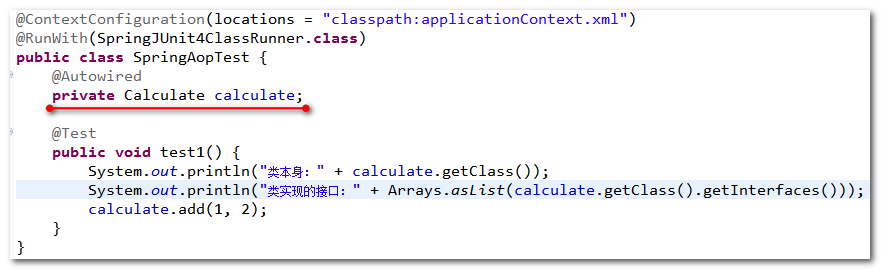
测试的结果:

2) 如果被代理对象,如果没有实现接口。获取对象的时候使用对象类型本身
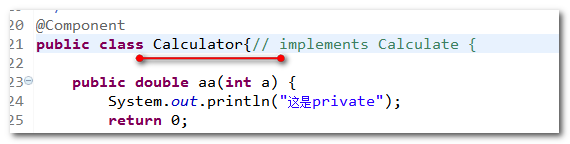
测试的代码:
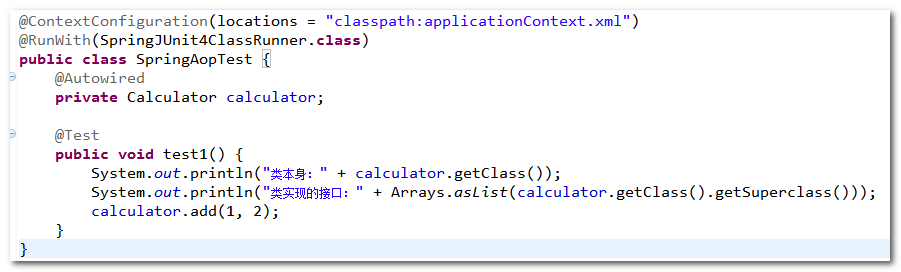
测试结果

9、Spring通知的执行顺序
Spring通知的执行顺序是:
正常情况:
前置通知====>>>>目标方法====>>>>后置通知=====>>>>返回值之后
异常情况:
前置通知====>>>>目标方法====>>>>后置通知=====>>>>抛异常通知
测试需要的类
1
2
3
4
5
6
7
8
9
10
11
| @Component
public class Calculator {
public int div(int num1, int num2) {
return num1 / num2;
}
public int add(int num1, int num2) {
return num1 + num2;
}
|
切面的类对象
1
2
3
4
5
6
7
8
9
10
11
12
13
14
15
16
17
18
19
20
21
22
23
24
25
26
27
28
29
| @Aspect
@Component
public class LogUtil {
@Before("execution(public int com.atguigu.aop.Calculator.add(int, int))" + " || "
+ "execution(public * com.atguigu.aop.Calculator.d*(..))")
public static void logBefore() {
System.out.println("前置 日记 :【xxx】 方法调用前 。参数1是:xxxx");
}
@After("execution(public int com.atguigu.aop.Calculator.add(int, int))" + " || "
+ "execution(public * com.atguigu.aop.Calculator.d*(..))")
public static void logAfter() {
System.out.println("后置 日记 :【xxxx】 方法调用前 。参数1是:xxxx");
}
@AfterReturning("execution(public int com.atguigu.aop.Calculator.add(int, int))" + " || "
+ "execution(public * com.atguigu.aop.Calculator.d*(..))")
public static void logAfterReturn() {
System.out.println("返回之后: 日记 :【xxxxx】 方法调用前 。参数1是:xxxxxx");
}
@AfterThrowing("execution(public int com.atguigu.aop.Calculator.add(int, int))" + " || "
+ "execution(public * com.atguigu.aop.Calculator.d*(..))")
public static void logThrowException() {
System.out.println("抛异常:日记 :【xxxxx】 方法调用前 。参数1是:xxxxxx");
}
}
|
测试的代码
1
2
3
4
5
6
7
8
9
10
11
12
13
14
15
| @ContextConfiguration(locations = "classpath:applicationContext.xml")
@RunWith(SpringJUnit4ClassRunner.class)
public class SpringAopTest {
@Autowired
private Calculator calculator;
@Test
public void test1() {
calculator.add(1, 2);
System.out.println("===============================");
calculator.div(1, 0);
}
}
|
测试的结果
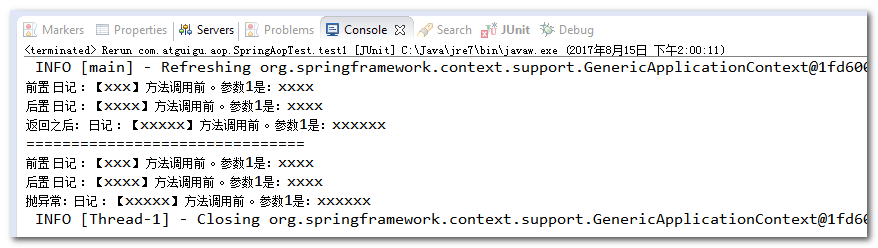
10、获取连接点信息
JoinPoint 是连接点的信息。
只需要在通知方法的参数中,加入一个JoinPoint参数。就可以获取到拦截方法的信息
注意:是org.aspectj.lang.JoinPoint这个类。
1
2
3
4
5
6
7
8
9
10
11
12
13
14
15
16
17
18
19
20
21
22
23
24
25
26
27
28
29
30
31
| @Aspect
@Component
public class LogUtil {
@Before("execution(public int com.atguigu.aop.Calculator.add(int, int))" + " || "
+ "execution(public * com.atguigu.aop.Calculator.d*(..))")
public static void logBefore(JoinPoint joinPoint) {
System.out.println("前置 日记 :【" + joinPoint.getSignature().getName() + "】 方法调用前 。参数是:"
+ Arrays.asList(joinPoint.getArgs()));
}
@After("execution(public int com.atguigu.aop.Calculator.add(int, int))" + " || "
+ "execution(public * com.atguigu.aop.Calculator.d*(..))")
public static void logAfter(JoinPoint joinPoint) {
System.out.println("后置 日记 :【" + joinPoint.getSignature().getName() + "】 方法调用 。参数是:"
+ Arrays.asList(joinPoint.getArgs()));
}
@AfterReturning("execution(public int com.atguigu.aop.Calculator.add(int, int))" + " || "
+ "execution(public * com.atguigu.aop.Calculator.d*(..))")
public static void logAfterReturn(JoinPoint joinPoint) {
System.out.println("返回之后: 日记 :【" + joinPoint.getSignature().getName() + "】 方法调用 。参数是:"
+ Arrays.asList(joinPoint.getArgs()));
}
@AfterThrowing("execution(public int com.atguigu.aop.Calculator.add(int, int))" + " || "
+ "execution(public * com.atguigu.aop.Calculator.d*(..))")
public static void logThrowException(JoinPoint joinPoint) {
System.out.println("抛异常:日记 :【" + joinPoint.getSignature().getName() + "】 方法调用 。参数是:"
+ Arrays.asList(joinPoint.getArgs()));
}
}
|
前面测试的代码没有变。再次执行的结果。都能拿到拦截的方法名和参数
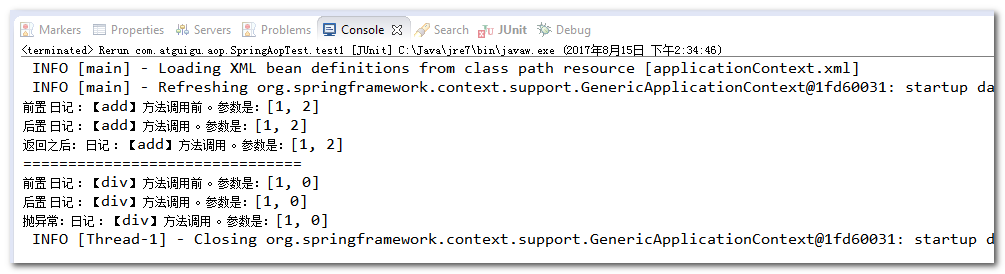
11、获取拦截方法的返回值和抛的异常信息
获取方法返回的值分为两个步骤:
1、在返回值通知的方法中,追加一个参数 Object result
2、然后在@AfterReturning注解中添加参数returning=”参数名”
获取方法抛出的异常分为两个步骤:
1、在异常通知的方法中,追加一个参数Exception exception
2、然后在@AfterThrowing 注解中添加参数 throwing=”参数名”
修改LogUtil切面类的代码
1
2
3
4
5
6
7
8
9
10
11
12
13
| @AfterReturning(value = "execution(public int com.atguigu.aop.Calculator.add(int, int))"
+ " || " + "execution(public * com.atguigu.aop.Calculator.d*(..))", returning = "result")
public static void logAfterReturn(JoinPoint joinPoint, Object result) {
System.out.println("返回之后: 日记 :【" + joinPoint.getSignature().getName() + "】 方法调用 。参数是:"
+ Arrays.asList(joinPoint.getArgs()) + ",返回值:" + result);
}
@AfterThrowing(value = "execution(public int com.atguigu.aop.Calculator.add(int, int))"
+ " || " + "execution(public * com.atguigu.aop.Calculator.d*(..))", throwing = "exception")
public static void logThrowException(JoinPoint joinPoint, Exception exception) {
System.out.println("抛异常:日记 :【" + joinPoint.getSignature().getName() + "】 方法调用 。参数是:"
+ Arrays.asList(joinPoint.getArgs()) + ",异常对象:" + exception);
}
|
测试的代码不变,测试的结果是
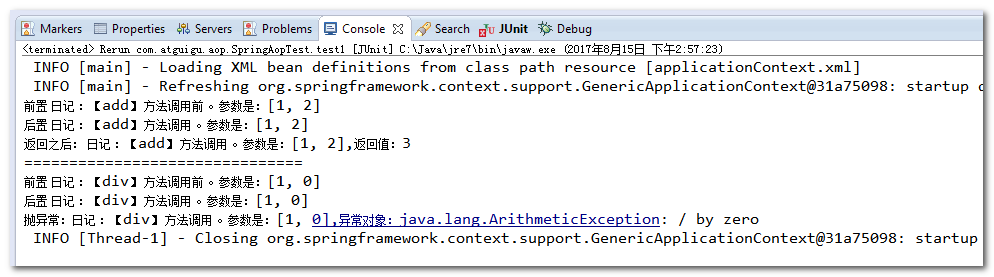
12、Spring的环绕通知
1、环绕通知使用@Around注解。
2、环绕通知如果和其他通知同时执行。环绕通知会优先于其他通知之前执行。
3、环绕通知一定要有返回值(环绕如果没有返回值。后面的其他通知就无法接收到目标方法执行的结果)。
4、在环绕通知中。如果拦截异常。一定要往外抛。否则其他的异常通知是无法捕获到异常的。
在LogUtil切面类中添加环绕通知
1
2
3
4
5
6
7
8
9
10
11
12
13
14
15
16
17
18
19
20
| @Around(value = "execution(* *(..))")
public static Object logAround(ProceedingJoinPoint proceedingJoinPoint) {
Object[] args = proceedingJoinPoint.getArgs();
Object resultObject = null;
try {
System.out.println("环绕前置");
resultObject = proceedingJoinPoint.proceed(args);
System.out.println("环绕后置");
} catch (Throwable e) {
System.out.println("环绕异常:" + e);
throw new RuntimeException(e);
} finally {
System.out.println("环绕返回后");
}
return resultObject;
}
|
修改测试的代码
1
2
3
4
5
6
7
8
9
10
11
12
13
| @ContextConfiguration(locations = "classpath:applicationContext.xml")
@RunWith(SpringJUnit4ClassRunner.class)
public class SpringAopTest {
@Autowired
private Calculator calculator;
@Test
public void test1() {
calculator.add(1, 2);
}
}
|
执行结果
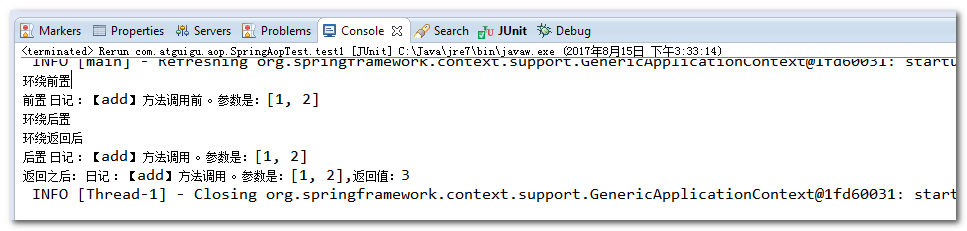
13、切入点表达式的重用
切入点表达式的重点,需要分三个步骤:
1、在切面类中定义一个空的方法
1
| public static void pointcut1() {}
|
2、在方法中使用@Pointcut定义一个切入连表达式
1
2
3
4
5
| @Pointcut(value="execution(public int com.atguigu.aop.Calculator.add(int, int))" + " || "
+ "execution(public * com.atguigu.aop.Calculator.*(..))")
public static void pointcut1() {}
|
3、其他的通知注解中使用方法名()的形式引用方法上定义的切入点表达式。
比如:@Before(“pointcut1()”)
14、多个通知的执行顺序
当我们有多个切面,多个通知的时候:
1、通知的执行顺序默认是由切面类的字母先后顺序决定。
2、在切面类上使用@Order注解决定通知执行的顺序(值越小,越先执行)
再添加另一个切面类
1
2
3
4
5
6
7
8
9
10
11
12
13
14
15
16
17
18
19
20
21
22
| @Component
@Aspect
@Order(1)
public class Validation {
@Before(value = "com.atguigu.aop.LogUtil.pointcut1()")
public static void before(JoinPoint joinPoint) {
System.out.println("这是Validation的前置通知,拦截的方法是:" + joinPoint.getSignature().getName());
}
@After(value = "com.atguigu.aop.LogUtil.pointcut1()")
public static void after(JoinPoint joinPoint) {
System.out.println("这是Validation的后置通知,拦截的方法是:" + joinPoint.getSignature().getName());
}
@AfterReturning(value = "com.atguigu.aop.LogUtil.pointcut1()", returning = "result")
public static void afterReturning(JoinPoint joinPoint, Object result) {
System.out.println("这是Validation的后置通知,拦截的方法是:" + joinPoint.getSignature().getName()
+ ", 返回值:" + result);
}
}
|
修改原来LogUtil中的切面内容(去掉环绕通知,留下前置,后置,返回后通知)
1
2
3
4
5
6
7
8
9
| @Aspect
@Component
@Order(2)
public class LogUtil {
@Pointcut(value="execution(public int com.atguigu.aop.Calculator.add(int, int))" + " || "
+ "execution(public * com.atguigu.aop.Calculator.*(..))")
public static void pointcut1() {}
}
|
测试的代码
1
2
3
4
5
6
7
8
9
10
11
| @ContextConfiguration(locations = "classpath:applicationContext.xml")
@RunWith(SpringJUnit4ClassRunner.class)
public class SpringAopTest {
@Autowired
private Calculator calculator;
@Test
public void test1() {
calculator.add(1, 0);
}
}
|
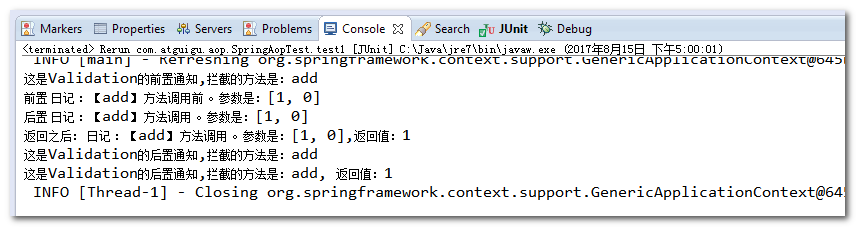
运行的结果
15、如何基于xml配置aop程序
需要导入的包
com.springsource.net.sf.cglib-2.2.0.jar
com.springsource.org.aopalliance-1.0.0.jar
com.springsource.org.aspectj.weaver-1.6.8.RELEASE.jar
commons-logging-1.1.3.jar
log4j-1.2.17.jar
spring-aop-4.0.0.RELEASE.jar
spring-aspects-4.0.0.RELEASE.jar
spring-beans-4.0.0.RELEASE.jar
spring-context-4.0.0.RELEASE.jar
spring-core-4.0.0.RELEASE.jar
spring-expression-4.0.0.RELEASE.jar
spring-test-4.0.0.RELEASE.jar
工程中编写的类
1
2
3
4
5
6
7
8
9
10
| public class Calculator {
public int div(int num1, int num2) {
return num1 / num2;
}
public int add(int num1, int num2) {
return num1 + num2;
}
}
|
LogUtil切面类
1
2
3
4
5
6
7
8
9
10
11
12
13
14
15
16
17
18
19
20
21
22
| public class LogUtil {
public static void logBefore(JoinPoint joinPoint) {
System.out.println("前置 日记 :【" + joinPoint.getSignature().getName() + "】 方法调用前 。参数是:"
+ Arrays.asList(joinPoint.getArgs()));
}
public static void logAfter(JoinPoint joinPoint) {
System.out.println("后置 日记 :【" + joinPoint.getSignature().getName() + "】 方法调用 。参数是:"
+ Arrays.asList(joinPoint.getArgs()));
}
public static void logAfterReturn(JoinPoint joinPoint, Object result) {
System.out.println("返回之后: 日记 :【" + joinPoint.getSignature().getName() + "】 方法调用 。参数是:"
+ Arrays.asList(joinPoint.getArgs()) + ",返回值:" + result);
}
public static void logThrowException(JoinPoint joinPoint, Exception exception) {
System.out.println("抛异常:日记 :【" + joinPoint.getSignature().getName() + "】 方法调用 。参数是:"
+ Arrays.asList(joinPoint.getArgs()) + ",异常对象:" + exception);
}
}
|
Validation切面类
1
2
3
4
5
6
7
8
9
10
11
12
13
14
15
| public class Validation {
public static void before(JoinPoint joinPoint) {
System.out.println("这是Validation的前置通知,拦截的方法是:" + joinPoint.getSignature().getName());
}
public static void after(JoinPoint joinPoint) {
System.out.println("这是Validation的后置通知,拦截的方法是:" + joinPoint.getSignature().getName());
}
public static void afterReturning(JoinPoint joinPoint, Object result) {
System.out.println("这是Validation的后置通知,拦截的方法是:" + joinPoint.getSignature().getName()
+ ", 返回值:" + result);
}
}
|
ApplicationContext.xml配置文件中的内容
1
2
3
4
5
6
7
8
9
10
11
12
13
14
15
16
17
18
19
20
21
22
23
24
25
26
27
28
29
30
31
32
|
<bean id="calculator" class="com.atguigu.aop.Calculator" />
<bean id="logUtil" class="com.atguigu.aop.LogUtil" />
<bean id="validation" class="com.atguigu.aop.Validation" />
<aop:config>
<aop:pointcut expression="execution(* com.atguigu.aop.Calculator.*(..))" id="pointcut1"/>
<aop:aspect order="1" ref="logUtil">
<aop:before method="logBefore" pointcut="execution(* com.atguigu.aop.Calculator.*(..))"/>
<aop:after method="logAfter" pointcut="execution(* com.atguigu.aop.Calculator.*(..))"/>
<aop:after-returning method="logAfterReturn"
returning="result" pointcut="execution(* com.atguigu.aop.Calculator.*(..))"/>
<aop:after-throwing method="logThrowException" throwing="exception"
pointcut="execution(* com.atguigu.aop.Calculator.*(..))"/>
</aop:aspect>
<aop:aspect order="2" ref="validation">
<aop:before method="before" pointcut-ref="pointcut1"/>
<aop:after method="after" pointcut-ref="pointcut1"/>
<aop:after-returning method="afterReturning"
returning="result" pointcut-ref="pointcut1"/>
</aop:aspect>
</aop:config>
|
测试的代码
1
2
3
4
5
6
7
8
9
10
11
| @ContextConfiguration(locations = "classpath:applicationContext.xml")
@RunWith(SpringJUnit4ClassRunner.class)
public class SpringAopTest {
@Autowired
Calculator calculator;
@Test
public void test1() {
calculator.add(1, 2);
}
}
|
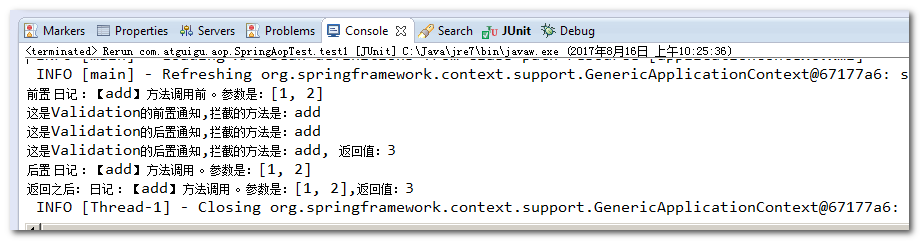
测试运行的结果
2.Spring之数据访问
1、Spring数据访问工程环境搭建
创建一个Java工程,导入需要的Jar包
Spring的核心jar包
spring-beans-4.0.0.RELEASE.jar
spring-context-4.0.0.RELEASE.jar
spring-core-4.0.0.RELEASE.jar
spring-expression-4.0.0.RELEASE.jar
Spring切面的jar包
com.springsource.net.sf.cglib-2.2.0.jar
com.springsource.org.aopalliance-1.0.0.jar
com.springsource.org.aspectj.weaver-1.6.8.RELEASE.jar
spring-aop-4.0.0.RELEASE.jar
spring-aspects-4.0.0.RELEASE.jar
Spring数据访问的jar包
spring-jdbc-4.0.0.RELEASE.jar
spring-orm-4.0.0.RELEASE.jar
spring-tx-4.0.0.RELEASE.jar
数据库访问需要的jar包
c3p0-0.9.1.2.jar
mysql-connector-java-5.1.37-bin.jar
日记需要的jar包
commons-logging-1.1.3.jar
log4j-1.2.17.jar
Spring的测试包
spring-test-4.0.0.RELEASE.jar
在src目录下jdbc.properties属性配置文件
1
2
3
4
| jdbc.username=root
jdbc.password=root
jdbc.url=jdbc:mysql://localhost:3306/spring
jdbc.driverClass=com.mysql.jdbc.Driver
|
在src目录下的log4j.properties配置文件
1
2
3
4
5
6
7
|
log4j.rootLogger=INFO, stdout
log4j.appender.stdout=org.apache.log4j.ConsoleAppender
log4j.appender.stdout.layout=org.apache.log4j.PatternLayout
log4j.appender.stdout.layout.ConversionPattern=%5p [%t] - %m%n
|
在applicationContext.xml中配置数据源
1
2
3
4
5
6
7
8
9
10
11
12
13
14
|
<context:property-placeholder location="classpath:jdbc.properties"/>
<bean id="c3p0DataSource" class="com.mchange.v2.c3p0.ComboPooledDataSource">
<property name="user" value="${jdbc.username}"/>
<property name="password" value="${jdbc.password}"/>
<property name="jdbcUrl" value="${jdbc.url}"/>
<property name="driverClass" value="${jdbc.driverClass}"/>
</bean>
<bean id="jdbcTemplate" class="org.springframework.jdbc.core.JdbcTemplate">
<property name="dataSource" ref="c3p0DataSource"/>
</bean>
|
测试数据源(测试数据库连接池)
1
2
3
4
5
6
7
8
9
10
11
12
13
| @ContextConfiguration(locations = "classpath:applicationContext.xml")
@RunWith(SpringJUnit4ClassRunner.class)
public class JdbcTest {
@Autowired
DataSource dataSource;
@Test
public void test1() throws Exception {
System.out.println( dataSource.getConnection() );
}
}
|
2、Spring之JdbcTemplate使用
在Spring中提供了对jdbc的封装类叫JdbcTemplate。它可以很方便的帮我们执行sql语句,操作数据库。
先准备单表的数据库数据
1
2
3
4
5
6
7
8
9
10
11
12
13
14
15
16
17
18
| drop database if exists jdbctemplate;
create database jdbctemplate;
use jdbctemplate;
create table `employee` (
`id` int(11) primary key auto_increment,
`name` varchar(100) default null,
`salary` decimal(11,2) default null
);
insert into `employee`(`id`,`name`,`salary`)
values (1,'李三',5000.23),(2,'李四',4234.77),(3,'王五',9034.51),
(4,'赵六',8054.33),(5,'孔七',6039.11),(6,'曹八',7714.11);
select * from employee;
|
JdbcTemplate的使用需要在applicationContext.xml中进行配置
1
2
3
4
5
|
<bean id="jdbcTemplate" class="org.springframework.jdbc.core.JdbcTemplate">
<property name="dataSource" ref="c3p0DataSource"/>
</bean>
|
实验2:将id=5的记录的salary字段更新为1300.00
1
2
3
4
5
6
7
| @Test
public void test2() throws Exception {
String sql = "update employee set salary = ? where id = ?";
jdbcTemplate.update(sql, 1300, 5);
}
|
实验3:批量插入
1
2
3
4
5
6
7
8
9
10
| @Test
public void test3() throws Exception {
String sql = "insert into employee(`name`,`salary`) values(?,?)";
ArrayList<Object[]> params = new ArrayList<>();
params.add(new Object[] {"aaa",100});
params.add(new Object[] {"bbb",100});
params.add(new Object[] {"ccc",100});
jdbcTemplate.batchUpdate(sql, params);
}
|
实验4:查询id=5的数据库记录,封装为一个Java对象返回
创建一个Employee对象
1
2
3
4
5
6
| public class Employee {
private Integer id;
private String name;
private BigDecimal salary;
}
|
1
2
3
4
5
6
7
8
9
10
11
12
13
| @Test
public void test4() throws Exception {
String sql = "select id ,name ,salary from employee where id = ?";
Employee employee = jdbcTemplate.queryForObject(sql, new BeanPropertyRowMapper(Employee.class), 5);
System.out.println(employee);
}
|
实验5:查询salary>4000的数据库记录,封装为List集合返回
1
2
3
4
5
6
7
8
| @Test
public void test5() throws Exception {
String sql = "select id,name,salary from employee where salary > ?";
List<Employee> list = jdbcTemplate.query(sql, new BeanPropertyRowMapper(Employee.class), 4000);
System.out.println(list);
}
|
实验6:查询最大salary
1
2
3
4
5
6
7
| @Test
public void test6() throws Exception {
String sql = "select max(salary) from employee";
BigDecimal salary = jdbcTemplate.queryForObject(sql, BigDecimal.class);
System.out.println(salary);
}
|
实验7:使用带有具名参数的SQL语句插入一条员工记录,并以Map形式传入参数值
1
2
3
4
5
6
7
8
9
10
11
12
13
14
15
16
17
18
19
20
21
22
23
| @ContextConfiguration(locations = "classpath:applicationContext.xml")
@RunWith(SpringJUnit4ClassRunner.class)
public class JdbcTest {
@Autowired
DataSource dataSource;
@Autowired
JdbcTemplate jdbcTemplate;
@Autowired
NamedParameterJdbcTemplate namedParameterJdbcTemplate;
@Test
public void test7() throws Exception {
String sql = "insert into employee(`name`,`salary`) values(:name,:salary)";
Map<String, Object> param = new HashMap<String,Object>();
param.put("name", "小明");
param.put("salary", new BigDecimal(55));
namedParameterJdbcTemplate.update(sql, param);
}
|
实验8:重复实验7,以SqlParameterSource形式传入参数值
1
2
3
4
5
6
7
8
9
| @Test
public void test8() throws Exception {
String sql = "insert into employee(`name`,`salary`) values(:name,:salary)";
SqlParameterSource sqlParameterSource = new BeanPropertySqlParameterSource(new Employee(0,
"小新", new BigDecimal(11111)));
namedParameterJdbcTemplate.update(sql, sqlParameterSource);
}
|
实验9:创建Dao,自动装配JdbcTemplate对象
添加类
1
2
3
4
5
6
7
8
9
10
11
12
| @Repository
public class EmployeeDao {
@Autowired
JdbcTemplate jdbcTemplate;
public int saveEmployee(Employee employee) {
String sql = "insert into employee(`name`,`salary`) values(?,?)";
return jdbcTemplate.update(sql, employee.getName(), employee.getSalary());
}
}
|
在applicationContext.xml中配置
1
2
3
|
<context:component-scan base-package="com.atguigu" />
|
测试代码
1
2
3
4
5
6
7
8
9
10
11
12
13
14
15
16
17
18
19
20
21
22
| @ContextConfiguration(locations = "classpath:applicationContext.xml")
@RunWith(SpringJUnit4ClassRunner.class)
public class JdbcTest {
@Autowired
DataSource dataSource;
@Autowired
JdbcTemplate jdbcTemplate;
@Autowired
NamedParameterJdbcTemplate namedParameterJdbcTemplate;
@Autowired
EmployeeDao employeeDao;
@Test
public void test9() throws Exception {
employeeDao.saveEmployee(new Employee(null, "ssssss", new BigDecimal(999)));
}
|
实验10:通过继承JdbcDaoSupport创建JdbcTemplate的Dao
1
2
3
4
5
6
7
8
9
10
11
12
13
14
| @Repository
public class EmployeeDao extends JdbcDaoSupport {
@Autowired
protected void setDataSource2(DataSource dataSource) {
System.out.println("自动注入 + " + dataSource);
super.setDataSource(dataSource);
}
public int saveEmployee(Employee employee) {
String sql = "insert into employee(`name`,`salary`) values(?,?)";
return getJdbcTemplate().update(sql, employee.getName(), employee.getSalary());
}
}
|