Spring-04
Spring之数据访问
1.Spring数据访问工程环境搭建
先导入需要的jar包
druid-1.1.9.jar
junit_4.12.jar
mysql-connector-java-5.1.37-bin.jar
org.hamcrest.core_1.3.0.jar
spring-aop-5.2.5.RELEASE.jar
spring-aspects-5.2.5.RELEASE.jar
spring-beans-5.2.5.RELEASE.jar
spring-context-5.2.5.RELEASE.jar
spring-core-5.2.5.RELEASE.jar
spring-expression-5.2.5.RELEASE.jar
spring-jcl-5.2.5.RELEASE.jar
spring-jdbc-5.2.5.RELEASE.jar
spring-orm-5.2.5.RELEASE.jar
spring-test-5.2.5.RELEASE.jar
spring-tx-5.2.5.RELEASE.jar
创建jdbc.properties属性配置文件
1
2
3
4
5
6
7
8
| user=root
password=root
url=jdbc:mysql://localhost:3306/jdbcTemplate
driverClassName=com.mysql.jdbc.Driver
initialSize=5
maxActive=10
|
创建applicationContext.xml配置文件
1
2
3
4
5
6
7
8
9
10
11
12
13
14
15
16
17
18
19
20
21
22
23
24
| <?xml version="1.0" encoding="UTF-8"?>
<beans xmlns="http://www.springframework.org/schema/beans"
xmlns:xsi="http://www.w3.org/2001/XMLSchema-instance"
xmlns:context="http://www.springframework.org/schema/context"
xsi:schemaLocation="http://www.springframework.org/schema/beans http://www.springframework.org/schema/beans/spring-beans.xsd http://www.springframework.org/schema/context https://www.springframework.org/schema/context/spring-context.xsd">
<context:property-placeholder location="classpath:jdbc.properties" />
<bean class="com.alibaba.druid.pool.DruidDataSource" id="dataSource">
<property name="username" value="${user}" />
<property name="password" value="${password}" />
<property name="url" value="${url}" />
<property name="driverClassName" value="${driverClassName}" />
<property name="initialSize" value="${initialSize}" />
<property name="maxActive" value="${maxActive}" />
</bean>
</beans>
|
2.Spring之JdbcTemplate使用
在Spring中提供了对jdbc的封装类叫JdbcTemplate。它可以很方便的帮我们执行sql语句,操作数据库。
先准备单表的数据库数据
1
2
3
4
5
6
7
8
9
10
11
12
13
14
15
16
17
18
19
| drop database if exists jdbctemplate;
create database jdbctemplate;
use jdbctemplate;
CREATE TABLE `employee` (
`id` int(11) primary key AUTO_INCREMENT,
`name` varchar(100) DEFAULT NULL,
`salary` decimal(11,2) DEFAULT NULL
);
insert into `employee`(`id`,`name`,`salary`)
values (1,'李三',5000.23),(2,'李四',4234.77),(3,'王五',9034.51),
(4,'赵六',8054.33),(5,'孔七',6039.11),(6,'曹八',7714.11);
select * from employee;
|
JdbcTemplate的使用需要在applicationContext.xml中进行配置
1
2
3
4
5
|
<bean id="jdbcTemplate" class="org.springframework.jdbc.core.JdbcTemplate">
<property name="dataSource" ref="dataSource"/>
</bean>
|
实验2:将id=5的记录的salary字段更新为1300.00
1
2
3
4
5
6
7
8
9
10
| @Test
public void test2() {
String sql = "update employee set salary=? where id=?";
System.out.println(jdbcTemplate.update(sql, new BigDecimal("1300.00"), 5));
}
|
实验3:批量插入
1
2
3
4
5
6
7
8
9
10
11
12
13
14
15
16
17
18
19
20
| 实验3:批量插入
@Test
public void test3() {
String sql = "insert into employee(`name`,`salary`) values(?,?)";
List<Object[]> batchArgs = new ArrayList<Object[]>();
batchArgs.add(new Object[]{"沙比特",new BigDecimal(1000)});
batchArgs.add(new Object[]{"邱比特",new BigDecimal(2000)});
batchArgs.add(new Object[]{"沙马特",new BigDecimal(3000)});
jdbcTemplate.batchUpdate(sql,batchArgs);
}
|
实验4:查询id=5的数据库记录,封装为一个Java对象返回
1
2
3
4
5
6
7
8
9
10
11
12
13
14
15
|
@Test
public void test4() {
String sql = "select `id`,`name`,`salary` from employee where id = ?";
Employee employee = jdbcTemplate.queryForObject(sql, new BeanPropertyRowMapper<Employee>(Employee.class), 5);
System.out.println(employee);
}
|
实验5:查询salary>4000的数据库记录,封装为List集合返回
1
2
3
4
5
6
7
8
9
10
11
12
13
14
15
16
17
18
19
20
21
22
23
24
25
| @Test
public void test5() {
String sql = "select `id`,`name`,`salary` from employee where salary > ?";
List<Employee> query = jdbcTemplate.query(sql, new BeanPropertyRowMapper<Employee>(Employee.class), new BigDecimal(4000));
for (Employee employee : query) {
System.out.println(
employee
);
}
}
|
实验6:查询最大salary
1
2
3
4
5
6
7
8
9
10
| @Test
public void test6() {
String sql = "select max(salary) from employee";
BigDecimal bigDecimal = jdbcTemplate.queryForObject(sql, BigDecimal.class);
System.out.println(bigDecimal);
}
|
实验7:使用带有具名参数的SQL语句插入一条员工记录,并以Map形式传入参数值
applicationContext.xml配置文件:
1
2
3
4
5
6
|
<bean class="org.springframework.jdbc.core.namedparam.NamedParameterJdbcTemplate"
id="namedParameterJdbcTemplate">
<constructor-arg index="0" ref="dataSource" />
</bean>
|
测试的代码:
1
2
3
4
5
6
7
8
9
10
11
12
13
14
15
16
17
18
19
|
@Test
public void test7() {
String sql = "insert into employee(`name`,`salary`) values( :name , :salary )";
Map<String,Object> paramMap = new HashMap<>();
paramMap.put("name","爱你,么么哒!!!");
paramMap.put("salary",new BigDecimal(90000));
namedParameterJdbcTemplate.update(sql,paramMap);
}
|
实验8:重复实验7,以SqlParameterSource形式传入参数值
1
2
3
4
5
6
7
8
9
10
11
12
13
14
15
|
@Test
public void test8() {
String sql = "insert into employee(`name`,`salary`) values( :name , :salary )";
Employee employee = new Employee(null,"国哥,万万岁",new BigDecimal(9999));
namedParameterJdbcTemplate.update(sql, new BeanPropertySqlParameterSource(employee));
}
|
实验9:创建Dao,自动装配JdbcTemplate对象
1
2
3
4
5
6
7
8
9
10
11
12
13
14
15
16
17
18
19
20
21
22
23
24
25
| package com.atguigu.test;
import org.springframework.beans.factory.annotation.Autowired;
import org.springframework.jdbc.core.BeanPropertyRowMapper;
import org.springframework.jdbc.core.JdbcTemplate;
import org.springframework.stereotype.Repository;
import java.util.List;
@Repository
public class EmployeeDao {
@Autowired
JdbcTemplate jdbcTemplate;
public List<Employee> queryAll(){
String sql = "select `id`,`name`,`salary` from employee";
List<Employee> query = jdbcTemplate.query(sql, new BeanPropertyRowMapper<Employee>(Employee.class));
return query;
}
}
|
在applicationContext.xml中添加包扫描:
<context:component-scan base-package="com"></context:component-scan>
测试代码:
1
2
3
4
5
6
7
8
| @Autowired
EmployeeDao employeeDao;
@Test
public void test9() {
employeeDao.queryAll().forEach(System.out::println);
}
|
实验10:通过继承JdbcDaoSupport创建JdbcTemplate的Dao
1
2
3
4
5
6
7
8
9
10
11
12
13
14
15
16
17
18
19
20
| @Repository
public class EmployeeDao extends JdbcDaoSupport {
@Autowired
public void initDataSource(DataSource dataSource){
setDataSource(dataSource);
}
public List<Employee> queryAll(){
String sql = "select `id`,`name`,`salary` from employee";
List<Employee> query = getJdbcTemplate().query(sql, new BeanPropertyRowMapper<Employee>(Employee.class));
return query;
}
}
|
声明式事务
事务分为声明式和编程式两种:
声明式事务:声明式事务是指通过注解或xml配置的形式对事务的各种特性进行控制和管理。
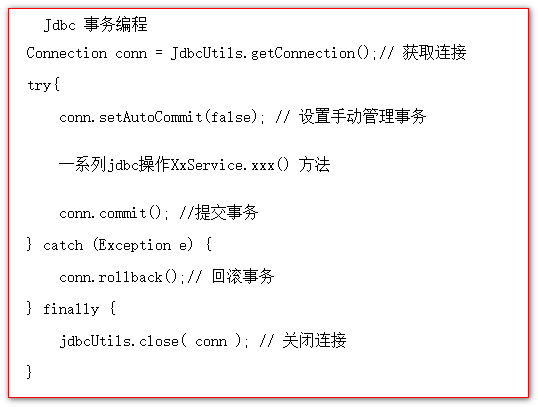
编码式(编程式)事务:指的是通过编码的方式实现事务的声明。
1、编码方式实现事务:
2、声明式事务环境搭建
2.1、准备测试数据库
1
2
3
4
5
6
7
8
9
10
11
12
13
14
15
16
17
18
19
20
21
22
23
24
25
26
27
28
| ##创建tx数据库
drop database if exists `tx`;
CREATE database `tx`;
##切换tx数据库
USE `tx`;
##创建用户表
CREATE TABLE `user` (
`id` int primary key auto_increment,
`username` varchar(50) NOT NULL,
`money` int(11) DEFAULT NULL
);
##插入数据
insert into `user`(`username`,`money`) values ('张三',1000),('李四',1000);
##创建图书表
create table `book`(
`id` int primary key auto_increment,
`name` varchar(500) not null,
`stock` int
);
##插入数据
insert into book(`name`,`stock`) values('java编程思想',100),('C++编程思想',100);
##查看数据
select * from book;
select * from user;
|
2.2、创建一个Java工程,导入Jar包
UserDao代码:
1
2
3
4
5
6
7
8
9
10
11
12
| @Repository
public class UserDao {
@Autowired
JdbcTemplate jdbcTemplate;
public int updateUser(){
return jdbcTemplate.update("update `user` set `username` = ?","用户表被修改");
}
}
|
BookDao代码:
1
2
3
4
5
6
7
8
9
10
| @Repository
public class BookDao {
@Autowired
JdbcTemplate jdbcTemplate;
public int updateBook(){
return jdbcTemplate.update("update `book` set `name` = ?","图书表被修改了");
}
}
|
Service代码:
1
2
3
4
5
6
7
8
9
10
11
12
13
14
15
| @Service
public class TransactionService {
@Autowired
BookDao bookDao;
@Autowired
UserDao userDao;
public void multiUpdate(){
bookDao.updateBook();
userDao.updateUser();
}
}
|
测试代码:
1
2
3
4
5
6
7
8
9
10
11
12
13
| @ContextConfiguration(locations = "classpath:applicationContext.xml")
@RunWith(SpringJUnit4ClassRunner.class)
public class TransactionTest {
@Autowired
TransactionService transactionService;
@Test
public void test() {
transactionService.multiUpdate();
}
}
|
修改jdbc.properties属性配置文件:
1
2
3
4
5
6
| user=root
password=root
url=jdbc:mysql://localhost:3306/tx
driverClassName=com.mysql.jdbc.Driver
initialSize=5
maxActive=10
|
3、测试Service的默认事务
实验1:测试service服务层的默认事务
1
2
3
4
5
6
| public void multiUpdate(){
bookDao.updateBook();
int i = 12 / 0;
userDao.updateUser();
}
|
异常的演示
这时候抛出除以0的异常。并且数据库的图书表被修改,但是用户表没改
PlatformTransactionManager接口:
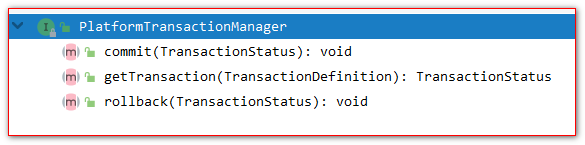
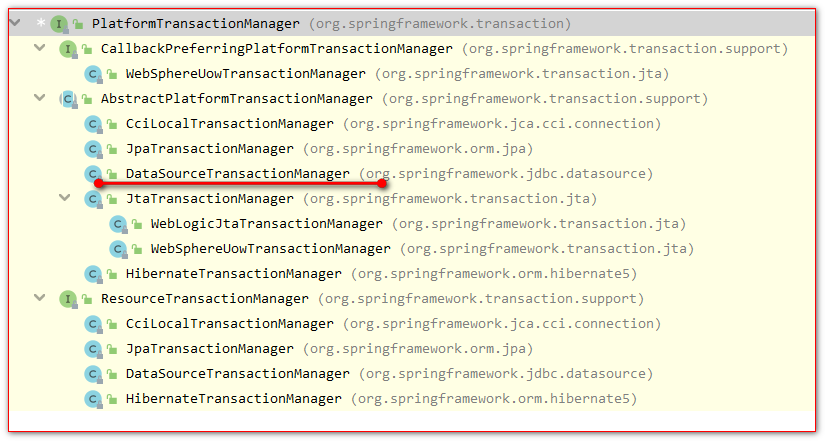
事务管理器的实现类( 针对不同持久层技术有不同的事务管理器实现类 )
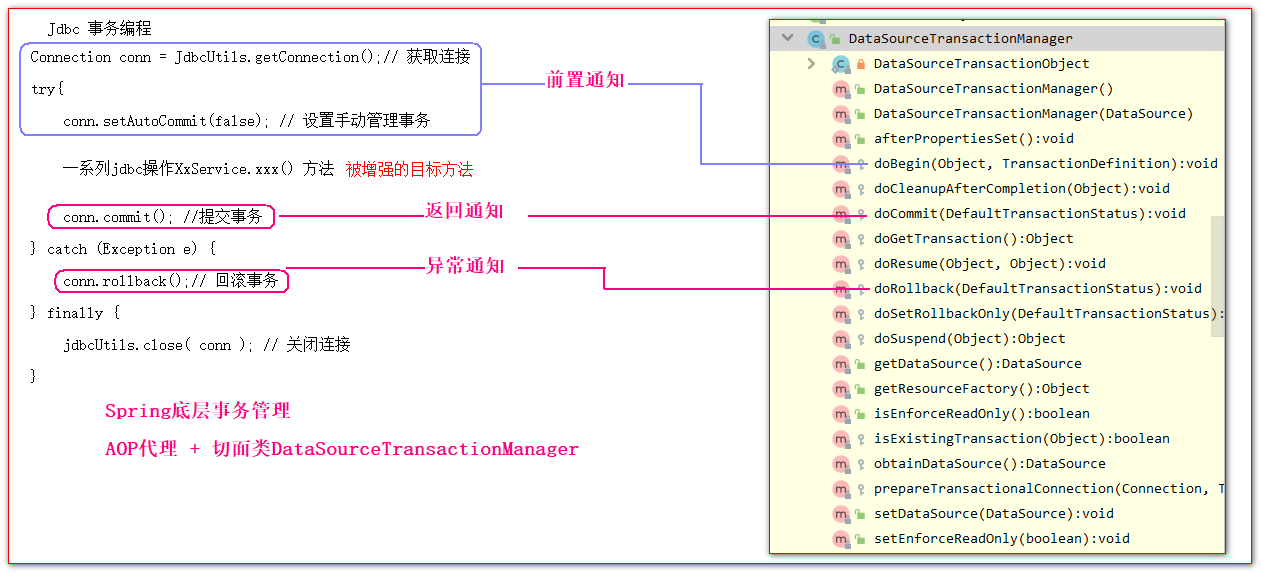
而我们重点关心的是DataSourceTransactionManager,因为我们底层使用的了DataSource数据源访问操作数据库
Spring底层事务管理原理:
4、使用Spring的注解声明事务管制
实验2:测试Spring的声明式事务
Spring声明式事务管理只需要以下三步配置:
1 配置事务管理器DataSourceTransactionManager到Spring容器中
1
2
3
4
5
6
7
8
9
|
<bean class="org.springframework.jdbc.datasource.DataSourceTransactionManager"
id="transactionManager">
<property name="dataSource" ref="dataSource" />
</bean>
|
2 配置事务的AOP
1
2
3
4
5
6
7
8
9
10
11
|
<tx:annotation-driven transaction-manager="transactionManager"></tx:annotation-driven>
|
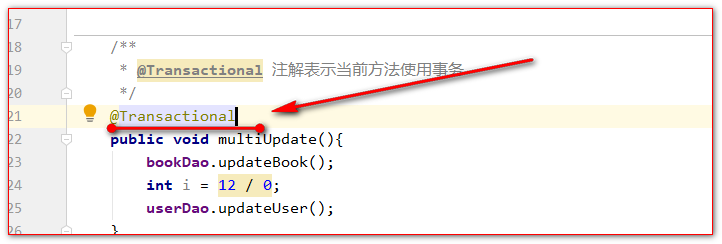
3 给需要使用事务的方法是添加注解@Transactional
5、noRollbackFor和noRollbackForClassName测试不回滚的异常
Spring底层默认是对运行时异常RuntimeException,以及运行时子异常进行回滚事务
1
2
3
4
5
6
7
8
9
10
11
12
|
@Transactional(noRollbackForClassName = "java.lang.ArithmeticException")
public void multiUpdate(){
    bookDao.updateBook();
    int i = 12 / 0;
    userDao.updateUser();
}
|
6、自定义设置回滚异常
实验5:rollbackFor和rollbackForClassName回滚的异常
1
2
3
4
5
6
7
8
9
10
11
12
13
14
15
16
17
|
@Transactional(rollbackForClassName = "java.io.FileNotFoundException")
public void multiUpdate() throws FileNotFoundException {
bookDao.updateBook();
int i = 12 ;
if (i == 12) {
throw new FileNotFoundException("我就是找不到,你打我呀");
}
userDao.updateUser();
}
|
7、事务的只读属性
只读,就是只允许执行查询操作,不允许执行写操作( insert, delete ,update ).
默认情况下,都是非只读事务
实验4:测试readOnly只读属性
1
2
3
4
5
6
7
8
9
10
|
@Transactional(readOnly = true)
public void multiUpdate() throws FileNotFoundException {
bookDao.updateBook();
userDao.updateUser();
}
|
只读事务。写异常

8、事务超时属性timeout(秒为单位)
1
2
3
4
5
6
7
8
9
10
11
12
13
14
15
16
|
@Transactional(timeout = 3)
public void multiUpdate() {
bookDao.updateBook();
try {
Thread.sleep(4000);
} catch (InterruptedException e) {
e.printStackTrace();
}
userDao.updateUser();
}
|

10、事务的传播特性propagation
什么是事务的传播行为:
当事务方法被另一个事务方法调用时,必须指定事务应该如何传播。
例如:方法可能继续在现有事务中运行,也可能开启一个新事务,并在自己的事务中运行。
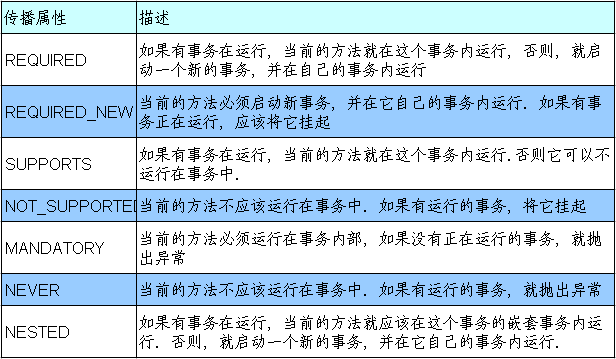
事务的传播行为可以由传播属性指定。Spring定义了7种类传播行为。
事务的传播特性,有以下几种类型:
11、注解演示事物传播特性
UserService
BookService
TransactionService
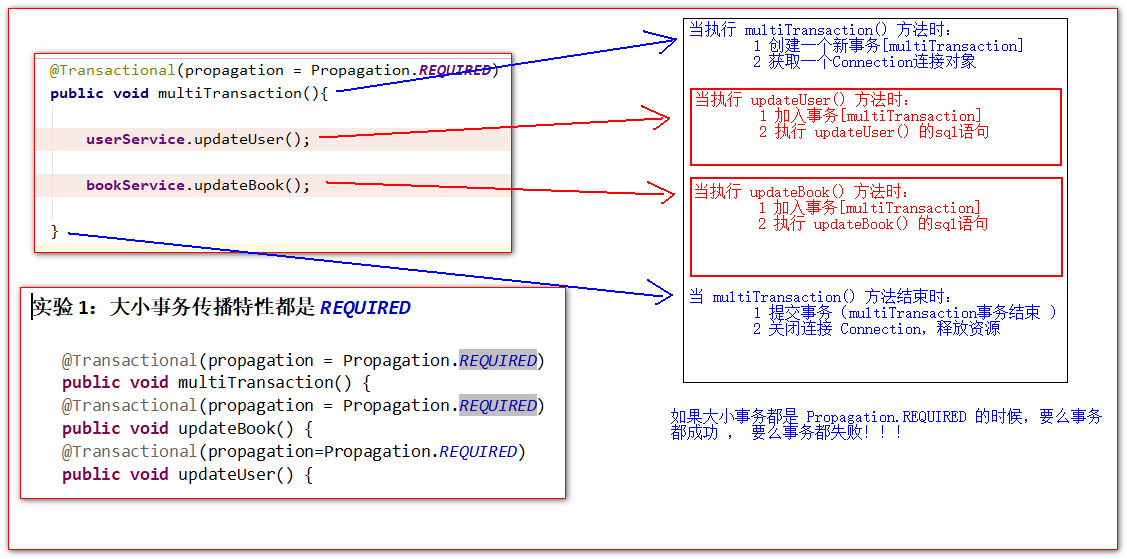
实验1:大小事务传播特性都是REQUIRED
1
2
3
4
5
6
7
| @Transactional(propagation = Propagation.REQUIRED)
public void multiTransaction() {
@Transactional(propagation = Propagation.REQUIRED)
public void updateBook() {
@Transactional(propagation=Propagation.REQUIRED)
public void updateUser() {
|
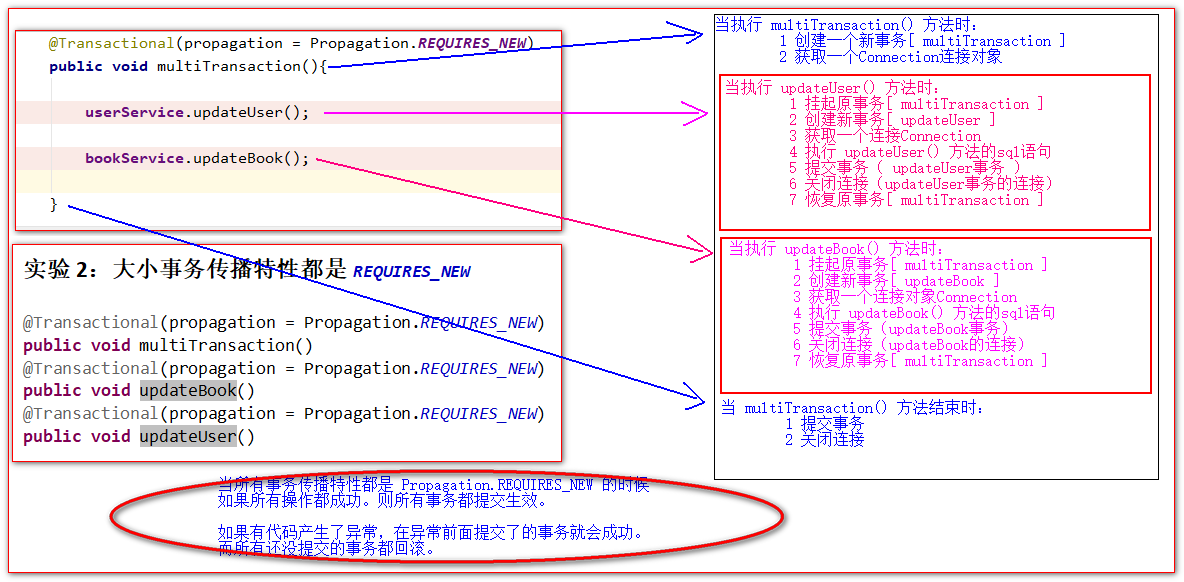
实验2:大小事务传播特性都是REQUIRES_NEW
1
2
3
4
5
6
7
| @Transactional(propagation = Propagation.REQUIRES_NEW)
public void multiTransaction()
@Transactional(propagation = Propagation.REQUIRES_NEW)
public void updateBook()
@Transactional(propagation = Propagation.REQUIRES_NEW)
public void updateUser()
|
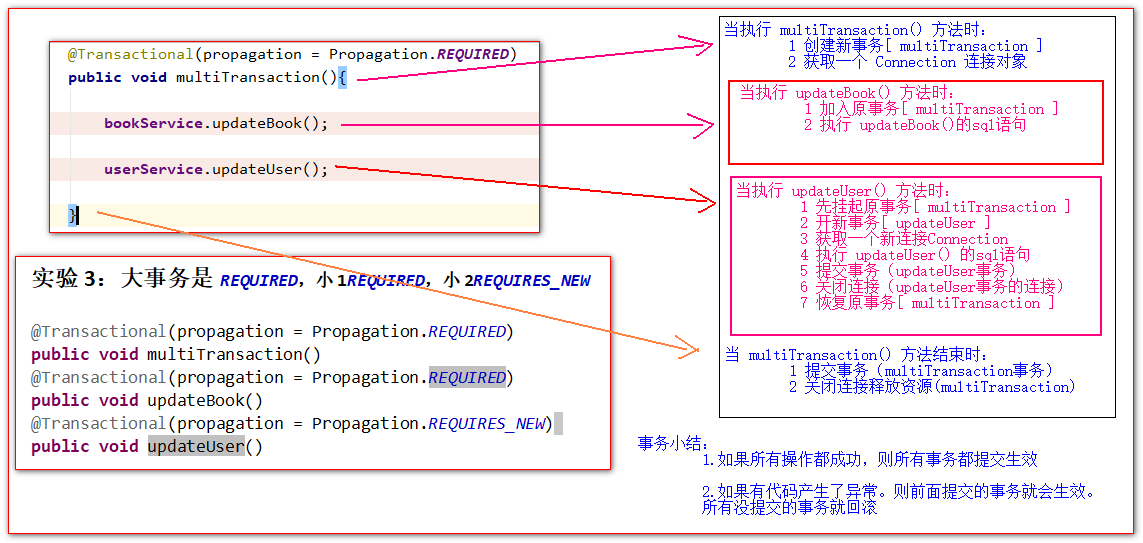
实验3:大事务是REQUIRED,小1REQUIRED,小2REQUIRES_NEW
1
2
3
4
5
6
7
| @Transactional(propagation = Propagation.REQUIRED)
public void multiTransaction()
@Transactional(propagation = Propagation.REQUIRED)
public void updateBook()
@Transactional(propagation = Propagation.REQUIRES_NEW)
public void updateUser()
|
数据库事务隔离级别
数据库隔离级别是为了解决数据库并发过程中数据的安全问题而存在的四种隔离级别。
四种事务隔离级别:
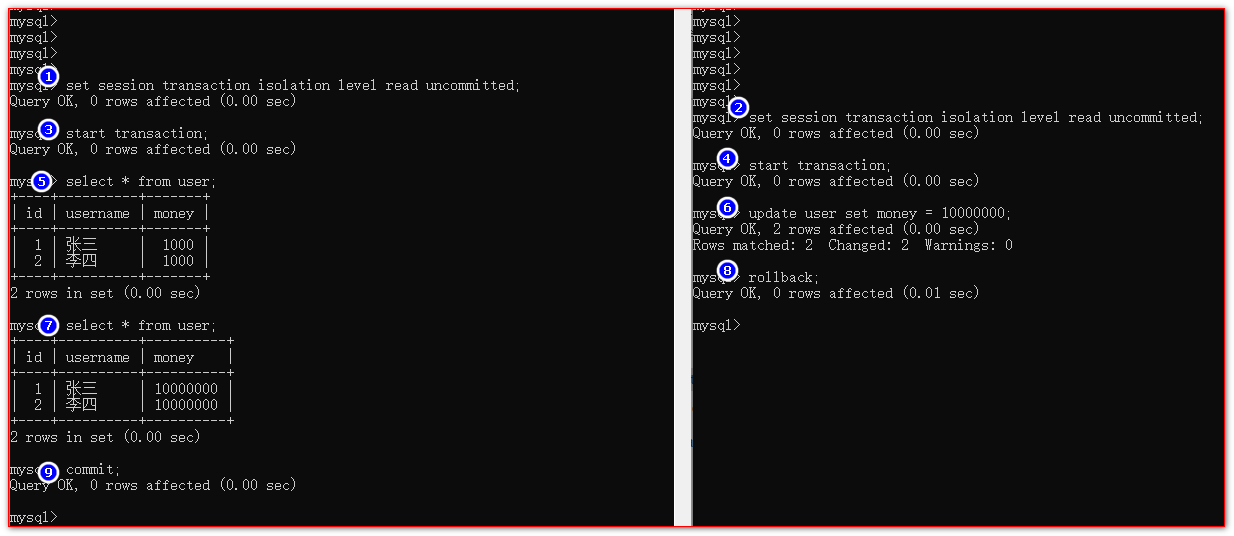
读未提交,可导致—–>>>> 脏读
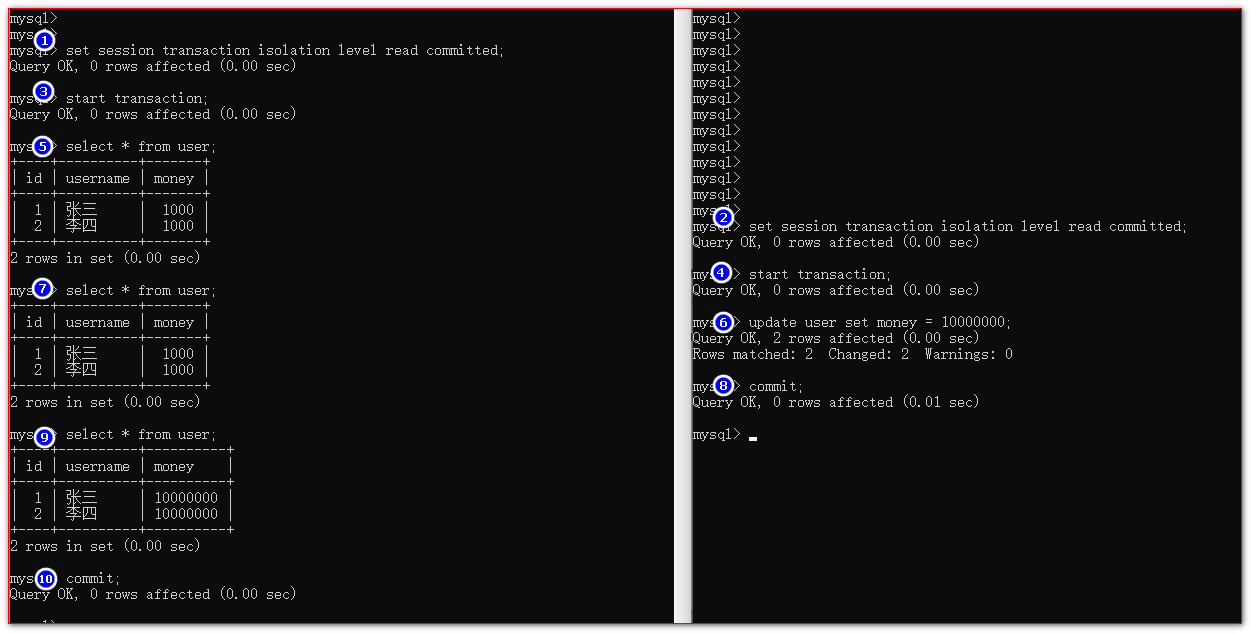
读已提交,可导致—–>>>> 不可重复读
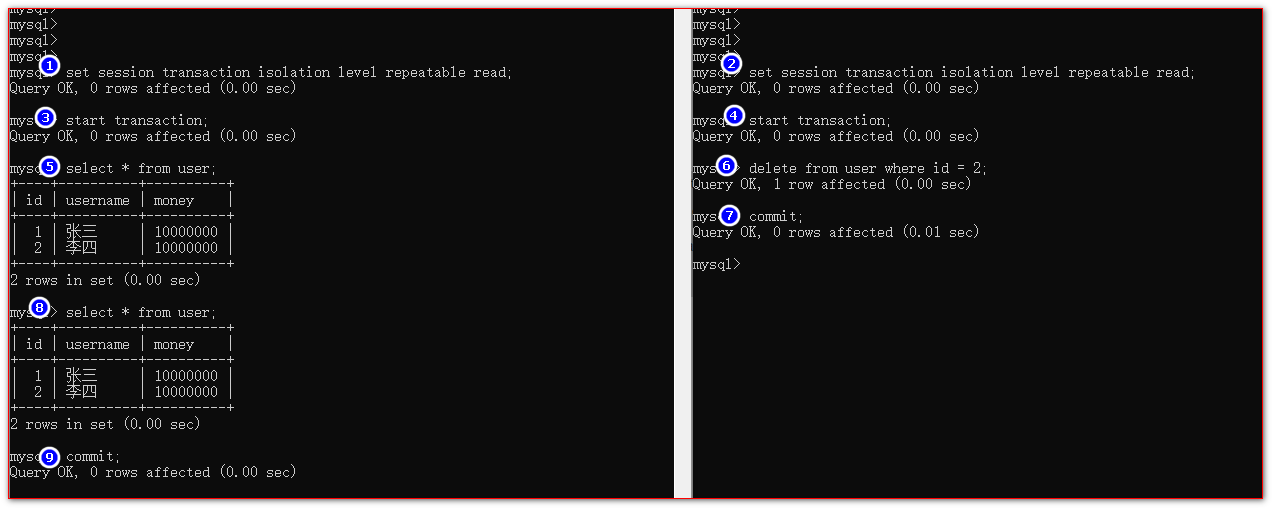
重复读,可导致 —–>>>> 幻读
什么是脏读?
一个事务读到另一个事务的写操作数据,但是这些数据还没提交生效。
什么是不可重复读?
两次以上一模一样的查询得到的结果不一样。
什么是幻读?
在A事务中读取多次相同的一张表的数据,但是B事务在这个过程中做了添加或删除的写操作。
A事务多次读取的结果并没有得到更新( 读不到删除和添加 )。
1.查看当前会话隔离级别
2.查看系统当前隔离级别
1
| select @@global.tx_isolation;
|
3.设置当前会话隔离级别
1
2
3
4
| set session transaction isolation level read uncommitted; 读未提交
set session transaction isolation level read committed; 读已提交
set session transaction isolation level repeatable read; 可重复读
set session transaction isolation level serializable; 串行化事务(读写不能并发)
|
4.开启事务
5.提交事务
6.回滚事务
1.脏读的演示:
2、读未提交导致不可重复读:
3、可重复读导致幻读的演示
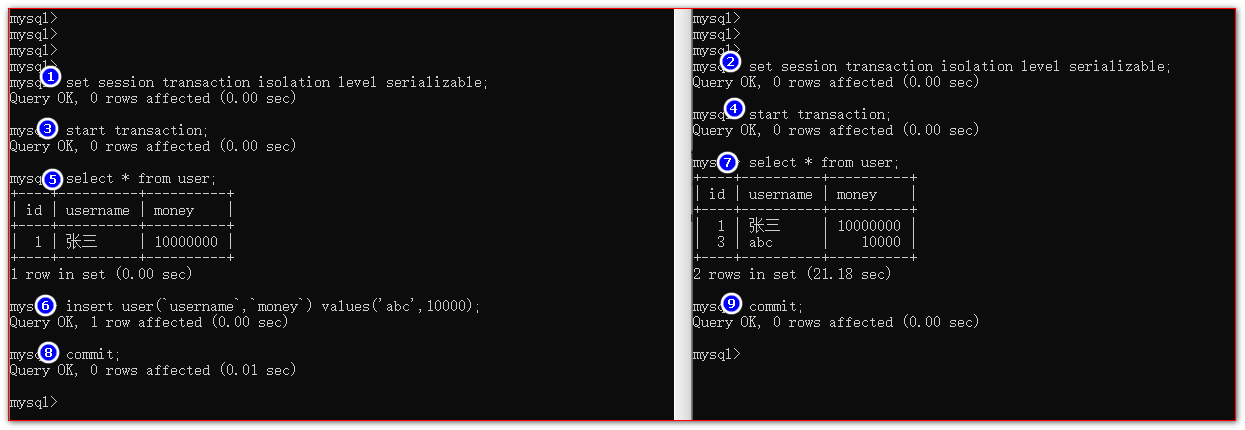
4、串行化事务的演示
xml配置式事务声明
(1) 新建一个模块
(2) 拷贝原来所有的jar包和代码。以及配置文件
(3) 去掉。所有@Transactional的注解。
(4) 在ApplicationContext.xml中添加如下的配置:
1
2
3
4
5
6
7
8
9
10
11
12
13
14
15
16
17
18
19
20
21
22
23
24
25
26
27
28
29
30
31
32
33
34
35
36
37
38
39
40
41
42
43
44
|
<bean class="org.springframework.jdbc.datasource.DataSourceTransactionManager"
id="transactionManager">
<property name="dataSource" ref="dataSource"/>
</bean>
<tx:advice id="tx_advice" transaction-manager="transactionManager">
<tx:attributes>
<tx:method name="updateBook" propagation="REQUIRED"/>
<tx:method name="updateUser" propagation="REQUIRES_NEW"/>
<tx:method name="multiTransaction" propagation="REQUIRED"/>
<tx:method name="multiUpdate" propagation="REQUIRED"/>
<tx:method name="save*" propagation="REQUIRED" />
<tx:method name="insert*" propagation="REQUIRED" />
<tx:method name="update*" propagation="REQUIRED" />
<tx:method name="delete*" propagation="REQUIRED" />
<tx:method name="*" read-only="true" />
</tx:attributes>
</tx:advice>
<aop:config>
<aop:advisor advice-ref="tx_advice"
pointcut="execution(public * com.atguigu..*Service*.*(..))"
/>
</aop:config>
|
Spring整合Web
1 先创建Spring IOC 容器对象
2 从Spring IOC 容器对象中获取组件对象
1、在web工程中添加Spring的jar包
Spring的核心包
spring-beans-4.0.0.RELEASE.jar
spring-context-4.0.0.RELEASE.jar
spring-core-4.0.0.RELEASE.jar
spring-expression-4.0.0.RELEASE.jar
aop包
spring-aop-4.0.0.RELEASE.jar
spring-aspects-4.0.0.RELEASE.jar
com.springsource.org.aopalliance-1.0.0.jar
com.springsource.org.aspectj.weaver-1.6.8.RELEASE.jar
JDBC-ORM包
spring-jdbc-4.0.0.RELEASE.jar
spring-orm-4.0.0.RELEASE.jar
spring-tx-4.0.0.RELEASE.jar
Spring的web整合包
spring-web-4.0.0.RELEASE.jar
整合Spring和Web容器分两个步骤:
1、导入spring-web-4.0.0.RELEASE.jar
2、在web.xml配置文件中配置org.springframework.web.context.ContextLoaderListener监听器监听ServletContext的初始化
3、在web.xml配置文件中配置contextConfigLocation上下文参数。配置Spring配置文件的位置,以用于初始化Spring容器
2.在web.xml中配置
1
2
3
4
5
6
7
8
| <context-param>
<param-name>contextConfigLocation</param-name>
<param-value>classpath:applicationContext.xml</param-value>
</context-param>
<listener>
<listener-class>org.springframework.web.context.ContextLoaderListener</listener-class>
</listener>
|
获取WebApplicationContext上下文对象的方法如下
方法一(推荐):
1
| WebApplicationContextUtils.getWebApplicationContext(getServletContext())
|
方法二(不推荐):
1
| getServletContext().getAttribute(WebApplicationContext.ROOT_WEB_APPLICATION_CONTEXT_ATTRIBUTE);
|