Spring-02
Spring EL表达式(非重要)
创建java实体Bean对象
1
2
3
4
5
6
7
8
9
10
11
12
13
14
15
| public class Person {
private int id;
private String name;
private String phone;
private double salary;
private Car car;
}
public class Car {
private String name;
private String carNo;
}
|
实验26:[SpEL测试I]在SpEL中使用字面量
使用格式:#{数值} #{“字符串” || ‘字符串’}
实验27:[SpEL测试II]在SpEL中引用其他bean
使用格式:#{bean的id}
实验28:[SpEL测试III]在SpEL中引用其他bean的某个属性值
使用格式: #{bean.属性名}
实验29:[SpEL测试IV]在SpEL中调用非静态方法
使用格式: #{bean.方法名(参数)}
实验30:[SpEL测试V]在SpEL中调用静态方法
使用格式:#{T(全名类).方法名(参数)}
实验31:[SpEL测试VI]在SpEL中使用运算符
使用格式:#{表达式}
1
2
3
4
5
6
7
8
9
10
11
12
13
14
| <bean class="com.atguigu.pojo.Car" id="car">
<property name="carNo" value="京B12345" />
<property name="name" value="马杀拉的" />
</bean>
<bean class="com.atguigu.pojo.Person" id="springel">
<property name="id" value="#{100}" />
<property name="car" value="#{car}" />
<property name="phone" value="#{car.carNo}" />
<property name="name" value="#{T(com.atguigu.pojo.Car).staticFun()}" />
<property name="salary" value="#{30000*12}" />
</bean>
|
注解功能(重要)
注解配置Dao、Service、Controller组件
实验32:通过注解分别创建Dao、Service、Controller★
Spring配置bean的常用注解有
@Controller 配置web层的组件 Controller控制器
@Service 配置Service业务层的组件
@Repository 配置Dao持久层的组件
@Component 配置Dao层,Web层,Service层之外的对象
@Scope 配置Bean对象的作用域,单例,多例。
这几个注解基本都相当于:<bean class="com.atguigu.pojo.Book" id="book" />,id为类名开头字母小写,class自然就是它的全类名
代码:
1
2
3
4
5
6
7
|
@Controller
public class BookController {
}
|
1
2
3
4
5
6
7
8
9
10
|
@Repository
@Scope("singleton")
public class BookDao {
}
|
1
2
3
4
5
6
7
8
9
|
@Component
public class Book {
}
|
1
2
3
4
5
6
7
8
9
10
11
|
@Service
public class BookService {
}
|
1
2
3
4
5
6
7
8
9
10
11
12
13
14
15
16
17
| 测试代码:
public class SpringTest {
@Test
public void test() {
ApplicationContext applicationContext =
new ClassPathXmlApplicationContext("applicationContext.xml");
System.out.println(applicationContext.getBean("bookDao"));
System.out.println(applicationContext.getBean("bookService"));
System.out.println(applicationContext.getBean("bookController"));
System.out.println(applicationContext.getBean("book"));
}
}
|
指定扫描包时的过滤内容
实验33:使用context:include-filter指定扫描包时要包含的类
实验34:使用context:exclude-filter指定扫描包时不包含的类
<context:include-filter /> 设置包含的内容
注意:通常需要与use-default-filters属性配合使用才能够达到“仅包含某些组件”这样的效果。即:通过将use-default-filters属性设置为false,
<context:exclude-filter /> 设置排除的内容
| 类别 |
示例 |
说明 |
| annotation |
com.atguigu.XxxAnnotation |
过滤所有标注了XxxAnnotation的类。这个规则根据目标组件是否标注了指定类型的注解进行过滤 |
| assignable |
com.atguigu.BaseXxx |
过滤所有BaseXxx类的子类。这个规则根据目标组件是否是指定类型的子类的方式进行过滤。 |
| aspectj |
com.atguigu.*Service+ |
所有类名是以Service结束的,或这样的类的子类。这个规则根据AspectJ表达式进行过滤。 |
| regex |
com.atguigu.anno.* |
所有com.atguigu.anno包下的类。这个规则根据正则表达式匹配到的类名进行过滤。 |
| custom |
com.atguigu.XxxTypeFilter |
使用XxxTypeFilter类通过编码的方式自定义过滤规则。该类必须实现org.springframework.core.type.filter.TypeFilter接口 |
自定义排除
1
2
3
4
5
6
7
8
9
10
11
12
13
14
15
16
17
|
<context:component-scan base-package="com">
</context:component-scan>
|
自定义包含:
1
2
3
4
5
6
7
8
9
10
11
12
|
<context:component-scan base-package="com" use-default-filters="false">
<context:include-filter type="annotation"
expression="org.springframework.stereotype.Repository"/>
<context:include-filter type="assignable" expression="com.atguigu.service.BookService"/>
</context:component-scan>
|
使用注解@Autowired自动装配
实验35:使用@Autowired注解实现根据类型实现自动装配★
@Autowired 注解 会自动的根据标注的对象类型在Spring容器中查找相对应的类。如果找到,就自动装配。
使用@Autowired注解,不需要get/set方法
1
2
3
4
5
6
7
8
9
10
11
12
13
14
15
16
17
18
19
20
21
22
23
24
25
26
27
28
| package com.atguigu.service;
import com.atguigu.dao.BookDao;
import org.springframework.beans.factory.annotation.Autowired;
import org.springframework.stereotype.Service;
@Service
public class BookService {
@Autowired
BookDao bookDao;
@Override
public String toString() {
return "BookService{" +
"bookDao=" + bookDao +
'}';
}
}
|
多个同类型的bean如何自动装配
实验36:如果资源类型的bean不止一个,默认根据@Autowired注解标记的成员变量名作为id查找bean,进行装配★
1
2
3
4
5
6
7
| package com.atguigu.dao;
import org.springframework.stereotype.Repository;
@Repository
public class BookDaoExt extends BookDao {
}
|
@Autowired 是告诉Spring,自动的从Spring的窗口中查找到需要的Bean对象,自动赋值
* 1 它会先从Spring容器中按类型找到并注入
**
* 2 当按类型查找到多个的时候,Spring会继续按变量名做为id继续查找并注入
**
1
2
3
4
5
6
7
8
9
10
11
12
13
14
15
16
17
18
19
20
21
22
23
24
25
26
27
28
29
| package com.atguigu.service;
import com.atguigu.dao.BookDao;
import org.springframework.beans.factory.annotation.Autowired;
import org.springframework.stereotype.Service;
@Service
public class BookService {
@Autowired
BookDao bookDao;
@Override
public String toString() {
return "BookService{" +
"bookDao=" + bookDao +
'}';
}
}
|
使用@Qualifier装配指定id的bean对象
@Autowired 是告诉Spring,自动的从Spring的窗口中查找到需要的Bean对象,自动赋值
实验37:如果根据成员变量名作为id还是找不到bean,可以使用@Qualifier注解明确指定目标bean的id★
1
2
3
4
5
6
7
8
9
10
11
12
13
14
15
16
17
18
19
20
21
22
23
24
25
26
27
28
29
30
31
32
33
| package com.atguigu.service;
import com.atguigu.dao.BookDao;
import org.springframework.beans.factory.annotation.Autowired;
import org.springframework.beans.factory.annotation.Qualifier;
import org.springframework.stereotype.Service;
@Service
public class BookService {
@Autowired
@Qualifier("bookDaoExt")
BookDao bookDao;
@Override
public String toString() {
return "BookService{" +
"bookDao=" + bookDao +
'}';
}
}
|
@Autowired注解的required属性作用(完整解释)
完整解释:
@Autowired 是告诉Spring,自动的从Spring的窗口中查找到需要的Bean对象,自动赋值
- 1 它会先从Spring容器中按类型找到并注入
- 2 当按类型查找到多个的时候,Spring会继续按变量名做为id继续查找并注入
- 3 我们可以使用注解@Qualifier(“bookDaoExt”)来指定一个id查找,当使用了注解@Qualifier指定id之后。原来的属性名就会忽略。
- 4 @Autowired(required = false)修改属性required = false允许找不到对象赋值,允许值为null
实验39:@Autowired注解的required属性指定某个属性允许不被设置
1
2
3
4
5
6
7
8
9
10
11
12
13
14
15
16
17
18
19
20
21
22
23
24
25
26
27
28
29
30
31
32
33
34
| package com.atguigu.service;
import com.atguigu.dao.BookDao;
import org.springframework.beans.factory.annotation.Autowired;
import org.springframework.beans.factory.annotation.Qualifier;
import org.springframework.stereotype.Service;
@Service
public class BookService {
@Autowired(required = false)
@Qualifier("bookDaoExt")
BookDao bookDao;
@Override
public String toString() {
return "BookService{" +
"bookDao=" + bookDao +
'}';
}
}
|
@Autowired和@Qualifier在方法上的使用
当注解 @Autowired 标识在方法上的时候,对象创建之后,Spring会自动的调用此方法用于初始化操作
1 它会先从Spring容器中按类型找到并注入
2 当按类型查找到多个的时候,Spring会继续按参数名做为id继续查找并注入
3 我们可以使用注解@Qualifier(“bookDaoExt”)来指定一个id查找,当使用了注解@Qualifier指定id之后。原来的属性名就会忽略。
4 @Autowired(required = false)修改属性required = false允许找不到对象赋值,允许值为null
实验38:在方法的形参位置使用@Qualifier注解
1
2
3
4
5
6
7
8
9
10
11
12
|
@Autowired(required = false)
public void abc( @Qualifier("bookDaoExt1") BookDao bookDao ){
System.out.println(" abc method called!!! =>> " + bookDao);
}
|
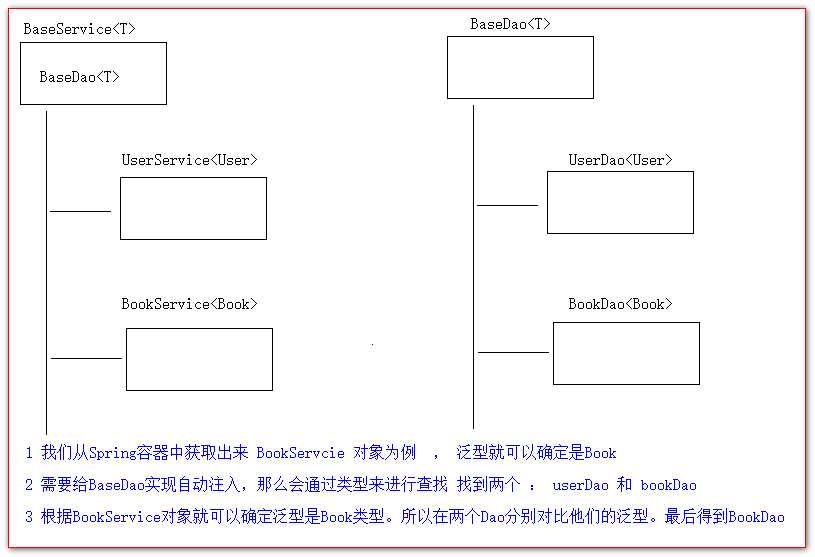
泛型注入(了解内容)
Spring的专有测试
@ContextConfiguration 配置Spring容器需要的配置文件路径
@RunWith 配置使用Spring的扩展junit测试
官方觉得使用Junit测试在编写测试代码的时候,过于繁锁。为了方便测试,并且很好的使用上Spring的一些特性和功能。就对
Junit测试进行了扩展。
1 先导入Spring对junit扩展后的jar包
2 配置两个注解
1
2
3
4
5
6
7
8
9
10
11
12
13
14
15
16
17
18
19
20
21
22
23
24
25
26
27
28
29
30
31
32
| package com.atguigu.test;
import com.atguigu.pojo.Book;
import com.atguigu.pojo.User;
import com.atguigu.service.BookService;
import com.atguigu.service.UserService;
import org.junit.Test;
import org.junit.runner.RunWith;
import org.springframework.beans.factory.annotation.Autowired;
import org.springframework.test.context.ContextConfiguration;
import org.springframework.test.context.junit4.SpringJUnit4ClassRunner;
@ContextConfiguration(locations = "classpath:applicationContext.xml")
@RunWith(SpringJUnit4ClassRunner.class)
public class SpringTest {
@Autowired
BookService bookService;
@Autowired
UserService userService;
@Test
public void test() {
bookService.save(new Book());
System.out.println("==============================================");
userService.save(new User());
}
}
|