Spring-01 1、Spring概述 ①Spring是一个开源框架
②Spring为简化企业级开发而生,使用Spring开发可以将Bean对象,Dao组件对象,Service组件对象等交给Spring容器来管理,这样使得很多复杂的代码在Spring中开发却变得非常的优雅和简洁,有效的降低代码的耦合度,极大的方便项目的后期维护、升级和扩展。
③Spring是一个IOC (DI)和AOP 容器框架。
④Spring的优良特性
[1]非侵入式 :基于Spring开发的应用中的对象可以不依赖于Spring的API
[2]控制反转 :IOC——Inversion of Control,指的是将对象的创建权交给Spring去创建。使用Spring之前,对象的创建都是由我们自己在代码中new创建。而使用Spring之后。对象的创建都是由给了Spring框架。
[3]依赖注入 :DI——Dependency Injection,是指依赖的对象不需要手动调用setXX方法去设置,而是通过配置赋值。
[4]面向切面编程 :Aspect Oriented Programming——AOP
[5]容器 :Spring是一个容器,因为它包含并且管理应用对象的生命周期
[6]组件化 :Spring实现了使用简单的组件配置组合成一个复杂的应用。在 Spring 中可以使用XML和Java注解组合这些对象。
[7]一站式 :在IOC和AOP的基础上可以整合各种企业应用的开源框架和优秀的第三方类库(实际上Spring 自身也提供了表述层的SpringMVC和持久层的Spring JDBC)。
2、Spring的模块介绍
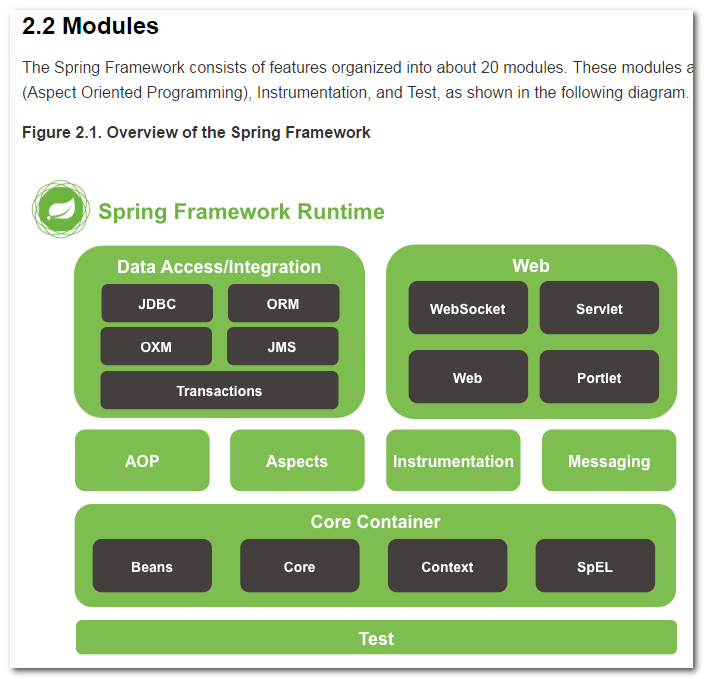
Spring框架分为四大模块:
Core核心模块。负责管理组件的Bean对象
spring-beans-4.0.0.RELEASE.jar
spring-context-4.0.0.RELEASE.jar
spring-core-4.0.0.RELEASE.jar
spring-expression-4.0.0.RELEASE.jar
面向切面编程
spring-aop-4.0.0.RELEASE.jar
spring-aspects-4.0.0.RELEASE.jar
数据库操作
spring-jdbc-4.0.0.RELEASE.jar
spring-orm-4.0.0.RELEASE.jar
spring-oxm-4.0.0.RELEASE.jar
spring-tx-4.0.0.RELEASE.jar
spring-jms-4.0.0.RELEASE.jar
Web模块
spring-web-4.0.0.RELEASE.jar
spring-webmvc-4.0.0.RELEASE.jar
spring-websocket-4.0.0.RELEASE.jar
spring-webmvc-portlet-4.0.0.RELEASE.jar
3、IOC依赖注入 3.1、什么是IOC IOC 全称指的是 Inverse Of Control 控制反转。
在使用Spring模块之前.我们的对象都是自己在代码中去new创建.而使用了Spring之后,对象的创建交给了Spring容器.
**注:**所有要使用Spring功能的对象都需要交给Spring容器来创建
3.2、什么是DI DI 指的是Dependency Injection 。是依赖注入的意思。
依赖 : A要去完成某个功能,在这个过程中,需要B的存在,如果没有B,A就无法实现功能. A对于B,就是A依赖B.
比如 web阶段 书城中:
1
2
3
4
5
6
7
8
9
public class BookService public void setBookDao ( BookDao bookDao ) this .bookDao = bookDao;
通过配置对bookDao进行赋值.(这里指在过滤器通过反射的方式进行赋值)
注入 : 注入就是赋值操作.
依赖注入, 就是给依赖的对象进行赋值操作.
在Spring中,我们的依赖注入,可以通过xml配置文件,以及注解的形式来进行操作.
3.3、第一个IOC示例程序 – 通过id获取对象(重点) 实验1:通过IOC容器创建对象,并为属性赋值★
1 先导入需要的jar包:
junit_4.12.jar
org.hamcrest.core_1.3.0.jar
spring-beans-5.2.5.RELEASE.jar
spring-context-5.2.5.RELEASE.jar
spring-core-5.2.5.RELEASE.jar
spring-expression-5.2.5.RELEASE.jar
spring-jcl-5.2.5.RELEASE.jar
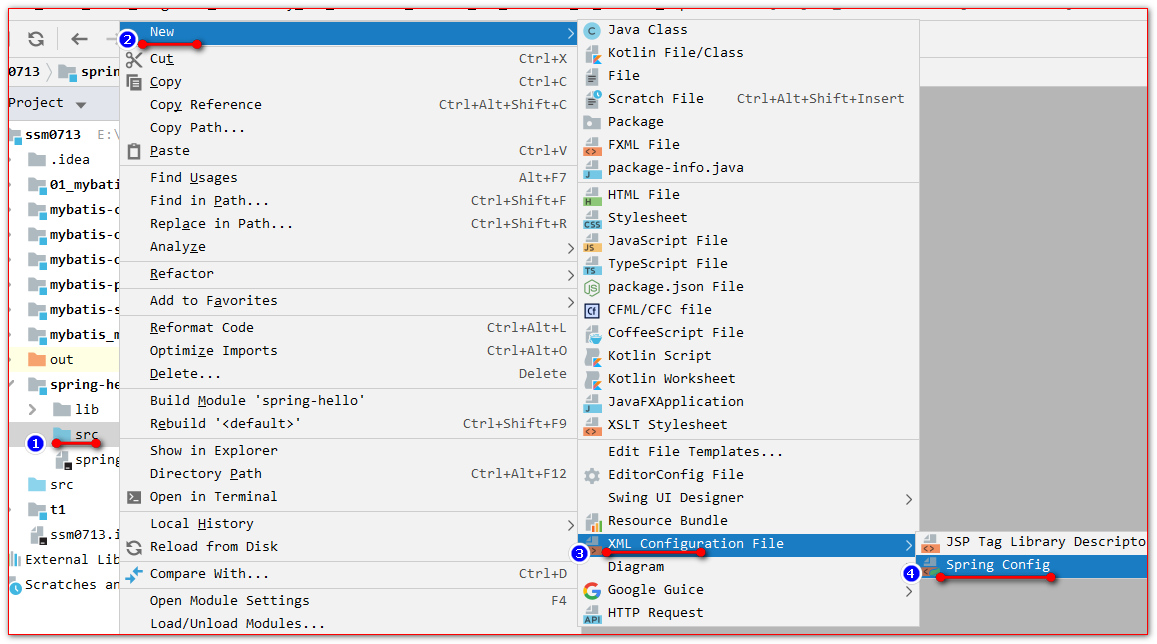
2 在src源码目录下创建Spring的配置文件:
3.创建Person对象
1
2
3
4
5
6
public class Person private Integer id;private String name;private Integer age;private String phone;
4 在applicationContext.xml中配置Bean对象:
1
2
3
4
5
6
7
8
9
10
11
12
13
14
15
16
17
18
19
20
21
22
23
24
<?xml version="1.0" encoding="UTF-8"?> <beans xmlns ="http://www.springframework.org/schema/beans" xmlns:xsi ="http://www.w3.org/2001/XMLSchema-instance" xsi:schemaLocation ="http://www.springframework.org/schema/beans http://www.springframework.org/schema/beans/spring-beans.xsd" > <bean class ="com.atguigu.pojo.Person" id ="p1" > <property name ="id" value ="1" /> <property name ="name" value ="ioc 的 hello world" /> <property name ="age" value ="18" /> <property name ="phone" value ="18610541354" /> </bean > </beans >
5 测试代码:
1
2
3
4
5
6
7
8
9
10
11
12
13
14
15
16
17
public class SpringTest @Test public void test () new ClassPathXmlApplicationContext("applicationContext.xml" );"p1" );
问题:
1、FileSystemXmlApplicationContext怎么用?
答:跟使用JavaSE的相对路径一样
1 new FileSystemXmlApplicationContext("src/applicationContext.xml" );
2、Bean是在什么时候被创建的?
答:在创建ApplicatiocnContext对象时一起创建Bean对象(默认)
3、如果调用getBean多次,会创建几个?
答:默认创建同一个
常见的错误:
指定的id不存在。找不到bean对象。
3.4、IOC示例程序 – 通过类型获取对象(重点) 实验2:根据bean的类型从IOC容器中获取bean的实例★
applicationContext.xml配置文件:
1 2 3 4 5 6 7 8 9 10 11 12 13 14 15 16 17 18 19 20 21 22 23 24 <bean class ="com.atguigu.pojo.Person" id ="p1" > <property name ="id" value ="1" /> <property name ="name" value ="ioc 的 hello world" /> <property name ="age" value ="18" /> <property name ="phone" value ="18610541354" /> </bean > <bean class ="com.atguigu.pojo.Person" id ="p2" > <property name ="id" value ="2" /> <property name ="name" value ="class类型查找" /> <property name ="age" value ="18" /> <property name ="phone" value ="110" /> </bean >
测试代码:
1
2
3
4
5
6
7
8
9
10
11
12
13
14
15
16
17
@Test public void test () new ClassPathXmlApplicationContext("applicationContext.xml" );
常见错误说明:
当在applicationContext.xml配置文件中。有多个同Person.class类型实现的时候。
3.5、IOC示例程序 – 通过构造方法参数名注入值 实验3:通过构造器为bean的属性赋值
构造器方法
1
2
3
4
5
6
7
8
public Person (Integer id, String name, Integer age, String phone) this .id = id;this .name = name;this .age = age;this .phone = phone;" 有参 new Person() " );
ApplicationContext.xml配置文件:
1 2 3 4 5 6 7 8 9 10 11 12 13 <bean class ="com.atguigu.pojo.Person" id ="p3" > <constructor-arg name ="id" value ="3" /> <constructor-arg name ="name" value ="构造器赋值" /> <constructor-arg name ="age" value ="18" /> <constructor-arg name ="phone" value ="120" /> </bean >
测试代码:
1
2
3
4
5
6
@Test public void test3 () new ClassPathXmlApplicationContext("applicationContext.xml" );"p3" );
3.6、IOC示例程序 – index属性指定构造器参数的顺序 实验4:通过index属性指定参数的位置
applicationContext.xml配置文件:
1 2 3 4 5 6 7 8 9 10 11 12 13 14 15 <bean class ="com.atguigu.pojo.Person" id ="p4" > <constructor-arg index ="0" value ="4" /> <constructor-arg index ="1" value ="参数顺序" /> <constructor-arg index ="2" value ="18" /> <constructor-arg index ="3" value ="110" /> </bean >
测试代码:
1
2
3
4
5
6
@Test public void test4 () new ClassPathXmlApplicationContext("applicationContext.xml" );"p4" );
3.7、IOC示例程序 – 根据构造器参数类型注入选择构造器赋值 实验5:根据参数类型注入
applicationContext.xml配置文件:
1 2 3 4 5 6 7 8 9 10 11 12 <bean class ="com.atguigu.pojo.Person" id ="p5" > <constructor-arg index ="0" value ="5" type ="java.lang.Integer" /> <constructor-arg index ="1" value ="type类型" type ="java.lang.String" /> <constructor-arg index ="2" value ="110" type ="java.lang.Integer" /> <constructor-arg index ="3" value ="120" type ="java.lang.String" /> </bean >
测试代码:
1
2
3
4
5
6
@Test public void test5 () new ClassPathXmlApplicationContext("applicationContext.xml" );"p5" );
3.8、IOC之 P名称空间 实验6:通过p名称空间为bean赋值
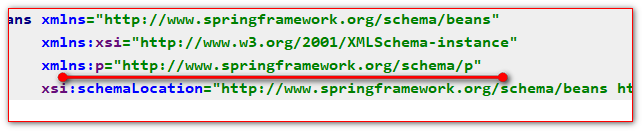
p名称空间可以以简短的形式通过set方法给属性赋值.
p名称空间:
applicationContext.xml中的配置:
1 2 3 4 5 6 7 <!--"值" class "com.atguigu.pojo.Person" id="p6" "6" p:name="p名称空间" p:age="18" p:phone="120" />
测试代码:
1
2
3
4
5
6
@Test public void test6 () new ClassPathXmlApplicationContext("applicationContext.xml" );"p6" );
3.9、测试null值的使用 实验7:测试使用null值
1
2
3
4
5
6
7
8
<bean class "com.atguigu.pojo.Person" id="p7" >"id" value="7" />"name" value="null值测试" />"phone" >null 标签表示null 值 -->
3.10、IOC之子对象的赋值测试(重点) 实验8:引用其他bean★
创建个新的工程。测试Spring的开发环境。此不重复。请参阅前面,环境搭建。
Car对象
1
2
3
4
public class Car private String type;private String carNo;
Person对象:
1
2
3
4
5
6
7
public class Person private Integer id;private String name;private Integer age;private String phone;private Car car;
applicationContext.xml配置文件:
1 2 3 4 5 6 7 8 9 10 11 12 13 <bean class ="com.atguigu.pojo.Car" id ="car" > <property name ="type" value ="保死杰" /> <property name ="carNo" value ="京A12345" /> </bean > <bean class ="com.atguigu.pojo.Person" id ="p8" > <property name ="id" value ="8" /> <property name ="car" ref ="car" /> </bean >
测试的代码:
1
2
3
4
5
6
@Test public void test8 () new ClassPathXmlApplicationContext("applicationContext.xml" );"p8" );
3.11、IOC之内部Bean的使用 实验9:引用内部bean
1 2 3 4 5 6 7 8 9 10 11 12 13 <bean class ="com.atguigu.pojo.Person" id ="p9" > <property name ="id" value ="9" /> <property name ="car" > <bean class ="com.atguigu.pojo.Car" id ="car2" > <property name ="type" value ="劳死来死" /> <property name ="carNo" value ="京A666666" /> </bean > </property > </bean >
常见错误:内部的Bean不能被外部使用
3.12、IOC之List属性的赋值 实验10:使用list子元素为List类型的属性赋值
Person添加list集合
1
2
3
4
5
6
7
8
public class Person private Integer id;private String name;private Integer age;private String phone;private Car car;private List<String> list;
applicationContext.xml中的配置:
1
2
3
4
5
6
7
8
9
10
11
12
13
14
<bean class "com.atguigu.pojo.Person" id="p10" >"id" value="10" />"list" >
测试代码:
1
2
3
4
5
6
@Test public void test10 () new ClassPathXmlApplicationContext("applicationContext.xml" );"p10" );
3.13、IOC之Map属性的赋值 实验11:使用map子元素为Map类型的属性赋值
Person中添加map属性:
1
2
3
4
5
6
7
8
9
public class Person private Integer id;private String name;private Integer age;private String phone;private Car car;private List<String> list;private Map<String,Object> map;
applicationContext.xml配置文件:
1 2 3 4 5 6 7 8 9 10 11 12 13 14 15 16 <bean class ="com.atguigu.pojo.Person" id ="p11" > <property name ="id" value ="11" /> <property name ="map" > <map > <entry key ="k1" value ="v1" /> <entry key ="k2" value ="v2" /> <entry key ="k3" value ="v3" /> </map > </property > </bean >
测试代码:
1
2
3
4
5
6
@Test public void test11 () new ClassPathXmlApplicationContext("applicationContext.xml" );"p11" );
3.14、IOC之Properties属性的赋值 实验12:使用prop子元素为Properties类型的属性赋值
Person类型:
1
2
3
4
5
6
7
8
9
10
public class Person private Integer id;private String name;private Integer age;private String phone;private Car car;private List<String> list;private Map<String,Object> map;private Properties props;
applicationcontext.xml配置文件:
1 2 3 4 5 6 7 8 9 10 11 12 13 14 15 16 17 18 <bean class ="com.atguigu.pojo.Person" id ="p12" > <property name ="id" value ="12" /> <property name ="props" > <props > <prop key ="url" > jdbc:mysql://localhost:3306/test</prop > <prop key ="username" > root</prop > <prop key ="password" > root</prop > </props > </property > </bean >
测试代码:
1
2
3
4
5
6
@Test public void test12 () new ClassPathXmlApplicationContext("applicationContext.xml" );"p12" );
3.15、IOC之util 名称空间 实验13:通过util名称空间创建集合类型的bean
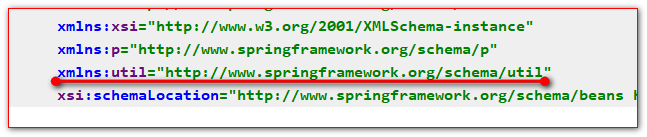
util名称空间,可以用来定义一个外部的集合,方便对象去引用.
导入util名称空间:
applicationContext.xml配置文件:
1 2 3 4 5 6 7 8 9 10 11 12 13 <util:list id ="list01" > <value > items1</value > <value > items2</value > <value > items3</value > </util:list > <bean id ="p13" class ="com.atguigu.pojo.Person" > <property name ="id" value ="13" > </property > <property name ="list" ref ="list01" /> </bean >
测试代码:
1
2
3
4
5
6
7
8
@Test public void test13 () new ClassPathXmlApplicationContext("applicationContext.xml" );"p13" );"list01" ));
3.16、IOC之级联属性赋值 实验14:给bean的级联属性赋值
1 2 3 4 5 6 7 8 9 <bean id ="p14" class ="com.atguigu.pojo.Person" > <property name ="id" value ="14" /> <property name ="car" ref ="car" /> <property name ="car.carNo" value ="京C111111" /> </bean >
常见错误:
级联属性一定要先注入对象。再注入对象的属性
3.17、IOC之静态工厂方法创建Bean 实验15:配置通过静态工厂方法创建的bean
工厂类:
1
2
3
4
5
6
7
public class PersonFactory public static Person create () return new Person(100 ,"工厂静态方法" ,"110" ,18 );
applicationContext.xml配置文件:
1 2 3 4 <bean class ="com.atguigu.PersonFactory" id ="p15" factory-method ="create" />
测试的代码:
1
2
3
4
5
6
@Test public void test15 () new ClassPathXmlApplicationContext("applicationContext.xml" );"p15" );
3.18、IOC之工厂实例方法创建Bean 实验16:配置通过实例工厂方法创建的bean
PersonFactory代码:
1
2
3
4
5
6
7
public class PersonFactory public Person create2 () return new Person(100 , "工厂实例方法" , "110" , 18 );
applicationContext.xml中的配置:
1 2 3 4 <bean class ="com.atguigu.PersonFactory" id ="personFactory" /> <bean id ="p16" factory-bean ="personFactory" factory-method ="create2" />
测试代码:
1
2
3
4
5
6
@Test public void test16 () new ClassPathXmlApplicationContext("applicationContext.xml" );"p16" );
3.19、IOC之FactoryBean接口方式创建对象 步骤如下:
实验17:配置FactoryBean接口创建Bean对象
FactoryBean接口实现类:
1
2
3
4
5
6
7
8
9
10
11
12
13
14
15
16
17
18
19
20
21
22
23
24
25
26
27
public class PersonFactoryBean implements FactoryBean <Person > public Person getObject () throws Exception return new Person(1 ,"工厂方法FactoryBean接口" ,"110" ,18 );public Class<?> getObjectType() {return Person.class;public boolean isSingleton () return true ;
applicationContext.xml中的配置:
1 <bean class ="com.atguigu.factory.PersonFactoryBean" id ="p17" />
测试代码:
1
2
3
4
5
6
@Test public void test17 () new ClassPathXmlApplicationContext("applicationContext.xml" );"p17" );
3.20、IOC之继承Bean配置 实验18:通过继承实现bean配置信息的重用
applicationContext.xml配置文件:
1 2 3 4 5 6 7 8 9 10 11 12 13 <bean id ="parent" class ="com.atguigu.pojo.Person" > <property name ="id" value ="100" /> <property name ="name" value ="person实例" /> <property name ="age" value ="100" /> <property name ="phone" value ="110" /> </bean > <bean id ="p18" class ="com.atguigu.pojo.Person" parent ="parent" > <property name ="id" value ="18" /> </bean >
测试的代码:
1
2
3
4
5
6
@Test public void test18 () new ClassPathXmlApplicationContext("applicationContext.xml" );"p18" );
3.21、IOC之Bean配置信息的抽象化 实验19:通过abstract属性创建一个模板bean
1 2 3 4 5 6 7 8 9 <!--abstract ="true" 表示当前的配置信息,只能用于继承,不能实例化"parent" class "com.atguigu.pojo.Person" abstract ="true" >"id" value="100" />"name" value="person实例" />"age" value="100" />"phone" value="110" />
3.22、IOC之组件创建顺序 实验20:bean之间的依赖 depends-on 属性
对象:
1
2
3
4
5
public class A public A () "A" );
1
2
3
4
5
public class B public B () "B" );
1
2
3
4
5
public class C public C () "C" );
applicationContext.xml配置文件:
1 2 3 4 5 6 7 8 9 10 <bean class ="com.atguigu.pojo.A" id ="a" depends-on ="b" /> <bean class ="com.atguigu.pojo.B" id ="b" /> <bean class ="com.atguigu.pojo.C" id ="c" />
测试代码:
1
2
3
4
5
6
7
8
9
public class SpringTest @Test public void test () new ClassPathXmlApplicationContext("applicationContext.xml" );
3.23、IOC之Bean的单例和多例(重点) 实验21:测试bean的作用域,分别创建单实例和多实例的bean★
applicationContext.xml配置文件:
1 2 3 4 5 6 7 8 9 10 11 12 13 14 15 16 17 18 19 20 21 22 23 24 25 26 27 28 29 30 31 32 33 <bean class ="com.atguigu.pojo.Person" id ="p20" scope ="prototype" > </bean >
3.24、基于xml配置文件的自动注入 xml方式配置实现自动注入,是指,通过在xml配置文件中以配置的方式.为配置的Bean对象的子对象.自动赋值.
先创建Person类和Car类
1
2
3
4
5
6
7
8
9
10
11
12
13
14
public class Car private String name;public class Person private Car car;public Person (Car car) this .car = car;
1 2 3 4 5 6 7 8 9 10 11 12 13 14 15 16 17 18 19 20 21 <bean class ="com.atguigu.pojo.Person" id ="p21" autowire ="constructor" > <property name ="id" value ="21" /> </bean >
4、对象的生命周期 4.1、IOC之Bean的生命周期 实验22:创建带有生命周期方法的bean
Person对象添加初始化方法和销毁方法:
1
2
3
4
5
6
7
8
9
10
11
12
13
14
public class Person private Integer id;private String name;private Integer age;private String phone;private Car car;public void init () " 初始化方法 " );public void destory () " 销毁方法 " );
applicationContext.xml中的配置:
1 2 3 4 5 6 7 8 9 10 <bean id ="p22" class ="com.atguigu.pojo.Person" scope ="prototype" init-method ="init" destroy-method ="destory" > <property name ="id" value ="22" /> </bean >
测试的代码:
1
2
3
4
5
6
7
8
9
10
@Test public void test3 () new ClassPathXmlApplicationContext("applicationContext.xml" );"p22" ));
3.2、Bean的后置处理器BeanPostProcessor 后置处理器,可以在对象创建初始化的前后 ,对对象做一些扩展,增强,等的操作
Bean的后置处理使用步骤:
1 先编写一个类去实现后置处理器接口
2 实现后置处理器的方法
3 去容器中配置后置处理器
实验23:测试bean的后置处理器
后置处理器的代码:
1
2
3
4
5
6
7
8
9
10
11
12
13
14
15
16
17
18
19
20
21
22
23
24
25
26
27
28
29
30
31
32
33
34
35
36
37
38
39
public class MyBeanPostProcessor implements BeanPostProcessor public Object postProcessBeforeInitialization (Object bean, String beanName) throws BeansException " postProcessBeforeInitialization 初始化之前 id => " + beanName + " , 对象是 => " + bean);return bean;public Object postProcessAfterInitialization (Object bean, String beanName) throws BeansException " postProcessAfterInitialization 初始化之后 id => " + beanName + " , 对象是 => " + bean);if (beanName.equals("p22" )) {new Car("马杀拉弟" ,"京C12341" ));return bean;
applicationContext.xml中的配置:
1 2 <bean class ="com.atguigu.process.MyBeanPostProcessor" />
测试的代码:
1
2
3
4
5
6
7
8
9
10
11
@Test public void testBeanPostProcessor () new ClassPathXmlApplicationContext("applicationContext.xml" );"p22" );
5.Spring管理数据库连接池(重点) 5.1、Spring配置管理数据库连接池对象(重点) 先导入需要的jar包
druid-1.1.9.jar
junit_4.12.jar
mysql-connector-java-5.1.37-bin.jar
org.hamcrest.core_1.3.0.jar
spring-beans-5.2.5.RELEASE.jar
spring-context-5.2.5.RELEASE.jar
spring-core-5.2.5.RELEASE.jar
spring-expression-5.2.5.RELEASE.jar
spring-jcl-5.2.5.RELEASE.jar
applicationContext.xml中的配置:
1 2 3 4 5 6 7 8 9 10 11 <bean class ="com.alibaba.druid.pool.DruidDataSource" id ="dataSource" > <property name ="username" value ="root" /> <property name ="password" value ="root" /> <property name ="driverClassName" value ="com.mysql.jdbc.Driver" /> <property name ="url" value ="jdbc:mysql://localhost:3306/mbg" /> <property name ="initialSize" value ="5" /> <property name ="maxActive" value ="10" /> </bean >
测试的代码:
1
2
3
4
5
6
7
8
9
@Test public void testDataSource () throws SQLException new ClassPathXmlApplicationContext("applicationContext.xml" );"dataSource" );
5.2、使用context名称空间加载jdbc.properties配置文件(重点) jdbc.properties属性配置文件:
1
2
3
4
5
6
user =root password =root url =jdbc:mysql://localhost:3306/book driverClassName =com.mysql.jdbc.Driver initialSize =5 maxActive =10
applicationContext.xml配置文件:
1 2 3 4 5 6 7 8 9 10 11 12 13 14 15 16 17 18 19 20 21 22 <context:property-placeholder location ="classpath:jdbc.properties" /> <bean class ="com.alibaba.druid.pool.DruidDataSource" id ="dataSource" > <property name ="username" value ="${user}" /> <property name ="password" value ="${password}" /> <property name ="driverClassName" value ="${driverClassName}" /> <property name ="url" value ="${url}" /> <property name ="initialSize" value ="${initialSize}" /> <property name ="maxActive" value ="${maxActive}" /> </bean >
测试代码:
1
2
3
4
5
6
7
8
9
@Test public void testDataSource () throws SQLException new ClassPathXmlApplicationContext("applicationContext.xml" );"dataSource" );