SpringBoot-02
SpringBoot-02
- 掌握工程热部署
- 掌握多环境的配置文件
- 掌握配置文件存放路径,及其加载顺序
- 掌握自定义配置文件名称
- 掌握内置web应用服务器的切换:tomcat切换为jetty
- 掌握为SpringBoot配置生产级监控Actuator
- 搭建Spring Boot Admin服务链接SpringBoot项目
- 了解SpringBoot自动配置实现原理【不要求掌握】
七、SpringBoot工程热部署
只需导入开发者工具依赖坐标,即可实现热部署功能:
1 | |
但还需注意:加入坐标之后,如果想要代码立即生效,必须在修改代码之后进行代码构建。默认情况IDEA不会自动构建,需要手动构建。如图两处地方均可。
1 | |
每次手动构建很麻烦?!!还有一种自动构建解决方案,但不建议使用。就是设置Build Project Automatically。同时打开Maintenance维护(打开快捷键Shift + Ctrl + Alt + /),选择Registry(注册表),设置运行时自动编译。
八、配置文件延伸
8.1 多环境配置文件
我们在开发Spring Boot应用时,通常同一套程序会被安装到不同环境,比如:开发dev、测试test、生产pro等。其中数据库地址、服务器端口等等配置都不同,如果每次打包时,都要修改配置文件,那么非常麻烦。profile功能就是来进行动态配置切换的。
profile配置方式有两种:
- 多profile文件方式:提供多个配置文件,每个代表一种环境。
- application-dev.properties/yml 开发环境
- application-test.properties/yml 测试环境
- application-pro.properties/yml 生产环境
- yml多文档方式:在yml中使用 — 分隔不同配置
profile激活方式:
- 配置文件: 再配置文件中配置:spring.profiles.active=dev
- 虚拟机参数:在VM options 指定:-Dspring.profiles.active=dev
- 命令行参数:java –jar xxx.jar –spring.profiles.active=dev
8.2 松散绑定
不论配置文件中的属性值是短横线、驼峰式还是下换线分隔配置方式,在注入配置时都可以通过短横线方式取出值;
使用范围:properties文件、YAML文件、系统属性
| 命名风格 | 示例 |
|---|---|
| 短横线分隔 | itheima.spring-boot.one-example |
| 驼峰式 | itheima.SpringBoot.OneExample |
| 下划线分隔 | itheima.spring_boot.one_example |
简单来说就是取配置文件中这三个key可以视为同一个key(就算同时写三个也会有个优先级的问题),取的时候取短横线这种key(请看下面的注意)
注意:@Value取值配置不能写驼峰式和下划线,只能写短横线,否则会报错
8.3 配置路径及其加载顺序
Springboot程序启动时,会从以下位置加载配置文件:
1.file:./config/:当前项目下的/config目录下
2.file:./ :当前项目的根目录
3.classpath:/config/:classpath的/config目录
4.classpath:/ :classpath的根目录
加载顺序为上文的排列顺序,高优先级配置的属性会生效
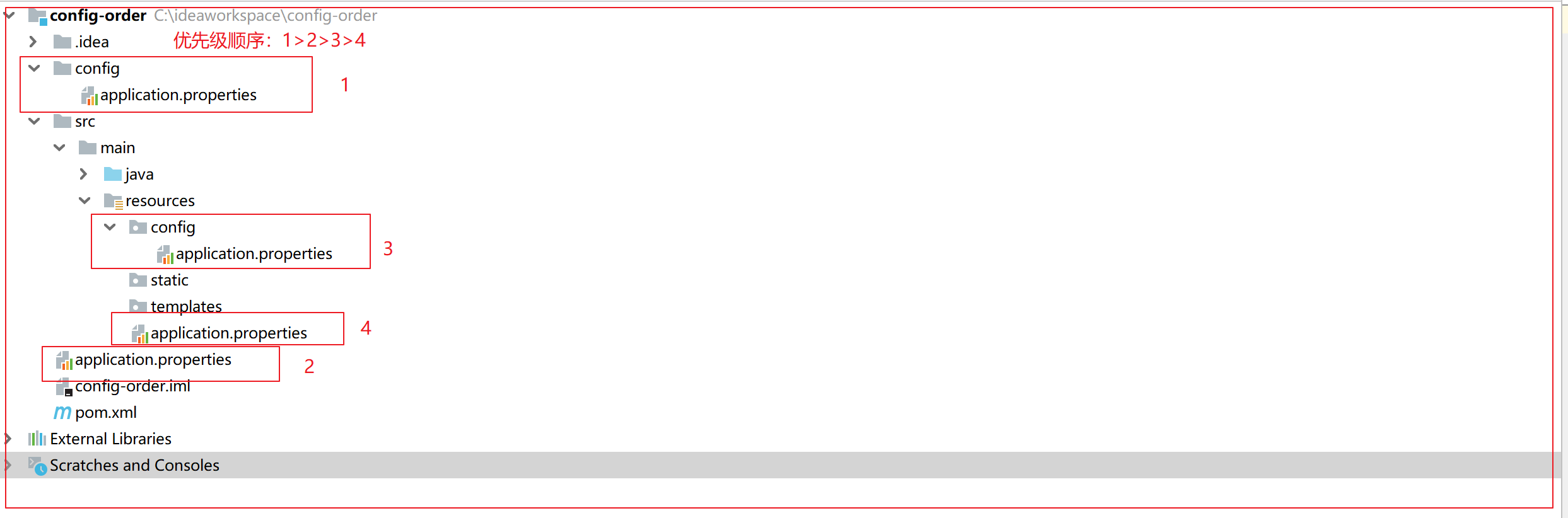
注意:在多个model的工程中,这种配置顺序不生效
8.4 外部配置加载顺序
- 开启 DevTools 时, ~/.spring-boot-devtools.properties
- 测试类上的 @TestPropertySource 注解
- @SpringBootTest#properties 属性
- ==命令⾏参数(–server.port=9000 )==
- SPRING_APPLICATION_JSON 中的属性
- ServletConfig 初始化参数
- ServletContext 初始化参数
- java:comp/env 中的 JNDI 属性
- System.getProperties()
- 操作系统环境变量
- random.* 涉及到的 RandomValuePropertySource
- jar 包外部的 application-{profile}.properties 或 .yml
- jar 包内部的 application-{profile}.properties 或 .yml
- jar 包外部的 application.properties 或 .yml
- jar 包内部的 application.properties 或 .yml
- @Configuration 类上的 @PropertySource
- SpringApplication.setDefaultProperties() 设置的默认属性
官方说明地址:
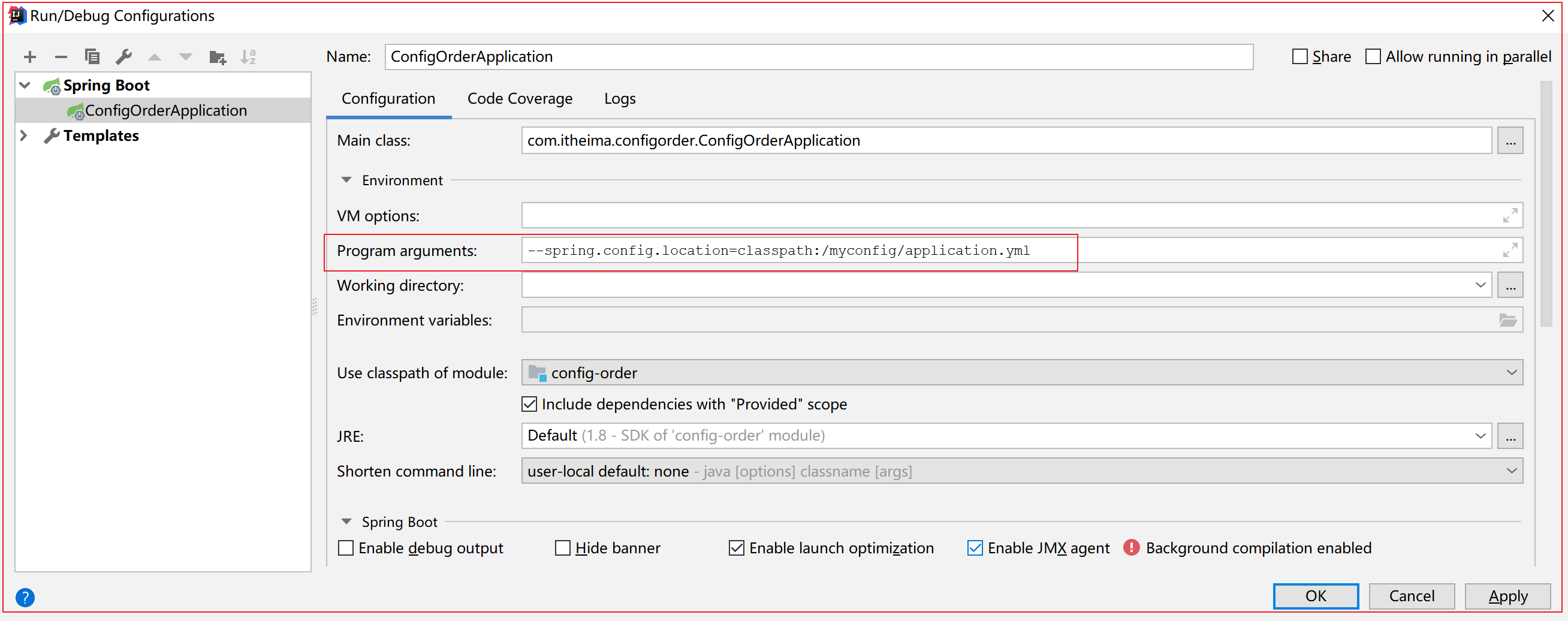
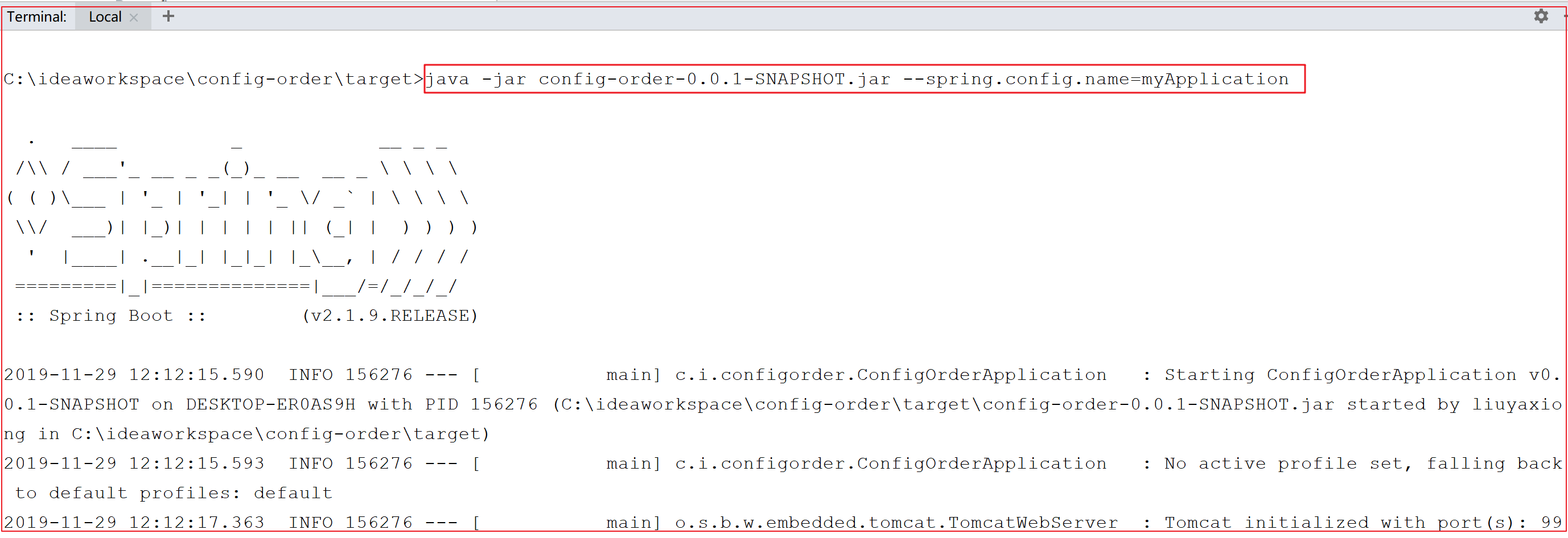
8.5 修改配置文件的位置及默认名称:
第一种方式:IDEA通过参数注入方式配置:
第二种方式:命令行:
1 | |
九、SpringBoot进阶
9.1 SpringBoot的监听器
1、什么是监听器
JavaEE包括13门规范,其中 Servlet规范包括三个技术点:Servlet、Listener、Filter
监听器就是监听某个对象的状态变化的组件
监听器,字面上的理解就是,观察监听某个事件的发生,当被监听的事件真的发生了,在这个事件发生后做点事
监听器的相关概念:
事件源:被监听的对象
监听器:监听事件源对象 事件源对象的状态的变化都会触发监听器
响应行为:监听器监听到事件源的状态变化时 所涉及的功能代码 —- 程序员编写的代码

1、js中的事件监听机制:onclick=fun()
2、Servlet中的监听器:web.xml
1 | |
3、SpringBoot中的监听器
- CommandLineRunner:应用程序启动完成后
- ApplicationRunner:应用程序启动完成后
- ApplicationContextInitializer:应用程序初始化之前【对框架开发者有意义】
- SpringApplicationRunListener:应用程序全阶段监听【对框架开发者有意义】
- 应用程序开始启动–starting
- 环境准备完成–environmentPrepared
- spring容器准备完成–environmentPrepared
- spring容器加载完成–environmentPrepared
- 应用程序启动完成–started
- 应用程序开始运行–running
- 应用程序运行时抛出异常时调用–failed
Spring Boot的扩展机制Spring Factories
- 主要目的是解耦:将监听器的配置权交给第三方厂商、插件开发者
- 框架提供接口,实现类由你自己来写,释放原生API能力,增加可定制性
- META-INF/spring.factories文件中配置接口的实现类名称
在ApplicationContextInitializer接口的实现类中必须写一个构造方法:
1 | |
2、监听器案例
需求:当应用程序启动完成时,初始化redis缓存。
实现步骤:
- 实现ApplicationRunner接口,重写run()方法
- 注入UserService接口实现类及RedisTemplate对象
- 将用户数据存入redis缓存
实现过程:
1 | |
9.2 自动配置实现原理详解
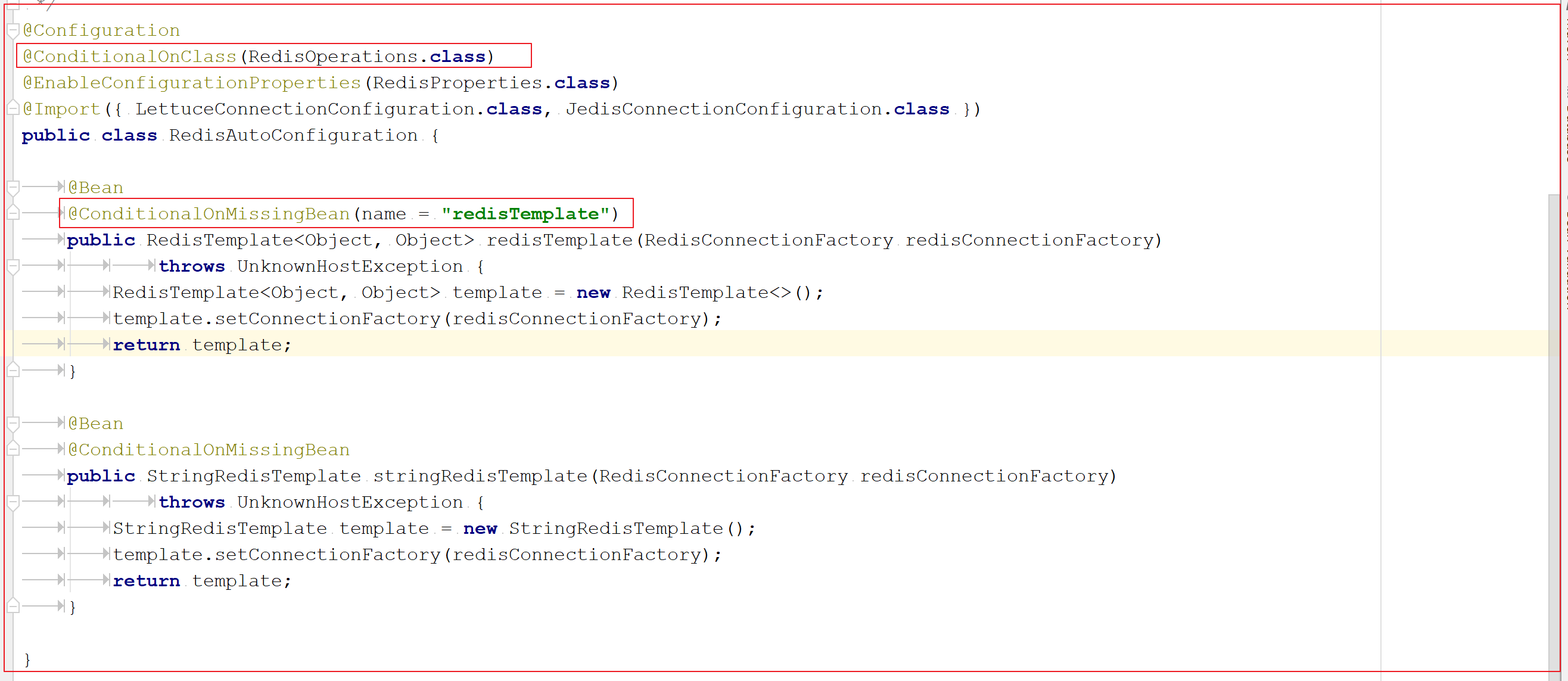
redisTemplate的bean怎么注入spring容器中的?
redisTemplate中的host和port怎么配置的?
1、@Import注解进阶
三种Jar包外导入类的方式:
- 直接导入
- 通过配置类导入
- 通过ImportSelector接口实现类导入
2、@Configuration注解进阶
配置类中的条件注解@Conditional及其衍生注解
- class类条件
- @ConditionalOnClass==存在类条件
- @ConditionalOnMissingClass==不存在类条件
- 属性条件
- @ConditionalOnProperty==属性条件,还可以为属性设置默认值
- Bean条件
- @ConditionalOnBean==存在Bean条件
- @ConditionalOnMissingBean==不存在Bean条件
- @ConditionalOnSingleCondidate==只有一个Bean条件
- 资源条件
- @ConditionalResource==资源条件
- Web应用条件
- @ConditionalOnWebApplication==web应用程序条件
- @ConditionalOnNotWebApplication==不是web应用程序条件
- 其他条件
- @ConditionalOneExpression==EL表达式条件
- @ConditionalOnJava==在特定的Java版本条件
自动配置类的执行顺序
- @AutoConfigureBefore==在那些自动配置之前执行
- @AutoConfigureAfter==在那些自动配置之后执行
- @AutoConfigureOrder==自动配置顺序
Redis的自动配置
Mybatis的自动配置

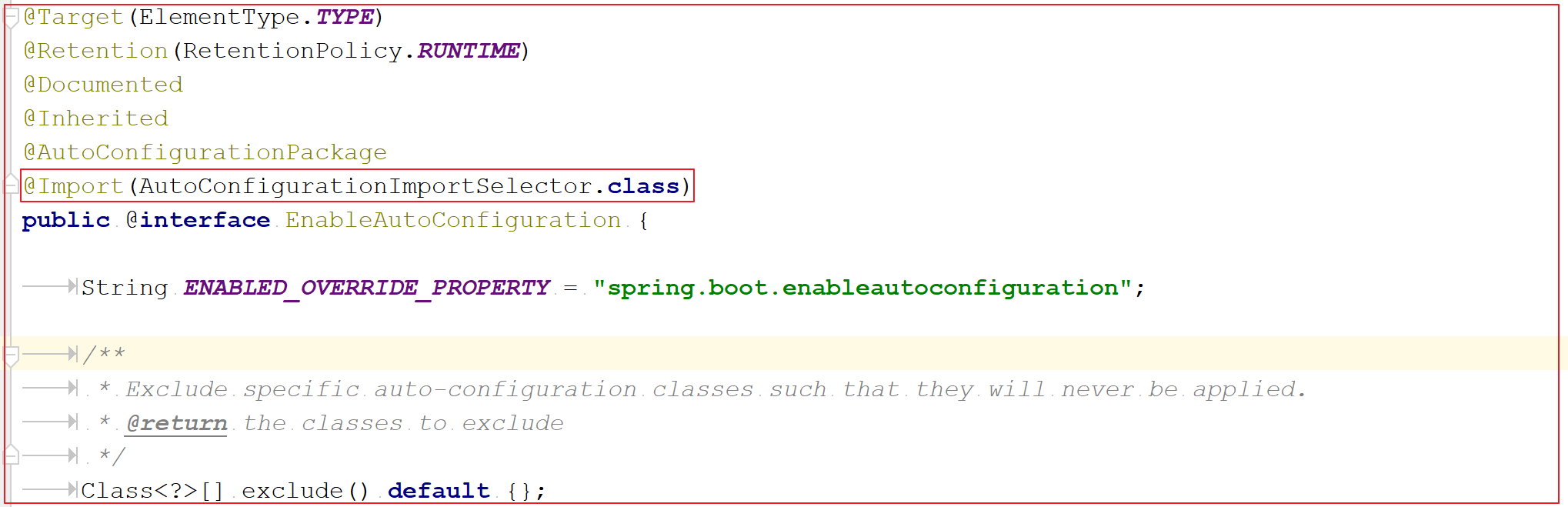
3、@EnableAutoConfiguration注解
其本质是配置类@Import与@Configuration的组合

9.3 自定义auto-configuration及starter
目标:
为传智播客教育集团研究院开发的,基于自主研发的模板引擎代码生成神器加入自动配置。要求当导入starter坐标时,自动创建代码生成器框架的核心对象codeutil。
分析过程:
参考Mybatis实现的自动配置
自动配置和starter是针对已有框架进行的整合!
必备四角色:框架、自动配置模块、starter模块、开发者
定制自动配置必要内容
- autoconfiguration模块,包含自动配置代码。自定义itcast-spring-boot-autoconfigure。
- starter模块。自定义itcast-spring-boot-starter
自动配置命名方式
- 官方的Starters
- spring-boot-starter-*
- 非官方的starters
- *-spring-boot-starter
- 官方的Starters
SpringBoot起步依赖,Starter Dependencies
一些注意事项
- starter中仅添加必备依赖坐标
- 需要声明对spring-boot-autoconfigure的依赖
- 测试项目的包名不能与自定义starter和自动配置的包名相同
- com.itheima
- cn.itcast
实现步骤:
- 获取准备好的框架–黑马架构师-代码生成器
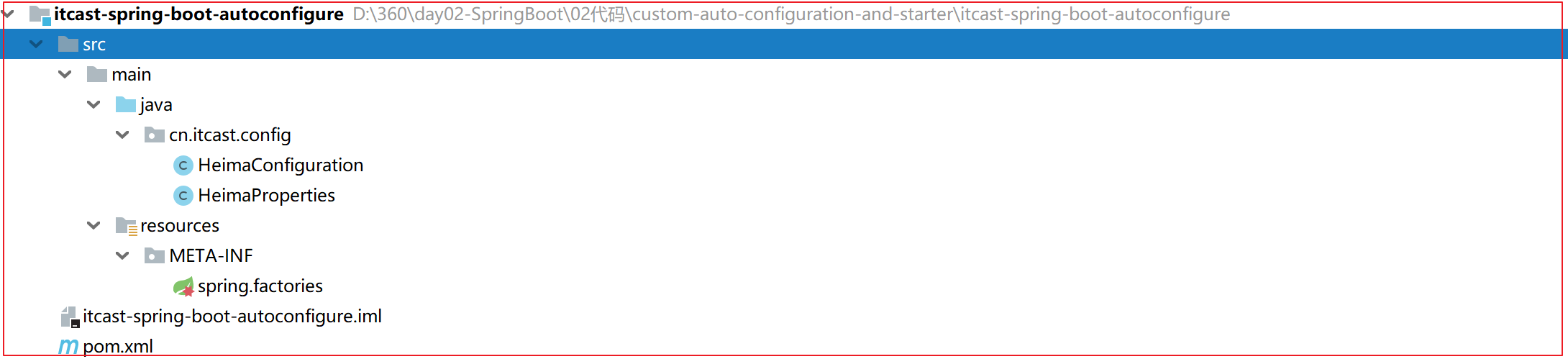
- 创建 itcast-spring-boot-autoconfigure 模块
- 定义代码生成器核心对象的配置类信息
- 在META-INF/spring.factories扩展自动配置
- 创建 itcast-spring-boot-starter 模块
- 将自动配置模块及starter模块安装到本地仓库
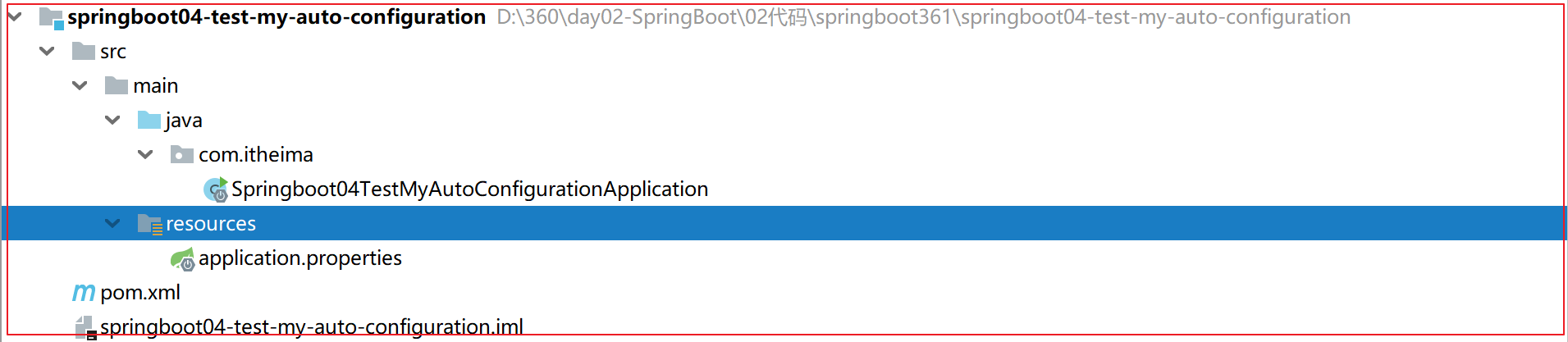
- 测试模块springboot04-test-my-auto-configuration
- 引入自定义的 itcast-spring-boot-starter依赖坐标
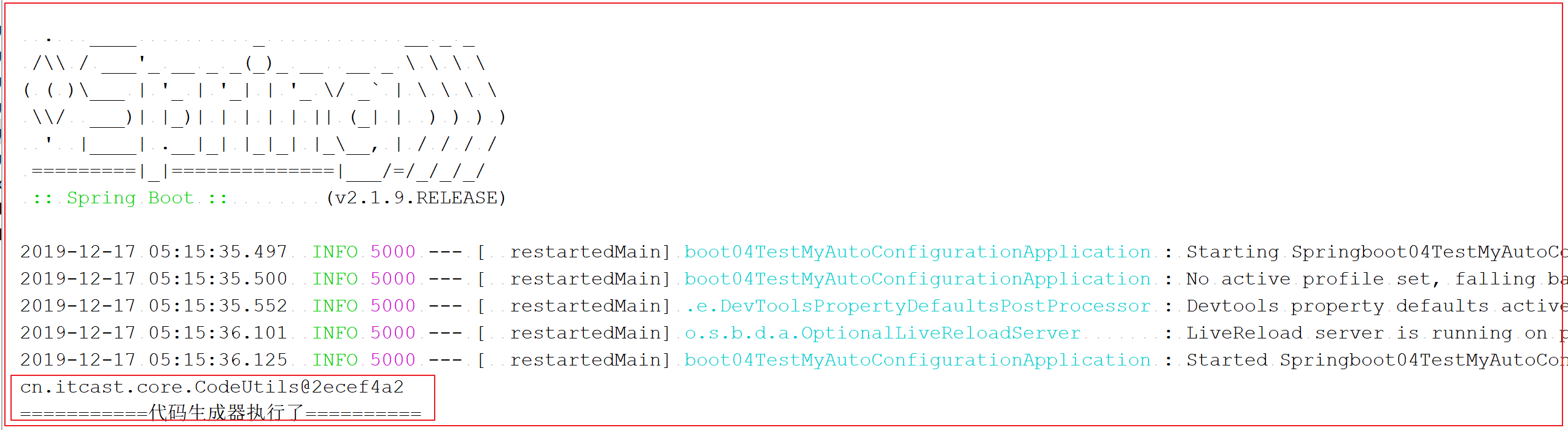
- 测试核心代码生成器对象,是否自动配置成功了
实现过程:
获取准备好的框架–黑马架构师-代码生成器

CodeUtils:
1
2
3
4
5
6
7
8
9
10/**
* 代码生成器,程序执行入口
*/
public class CodeUtils {
public void generatorCode(){
//生成代码
System.out.println("-----------黑马架构师代码生成器执行--------");
}
}
创建 itcast-spring-boot-autoconfigure 模块
HeimaConfiguration
1
2
3
4
5
6
7
8
9
10
11
12@Configuration
@ConditionalOnClass(CodeUtils.class)
@Import(HeimaProperties.class)
public class HeimaConfiguration {
//配置黑马架构师的核心对象CodeUtils
@Bean
@ConditionalOnProperty(name = "spring.heima.enable",havingValue = "true",matchIfMissing = true)
public CodeUtils codeUtil(){
return new CodeUtils();
}
}HeimaProperties
1
2
3
4
5
6@ConfigurationProperties(prefix = "spring.heima")
public class HeimaProperties {
private String username;
private String password;
//getter setter toString
}META-INF/spring.factories
1
2# 注册自定义自动配置
org.springframework.boot.autoconfigure.EnableAutoConfiguration=cn.itcast.config.HeimaConfigurationpom.xml
1
2
3
4
5
6
7
8
9
10
11
12
13
14
15
16
17
18
19
20
21
22
23
24
25
26
27
28<?xml version="1.0" encoding="UTF-8"?>
<project xmlns="http://maven.apache.org/POM/4.0.0"
xmlns:xsi="http://www.w3.org/2001/XMLSchema-instance"
xsi:schemaLocation="http://maven.apache.org/POM/4.0.0 http://maven.apache.org/xsd/maven-4.0.0.xsd">
<modelVersion>4.0.0</modelVersion>
<parent>
<groupId>org.springframework.boot</groupId>
<artifactId>spring-boot-starter-parent</artifactId>
<version>2.1.11.RELEASE</version>
</parent>
<groupId>cn.itcast</groupId>
<artifactId>itcast-spring-boot-autoconfigure</artifactId>
<version>1.0-SNAPSHOT</version>
<dependencies>
<dependency>
<groupId>org.springframework.boot</groupId>
<artifactId>spring-boot-autoconfigure</artifactId>
</dependency>
<!--导入需要加入自定义自动配置的框架-->
<dependency>
<groupId>cn.itcast</groupId>
<artifactId>itcast-codeutils</artifactId>
<version>1.0-SNAPSHOT</version>
</dependency>
</dependencies>
</project>
创建 itcast-spring-boot-starter 模块

pom.xml
1
2
3
4
5
6
7
8
9
10
11
12
13
14
15
16
17
18
19
20
21
22
23
24<?xml version="1.0" encoding="UTF-8"?>
<project xmlns="http://maven.apache.org/POM/4.0.0"
xmlns:xsi="http://www.w3.org/2001/XMLSchema-instance"
xsi:schemaLocation="http://maven.apache.org/POM/4.0.0 http://maven.apache.org/xsd/maven-4.0.0.xsd">
<modelVersion>4.0.0</modelVersion>
<groupId>com.itcast</groupId>
<artifactId>itcast-spring-boot-starter</artifactId>
<version>1.0-SNAPSHOT</version>
<dependencies>
<!--黑马架构师-代码生成器的依赖-->
<dependency>
<groupId>com.itheima</groupId>
<artifactId>itcast-codeutil</artifactId>
<version>1.0-SNAPSHOT</version>
</dependency>
<!--框架的自动配置依赖-->
<dependency>
<groupId>com.itcast</groupId>
<artifactId>itcast-spring-boot-autoconfigure</artifactId>
<version>1.0-SNAPSHOT</version>
</dependency>
</dependencies>
</project>
将自动配置模块及starter模块安装到本地仓库,执行maven的install命令
测试模块springboot04-test-my-auto-configuration
引入自定义的 itcast-spring-boot-starter依赖坐标
1
2
3
4
5
6<!--导入黑马架构师的起步依赖-->
<dependency>
<groupId>cn.itcast</groupId>
<artifactId>itcast-spring-boot-starter</artifactId>
<version>1.0-SNAPSHOT</version>
</dependency>测试核心代码生成器对象,是否自动配置成功了
9.4 切换内置的web应用服务器
前置条件,必须会使用Maven helper的插件,懂得依赖排除
SpringBoot的web环境中默认使用tomcat作为内置服务器,其实SpringBoot提供了另外2中内置服务器供我们选择,我们可以很方便的进行切换。
Jetty: Jetty 是一个开源的servlet容器,它为基于Java的web容器,例如JSP和servlet提供运行环境。Jetty是使用Java语言编写的,它的API以一组JAR包的形式发布。
Undertow: 是红帽公司开发的一款基于 NIO 的高性能 Web 嵌入式服务器
操作过程:
在spring-boot-starter-web排除tomcat
1
2
3
4
5
6
7
8
9
10
11<dependency>
<groupId>org.springframework.boot</groupId>
<artifactId>spring-boot-starter-web</artifactId>
<!--排除tomcat的starter-->
<exclusions>
<exclusion>
<artifactId>spring-boot-starter-tomcat</artifactId>
<groupId>org.springframework.boot</groupId>
</exclusion>
</exclusions>
</dependency>导入其他容器的starter
1
2
3
4
5
<!--导入jetty容器依赖-->
<dependency>
<groupId>org.springframework.boot</groupId>
<artifactId>spring-boot-starter-jetty</artifactId>
</dependency>配置之后的效果

9.5 SpringBoot启动流程分析
执行流程图:
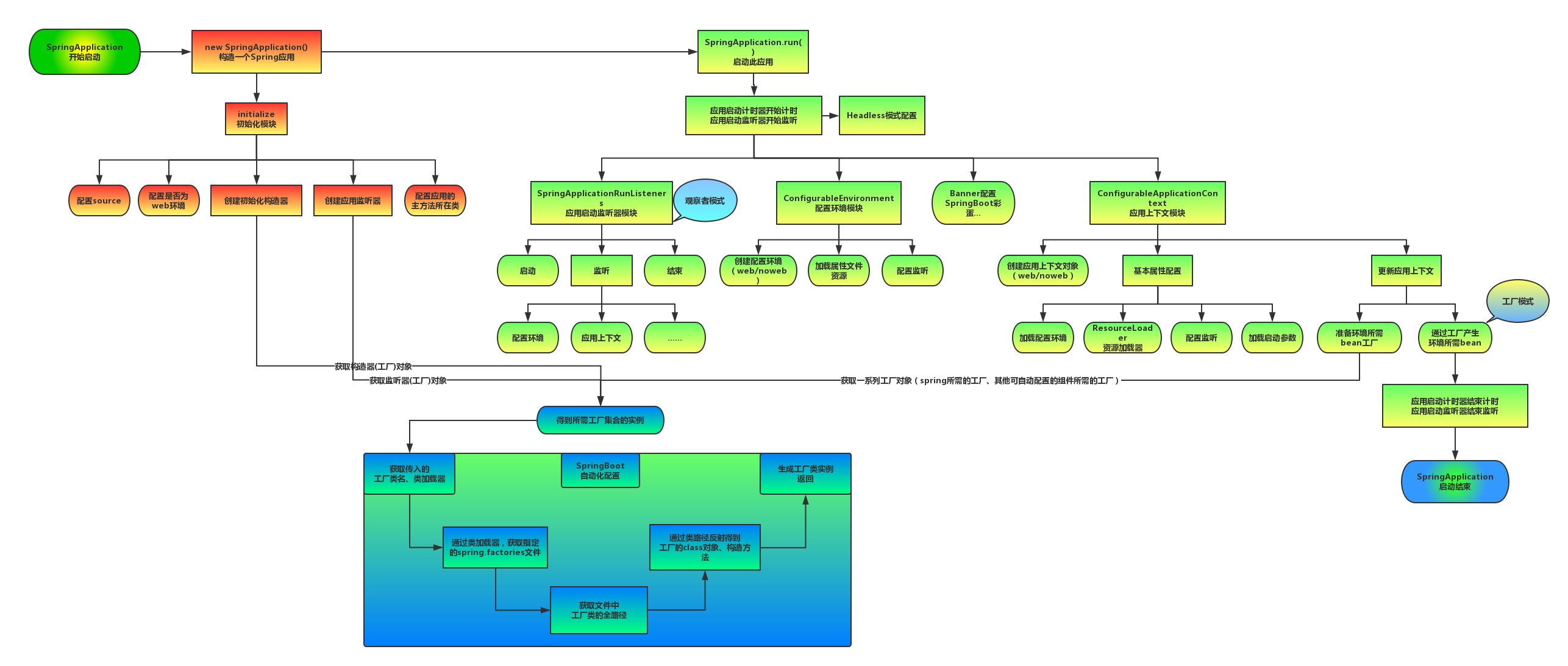
源码分析:
SpringApplication类的构造方法
1 | |
SpringApplication类的run()方法
1 | |
10、生产级监控Actuator
10.1 Actuator简介
SpringBoot自带监控功能Actuator,可以帮助实现对程序内部运行情况监控,比如监控状况、Bean加载情况、配置属性、日志信息等。
使用步骤:
导入依赖坐标
1
2
3
4<dependency>
<groupId>org.springframework.boot</groupId>
<artifactId>spring-boot-starter-actuator</artifactId>
</dependency>
- 访问监控地址: http://localhost:8080/actuator
10.2 监控应用endpoint
| 路径 | 描述 | 默认开启 |
|---|---|---|
| /beans | 显示容器的全部的Bean,以及它们的关系 | Y |
| /env | 获取全部环境属性 | Y |
| /env/{name} | 根据名称获取特定的环境属性值 | Y |
| /health | 显示健康检查信息 | Y |
| /info | 显示设置好的应用信息 | Y |
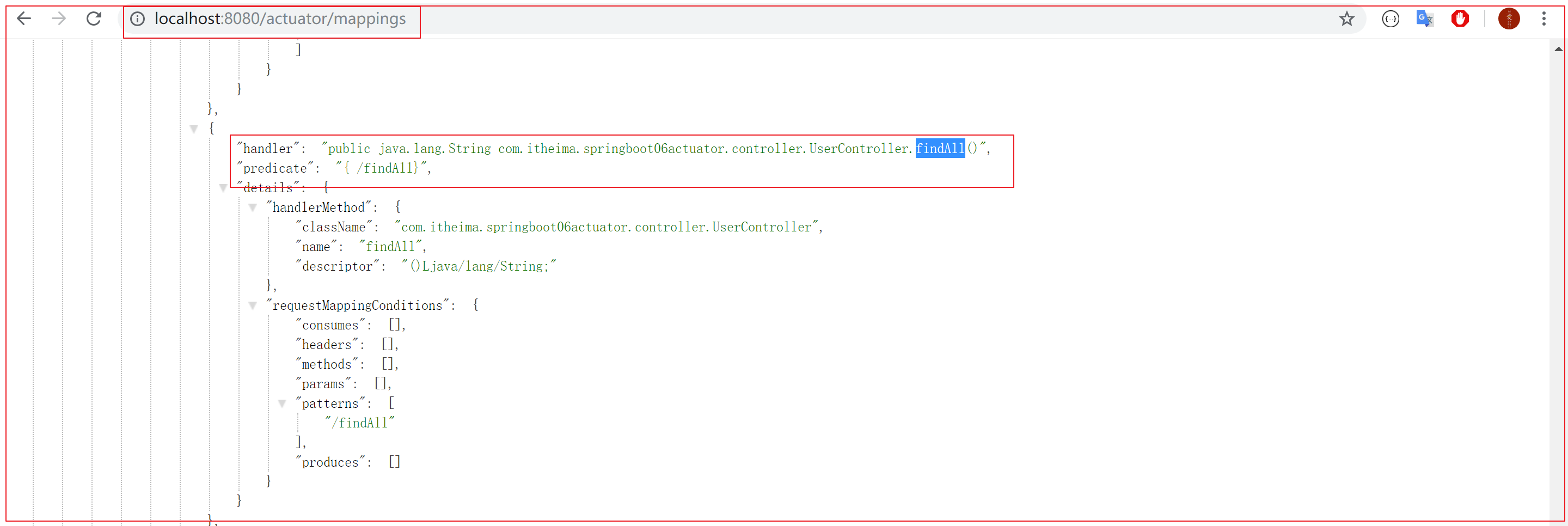
| /mappings | 显示所有的@RequestMapping信息 | Y |
| /metrics | 显示应用的度量信息 | Y |
| /scheduledtasks | 显示任务调度信息 | Y |
| /httptrace | 显示Http Trace信息 | Y |
| /caches | 显示应用中的缓存 | Y |
| /conditions | 显示配置条件的匹配情况 | Y |
| /configprops | 显示@ConfigurationProperties的信息 | Y |
| /loggers | 显示并更新日志配置 | Y |
| /shutdown | 关闭应用程序 | N |
| /threaddump | 执行ThreadDump | Y |
| /headdump | 返回HeadDump文件,格式为HPROF | Y |
| /prometheus | 返回可供Prometheus抓取的信息 | Y |
举例:
http://localhost:8080/actuator/beans
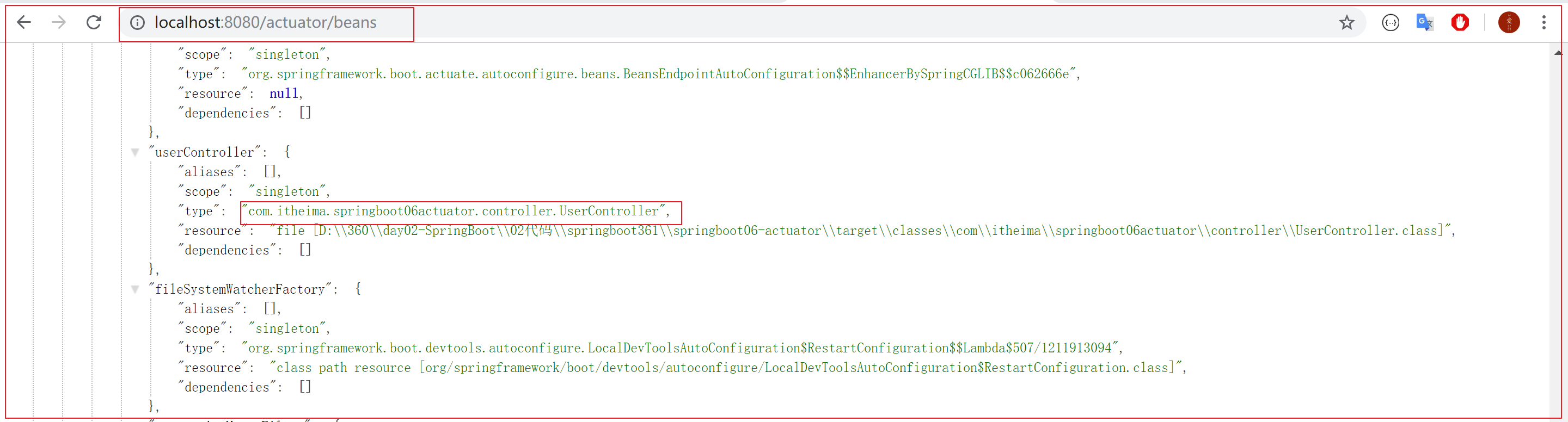
http://localhost:8080/actuator/mappings
10.3 配置
1 | |
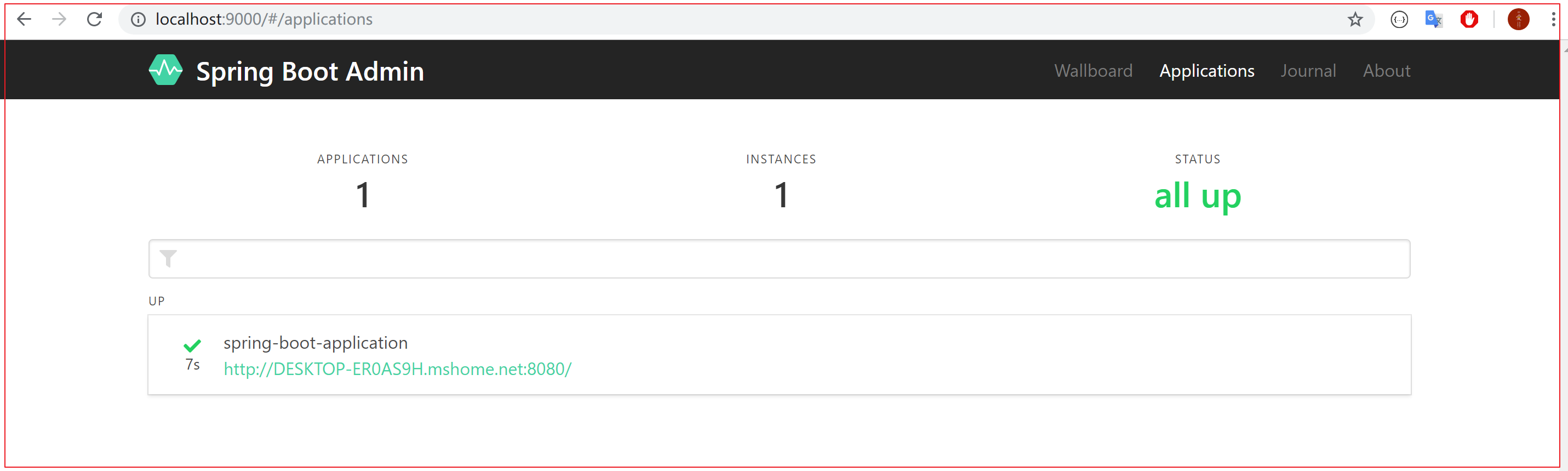
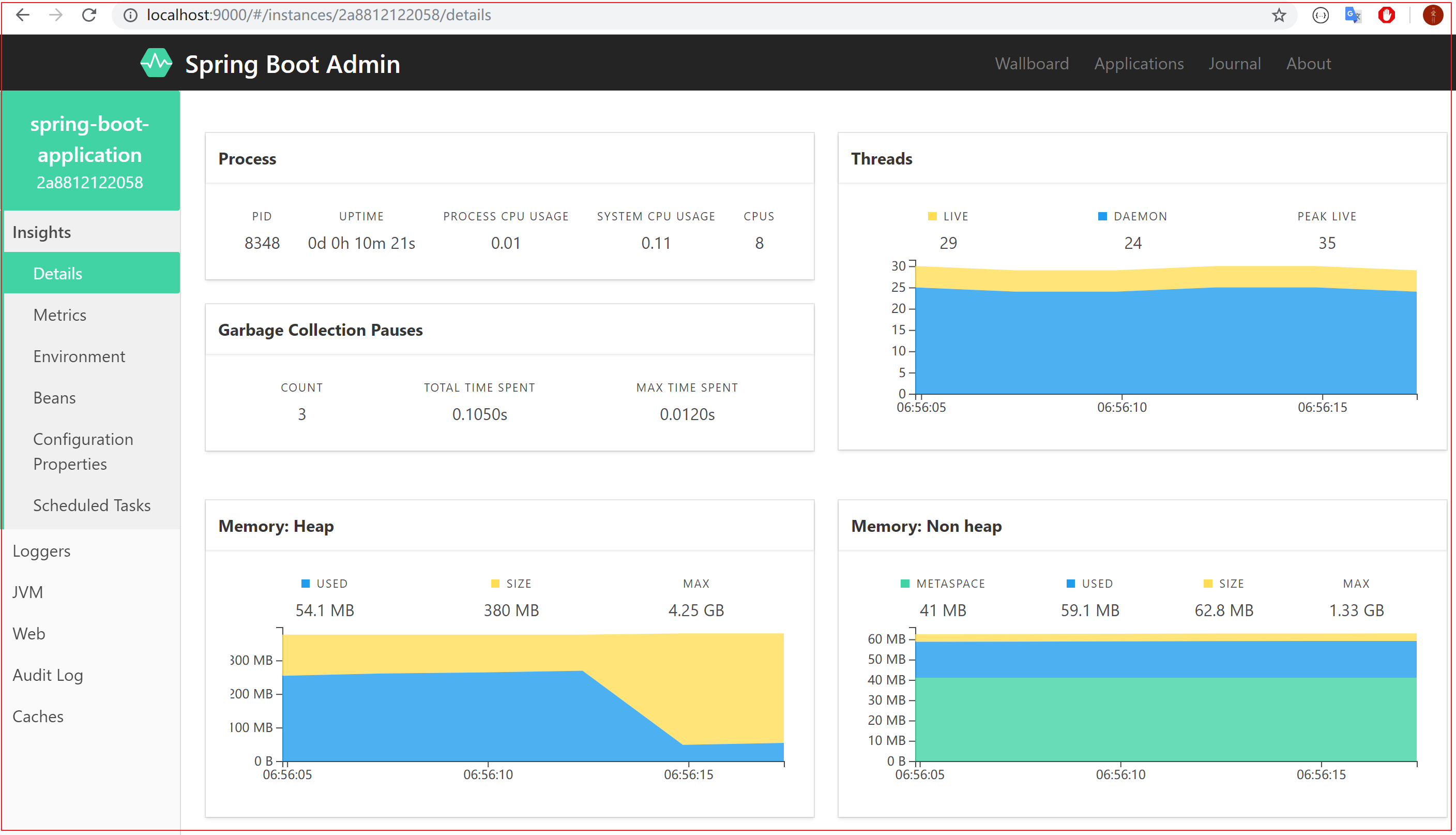
10.4 通过Spring Boot Admin了解程序的运行状态
目的:为SpringBoot应用程序提供一套管理界面
主要功能:
- 集中展示应用程序Actuator相关的内容
- 变更通知
搭建服务端:
①创建 admin-server 模块
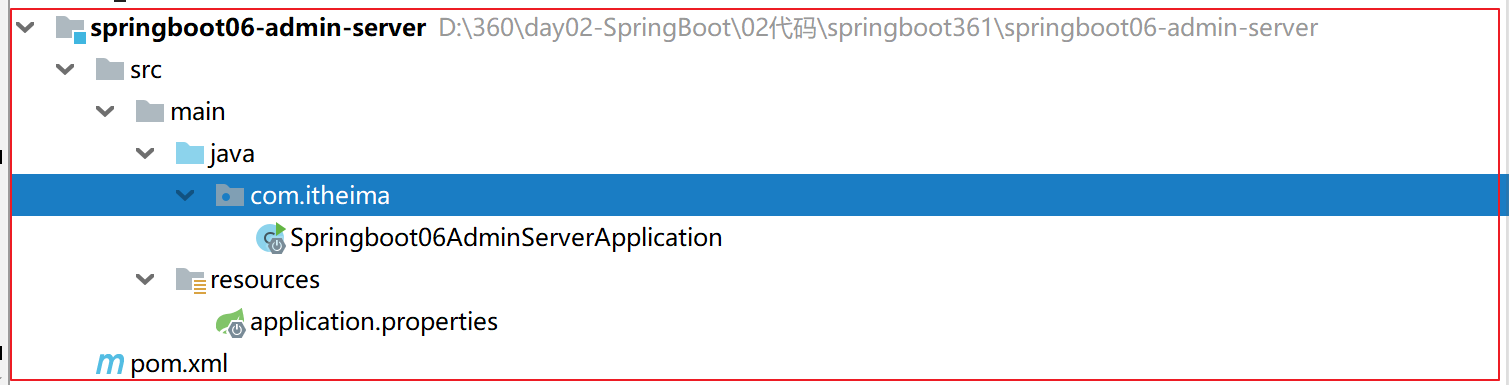
②导入依赖坐标 admin-starter-server
1 | |
③在引导类上启用监控功能@EnableAdminServer
1 | |
配置客户端:
①创建 admin-client 模块
②导入依赖坐标 admin-starter-client
1 | |
③配置相关信息:server地址等
1 | |
④启动server和client服务,访问server
总结
- 掌握工程热部署
- 掌握多环境的配置文件
- 掌握配置文件存放路径,及其加载顺序
- 掌握自定义配置文件名称application.yml
- 了解SpringBoot自动配置实现原理【不要求掌握】
- 掌握内置web应用服务器的切换:tomcat切换为jetty
- 了解为SpringBoot配置生产级监控Actuator
- 搭建Spring Boot Admin服务链接SpringBoot项目