SpringBoot-01
SpringBoot-01
- 能够理解SpringBoot的设计初衷,开发环境要求
- 能够搭建SpringBoot的开发工程
- 能够理解SpringBoot的配置文件常见配置ApplactionContext.xml
- 导包
- 配置文件
- api(new对象)
- 能够使用SpringBoot整合MyBatis,整合Redis进行缓存,整合RestTemplate发送Http请求
- 能够使用SpringBoot进行简单代码测试
- 能够打包部署SpringBoot项目
学习今日内容,必备基础知识:
Spring的对象ioc容器:new ClassPathXMLApplicationContext()、@Value、@Configuration
SpringMVC:@RestController、@RequestMapping
Maven知识:依赖传递、依赖管理(BOM,Bill of Material)
、依赖冲突、依赖排除、打包 Mybatis:@Select注解
定时器:cron表达式
一、SpringBoot简介
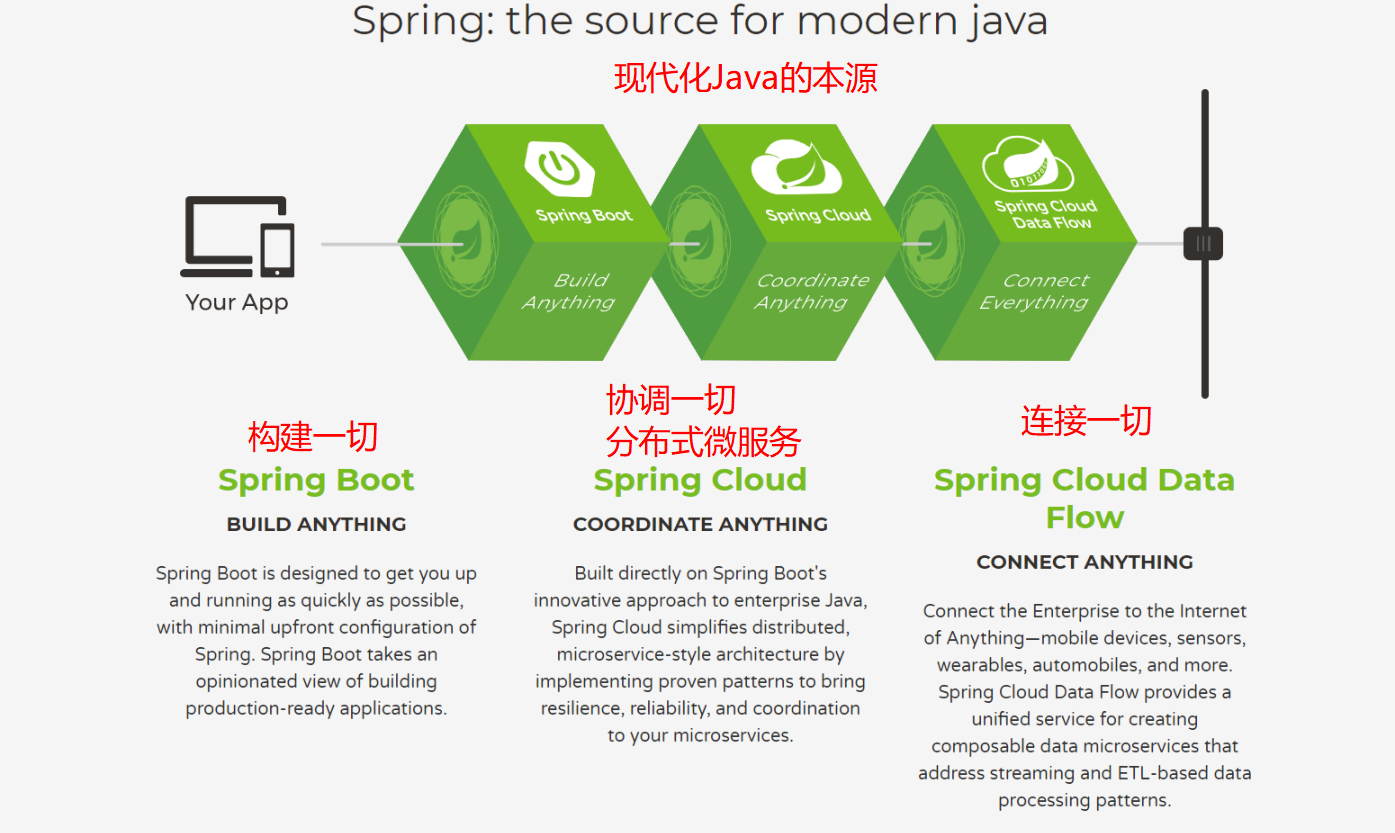
当前互联网后端开发中,JavaEE占据了主导地位。对JavaEE开发,首选框架是Spring框架。在传统的Spring开发中,需要使用大量的与业务无关的XML配置才能使Spring框架运行起来,这点备受许多开发者诟病。随着Spring4.x发布,Spring已经完全脱离XML,只使用注解就可以运行项目。为了进一步简化Spring应用的开发,SpringBoot诞生了。它是由Pivotal团队提供的全新框架,其设计目的是简化Spring应用的搭建及开发过程,并迎合时下流行的分布式微服务设计思想,越来越多企业在使用SpringBoot。本课程跟随时代的潮流,带大家张掌握这门技术。
1.1 设计初衷
- 为Spring开发者提供一种,更快速、体验更好的Spring应用开发方式。
- 开箱即用,同时也可快速扩展
- 嵌入式的Tomcat。
- 绝对没有冗余代码,无需XML配置。
1.2 核心功能
- 核心能力:Spring容器、日志、自动配置AutoCongfiguration、Starters
- web应用的能力:MVC、嵌入式Web服务器
- 数据访问(持久化):关系型数据库、非关系型数据库
- 强大的整合其他技术的能力
- 测试:强悍的应用测试
1.3 开发环境要求
Spring Boot 的2.2.2.RELEASES正式发行版,使用Java8、Java 11或Java 13,对应的Spring版本是5.2.0。构建工具Maven版本要求是3.3及以上,最好是使用Maven的3.5.4版本。
Servlet容器版本:
SpringBoot 支持如下的嵌入式Servlet容器,Spring Boot应用程序最低支持到Servlet 3.1的容器。
| Name | Servlet Version |
|---|---|
| Tomcat 9.0 | 4.0 |
| Jetty 9.4 | 3.1 |
| Undertow 2.0 | 4.0 |
1.4 Spring怎么做Web开发?
我们怎么开发一个web项目:
- web.xml配置:SpringMVC核心控制器(DispatchServlet),Spring容器监听器,编码过滤器….
- Spring 配置:包扫描(service、dao),配置数据源,配置事务….
- SpringMVC配置:包扫描(controller),视图解析器,注解驱动,拦截器,静态资源….
- 日志配置
- 少量业务代码
- …
- 部署 Tomcat 调试,每次测试都需要部署
- …
但是如果用 Spring Boot 呢?
超简单!无需配置!!无感Tomcat!超迅速搭建功能强大的整套 Web!到底多简单?入门案例揭晓。
二、SpringBoot快速入门
2.1 Maven搭建SpringBoot工程
Maven搭建SpringBoot工程,实现web的请求响应。浏览器访问在页面中输出helloworld。
- http://127.0.0.1:8080/sayHello
- Hi,my name is SpringBoot!!!
实现步骤:
- 创建Maven工程
- pom.xml文件中配置起步依赖
- 编写SpringBoot启动引导类
- 编写Controller
- 访问http://localhost:8080/hello测试
实现过程:
创建Maven工程day01_springboot_helloworld
pom.xml文件中配置父坐标和web的起步依赖
1
2
3
4
5
6
7
8
9
10
11
12
13
14
15
16
17
18
19
20
21
22
23
24
<?xml version="1.0" encoding="UTF-8"?>
<project xmlns="http://maven.apache.org/POM/4.0.0"
xmlns:xsi="http://www.w3.org/2001/XMLSchema-instance"
xsi:schemaLocation="http://maven.apache.org/POM/4.0.0 http://maven.apache.org/xsd/maven-4.0.0.xsd">
<modelVersion>4.0.0</modelVersion>
<!--继承SpringBoot父POM文件-->
<parent>
<groupId>org.springframework.boot</groupId>
<artifactId>spring-boot-starter-parent</artifactId>
<version>2.1.7.RELEASE</version>
</parent>
<groupId>com.itheima</groupId>
<artifactId>day01_springboot_helloword</artifactId>
<version>1.0-SNAPSHOT</version>
<dependencies>
<!--web 开发的相关依赖-->
<dependency>
<groupId>org.springframework.boot</groupId>
<artifactId>spring-boot-starter-web</artifactId>
</dependency>
</dependencies>
</project>编写SpringBoot引导类
1
2
3
4
5
6
7
8@Configuration//配置类
@EnableAutoConfiguration//开启自动配置
@ComponentScan//包扫描
public class DemoApplication {
public static void main(String[] args) {
SpringApplication.run(DemoApplication.class,args);
}
}编写三层架构代码:Controller
controller
1
2
3
4
5
6
7
8
9
@RestController
public class HelloController {
@RequestMapping("/hello")
public String hello(String name){
return "hello world!!!";
}
}
访问http://localhost:8080/hello测试
2.2 使用IDEA快速创建SpringBoot项目
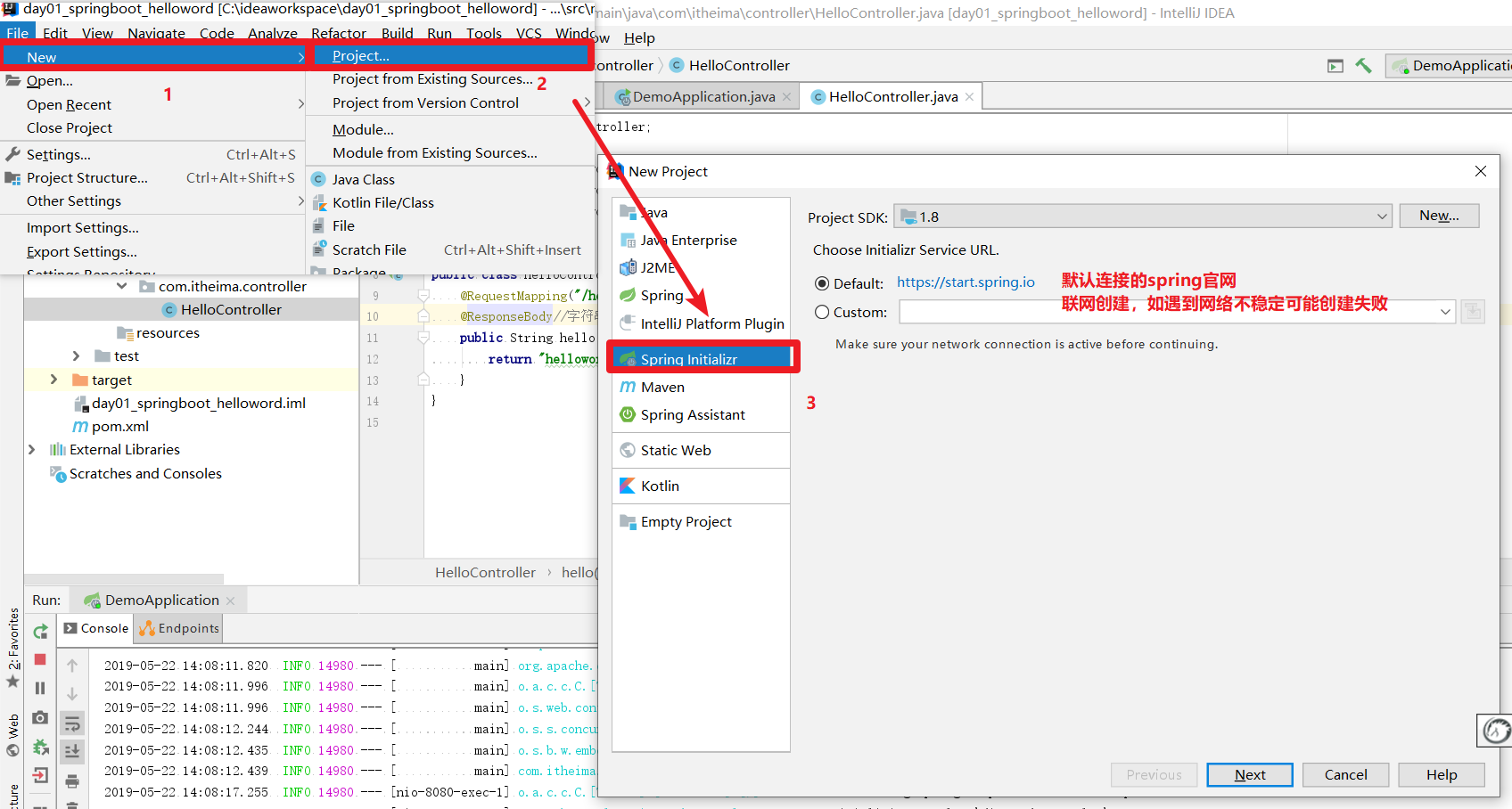
使用Spring Initializr 方式创建SpringBoot工程。然后实现入门案例的代码。
俗称:基础部分重复架构代码
实现步骤:
使用Spring Initializr创建SpringBoot
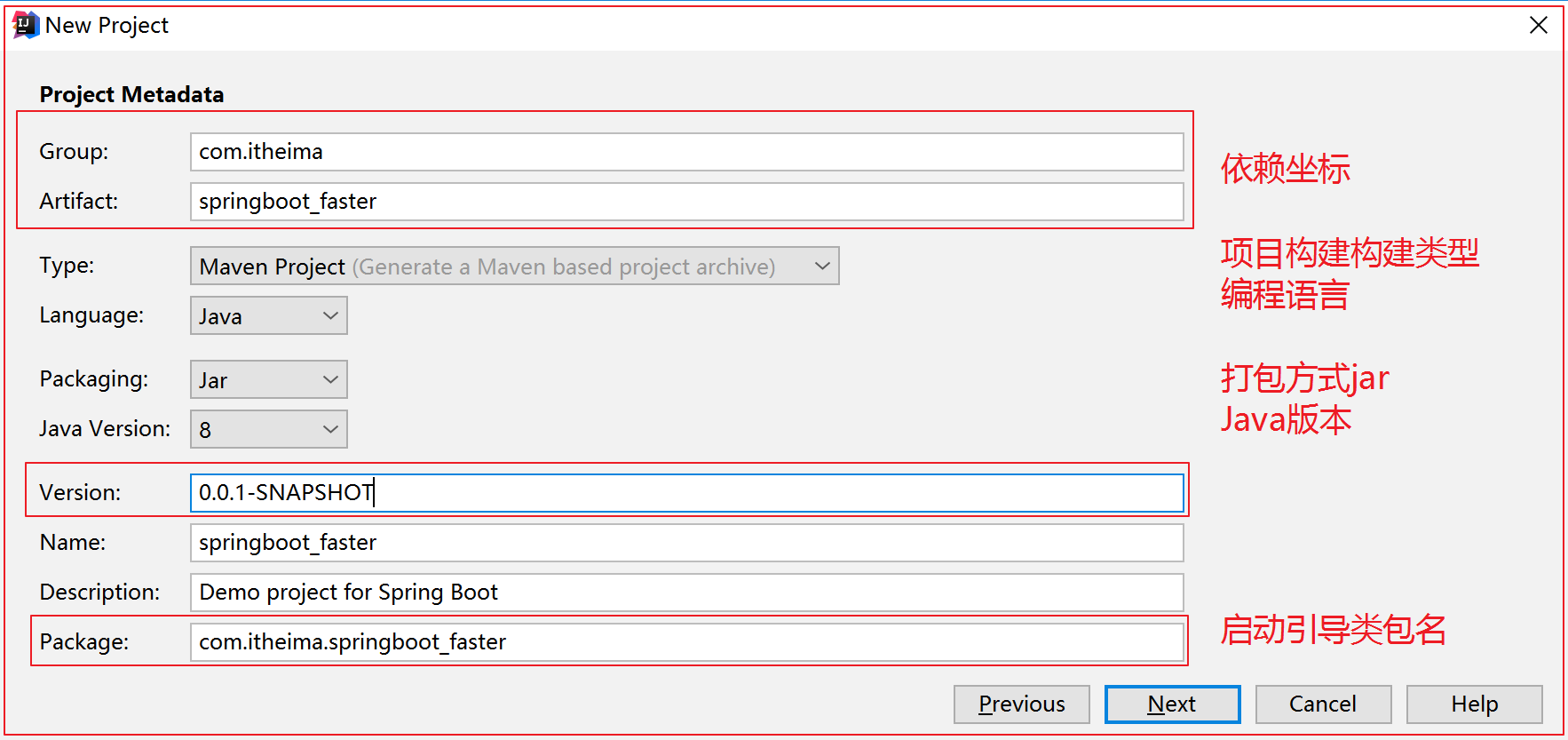
配置项目信息
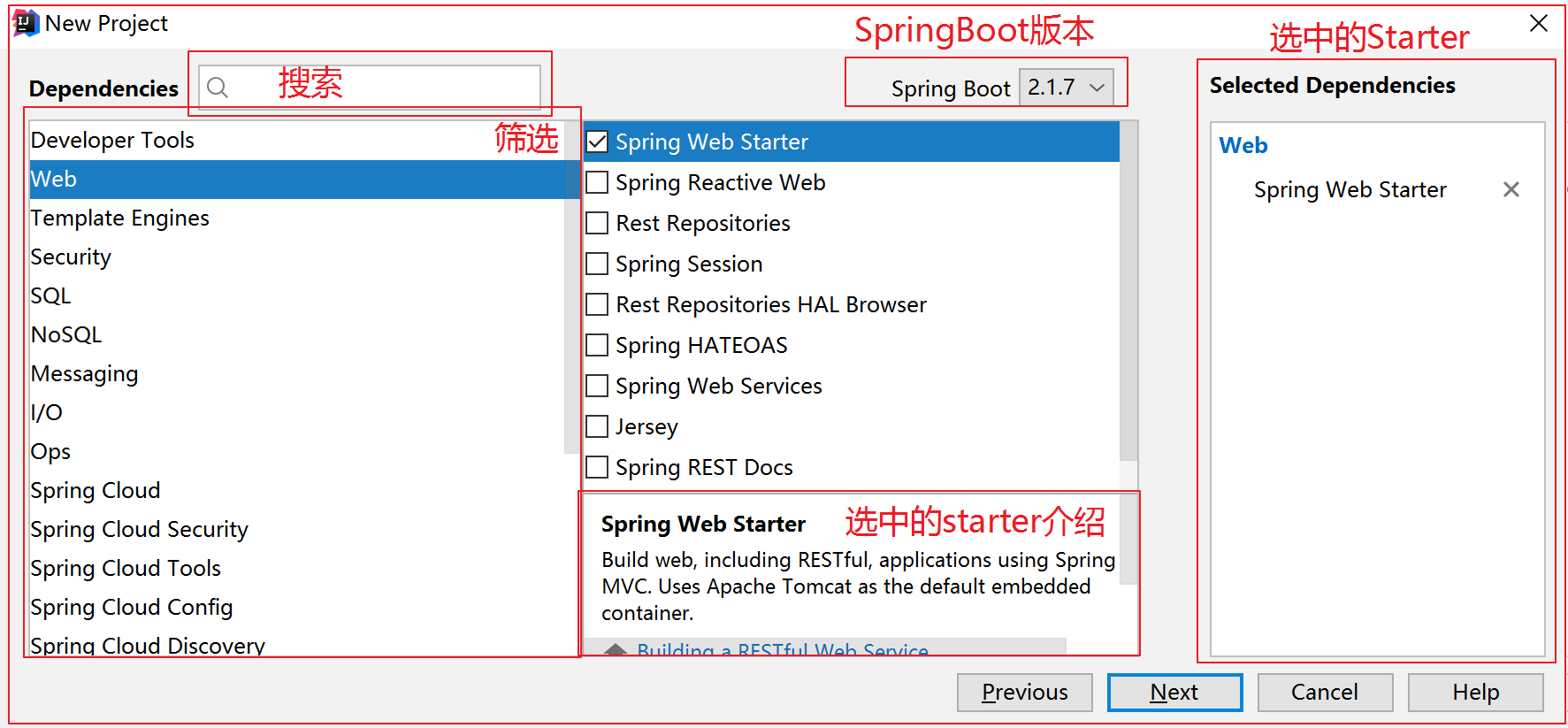
勾选起步依赖
配置文件存储路径地址
再次编写入门案例三层架构代码
实现过程:
- 使用创建SpringBoot工程
- 配置项目信息
- 勾选起步依赖
- 配置文件存储路径地址
- 创建完成后工程目录结构
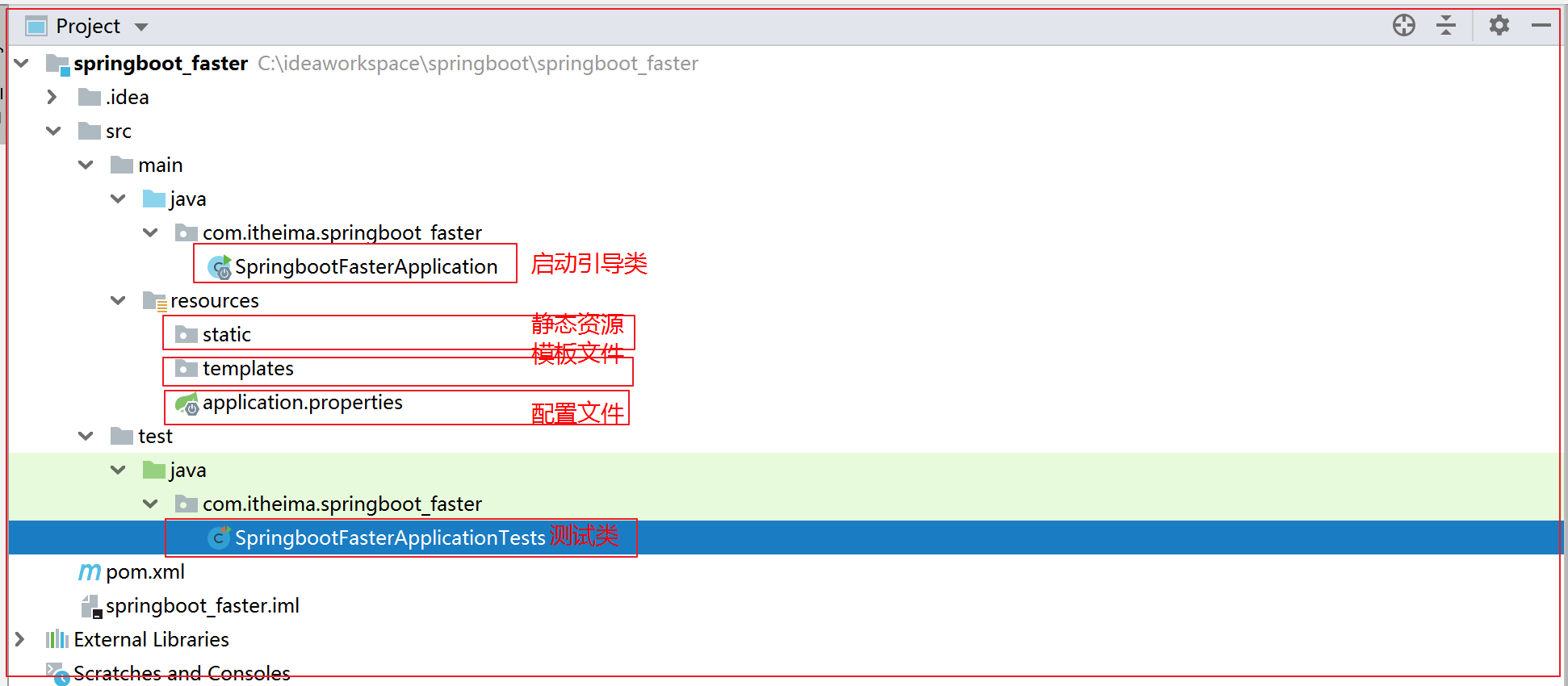
- pom文件介绍
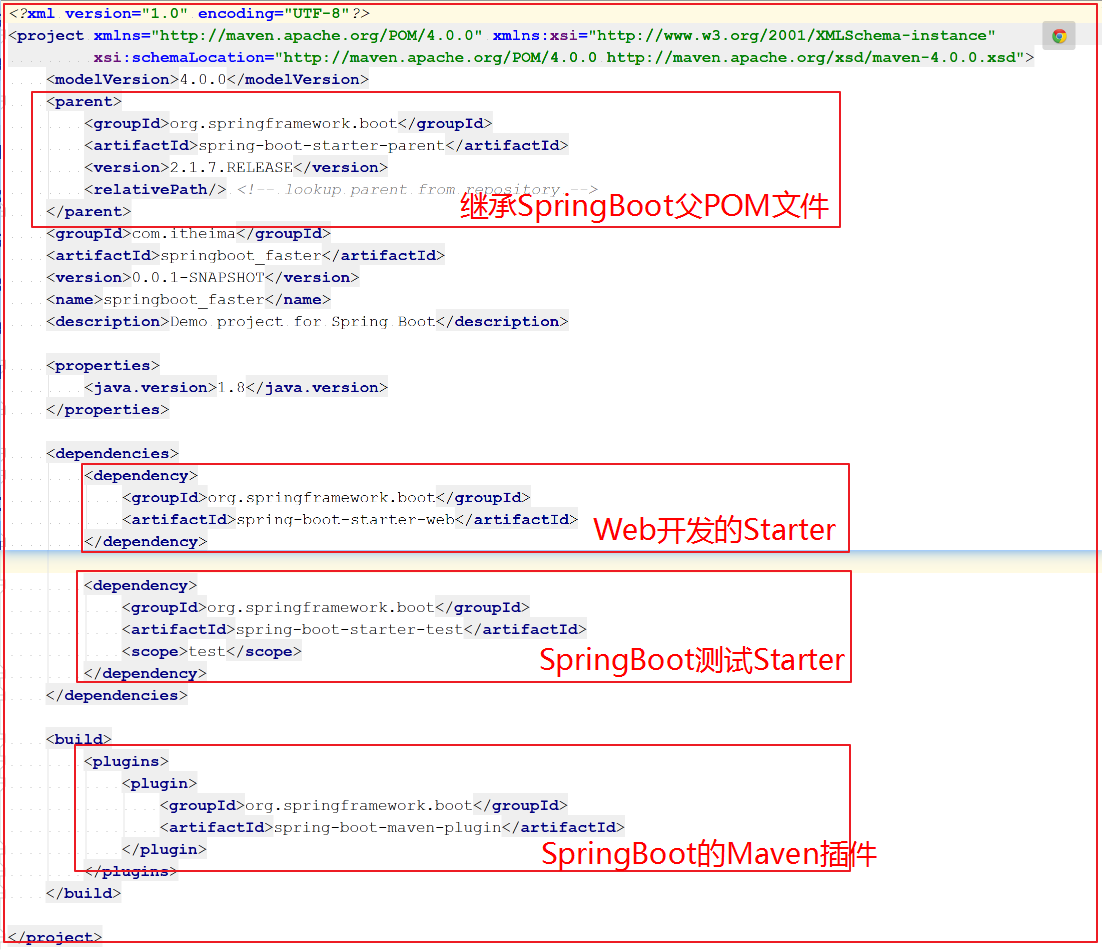
- pom文件介绍
- 编写入门案例代码
- 访问http://localhost:8080/hello接口测试
2.3 SpringBoot工程热部署
只需导入开发者工具依赖坐标,即可实现热部署功能:
1 | |
但还需注意:加入坐标之后,如果想要代码立即生效,必须在修改代码之后进行代码构建。默认情况IDEA不会自动构建,需要手动构建。如图两处地方均可。
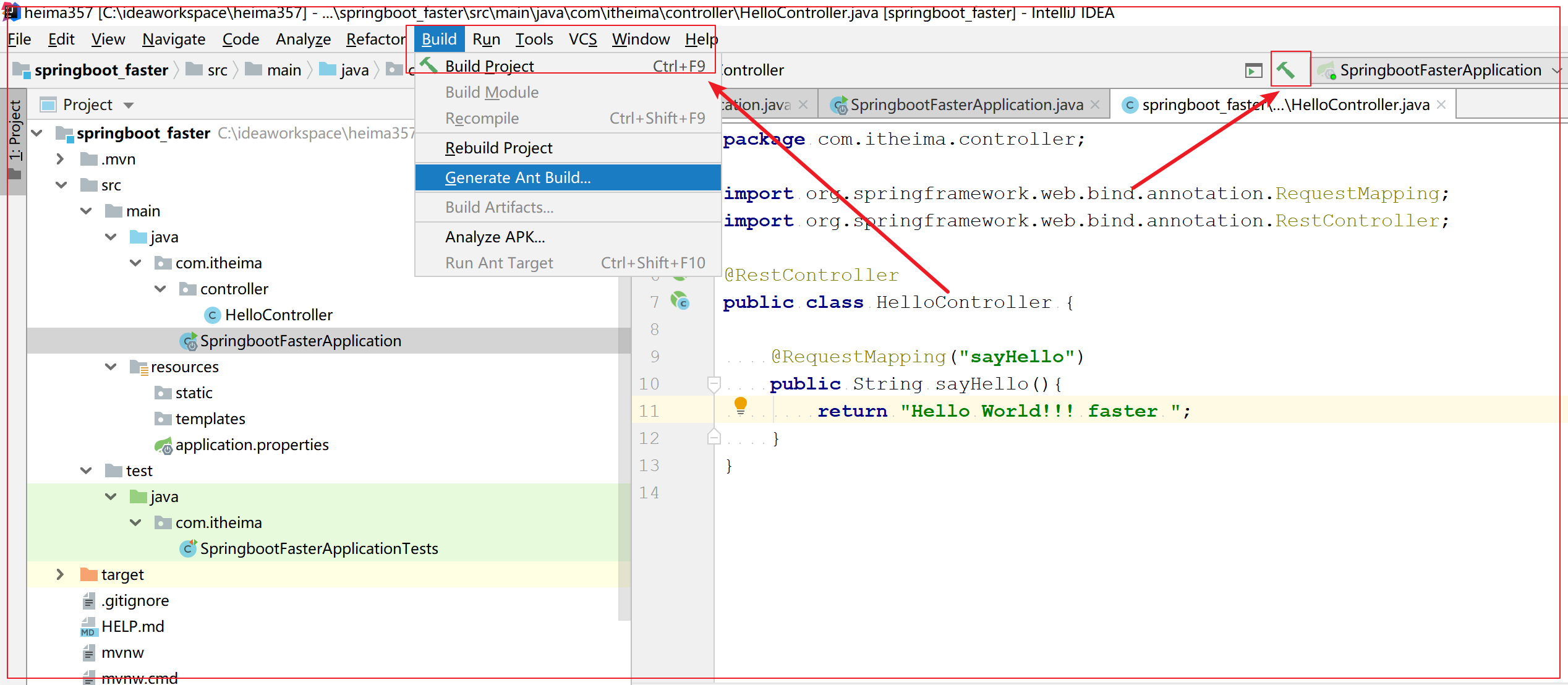
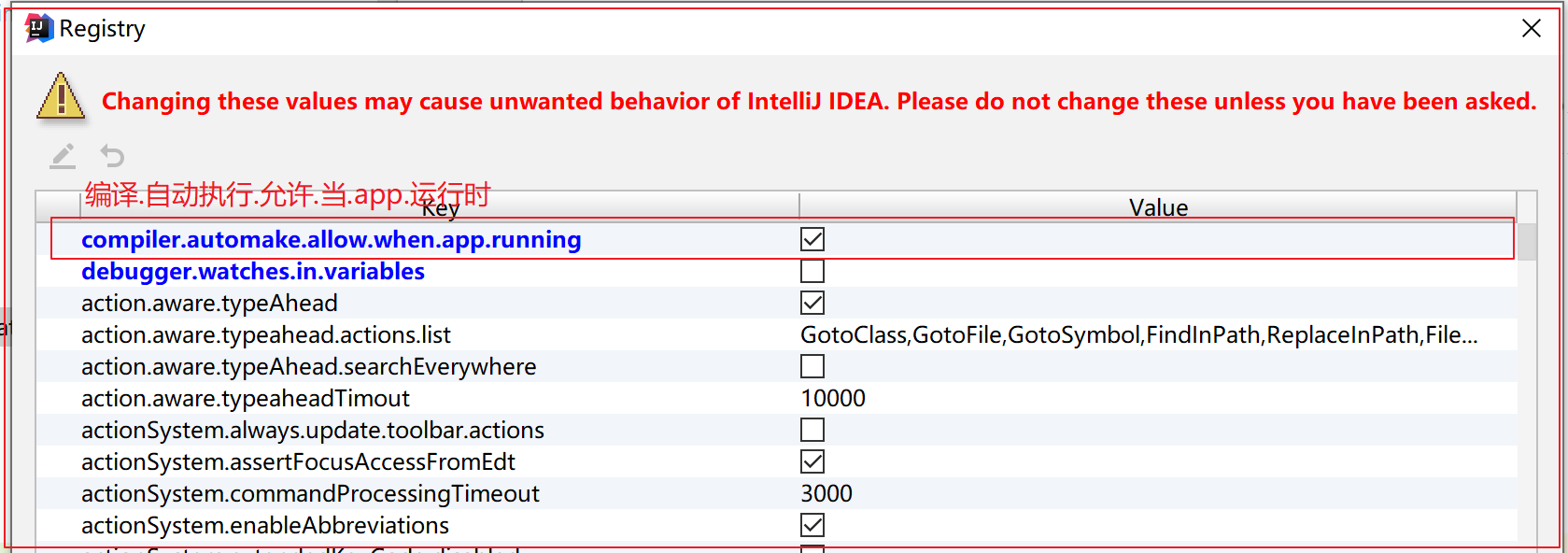
每次手动构建很麻烦?!!还有一种自动构建解决方案,但不建议使用。就是设置Build Project Automatically。同时打开Maintenance维护(打开快捷键Shift + Ctrl + Alt + /),选择Registry(注册表),设置运行时自动编译。
三、SpringBoot原理分析
3.1 starters的原理
**==starters是依赖关系的整理和封装==**。是一套依赖坐标的整合,可以让导入应用开发的依赖坐标更方便。
利用依赖传递的特性:帮你把依赖打包了,starter
搞框架:
- 导包 == starter
- 配置文件 == AutoConfiguration
- new对象
有了这些Starters,你获得Spring和其整合的所有技术的一站式服务。无需配置(自动配置)、无需复制粘贴依赖坐标,一个坐标即可完成所有入门级别操作。举例:Web开发,只需要导入spring-boot-starter-web。
1 | |
每个Starter包含了当前功能下的许多必备依赖坐标,这些依赖坐标是项目开发,上线和运行必须的。同时这些依赖也支持依赖传递。举例:spring-boot-starter-web包含了所有web开发必须的依赖坐标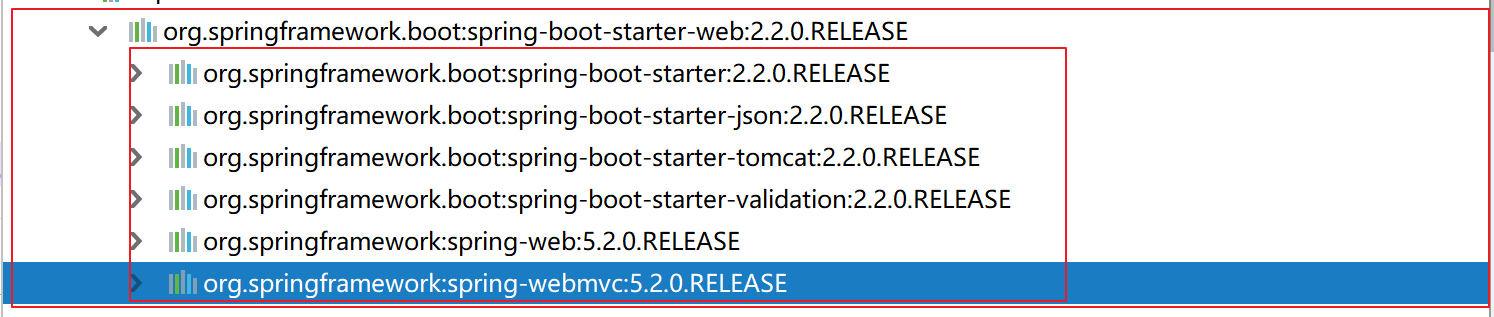
常用的starters有哪些?非常多,一下只列举部分:
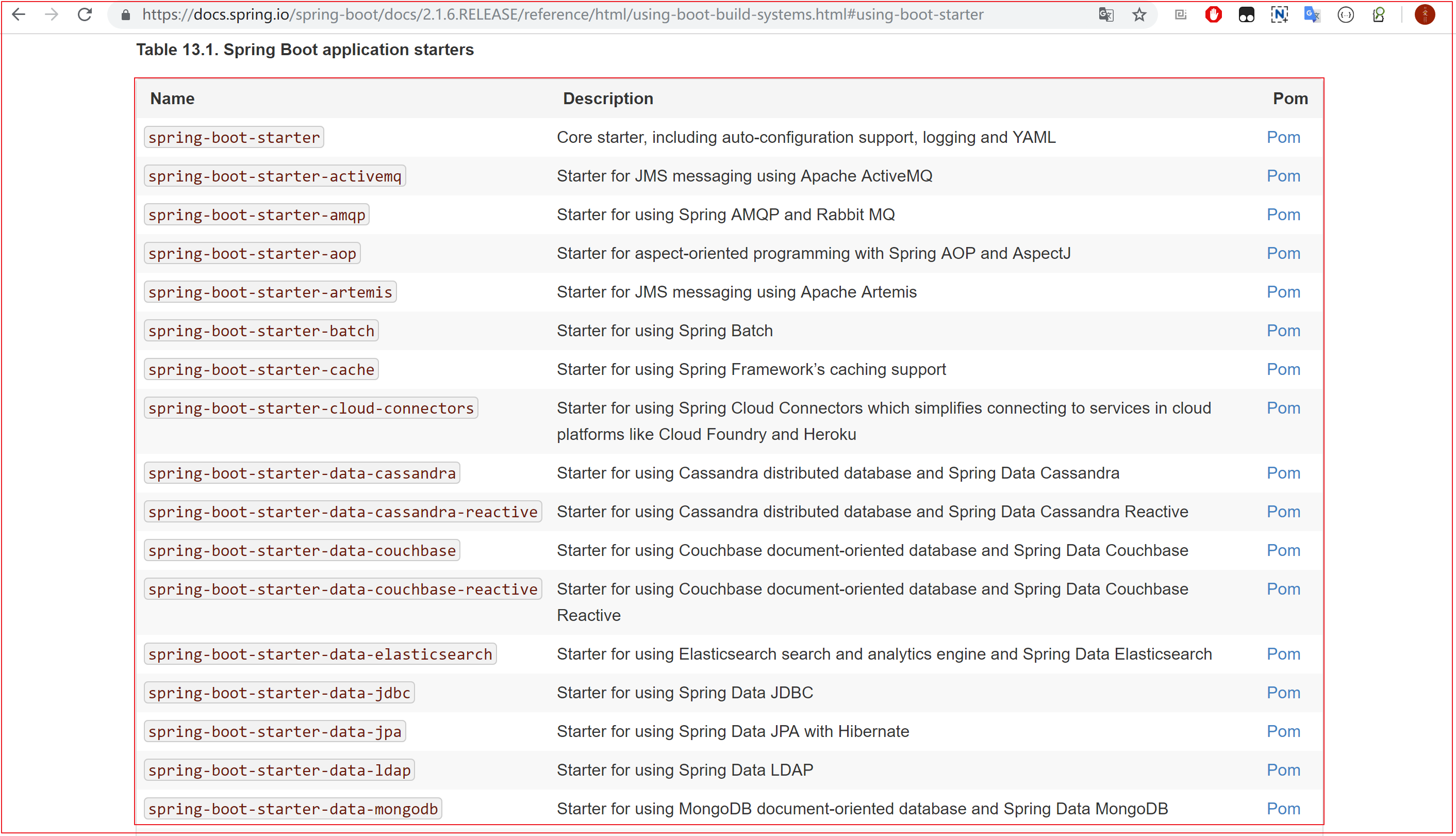
starter为什么不需要写版本?
3.2 依赖管理的原理
BOM(Bill of Materials)依赖清单,是由Maven提供的功能,
BOM内定义成套相互兼容的jar包版本集合
使用时依赖时,只需依赖该BOM文件,即可放心的使用清单内的依赖jar包,且无需版本号。
BOM设计初衷:方便维护项目依赖版本升级。
依赖管理(Dependency Management)
继承了
spring-boot-starter-parent的好处和特点- 默认编译Java 1.8
- 默认编码UTF-8
- 通过spring-boot-denpendencies的pom管理所有公共Starter依赖的版本
- spring-boot-denpendencies通过Maven的一个
特性来实现版本管理 - 随用随取,不用继承父类所有的starter依赖。
POM文件中的Maven插件
1
2
3
4
5
6
7
8
9<!-- 作用:将一个SpringBoot的工程打包成为可执行的jar包 -->
<build>
<plugins>
<plugin>
<groupId>org.springframework.boot</groupId>
<artifactId>spring-boot-maven-plugin</artifactId>
</plugin>
</plugins>
</build>如果想使用父pom文件中的任何插件,无需配置即可使用
3.3 自动配置(AutoConfiguration)原理
所有我们要配置的项目Pivotal团队的开发人员,帮我们写好了,怎么实现的,主要是通过@Configuration实现
SpringBoot采用约定大于配置设计思想,将所有可能遇到的配置信息提前配置好,写在自动配置的jar包中。每个Starter基本都会有对应的自动配置。
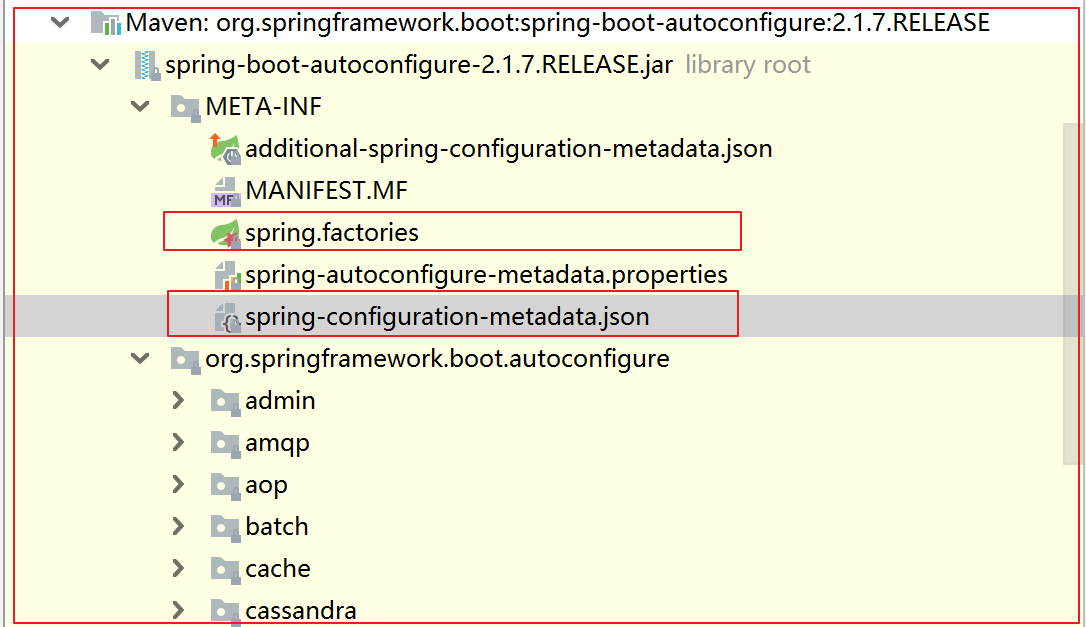
SpringBoot帮我们将配置信息写好,存放在一个jar包中:spring-boot-autoconfigure-2.1.11.RELEASE.jar
jar包里,存放的都是配置类,让配置类生效的”规则类”
==自动配置的值在哪里?==
==自动配置的值怎么才能生效?==
查看启动类注解@SpringBootApplication
追踪步骤:
- @EnableAutoConfiguration
- @Import({AutoConfigurationImportSelector.class})
- spring.factories
- org.springframework.boot.autoconfigure.web.servlet.ServletWebServerFactoryAutoConfiguration
- @EnableConfigurationProperties({ServerProperties.class})
- private final ServerProperties.Tomcat tomcat = new ServerProperties.Tomcat();
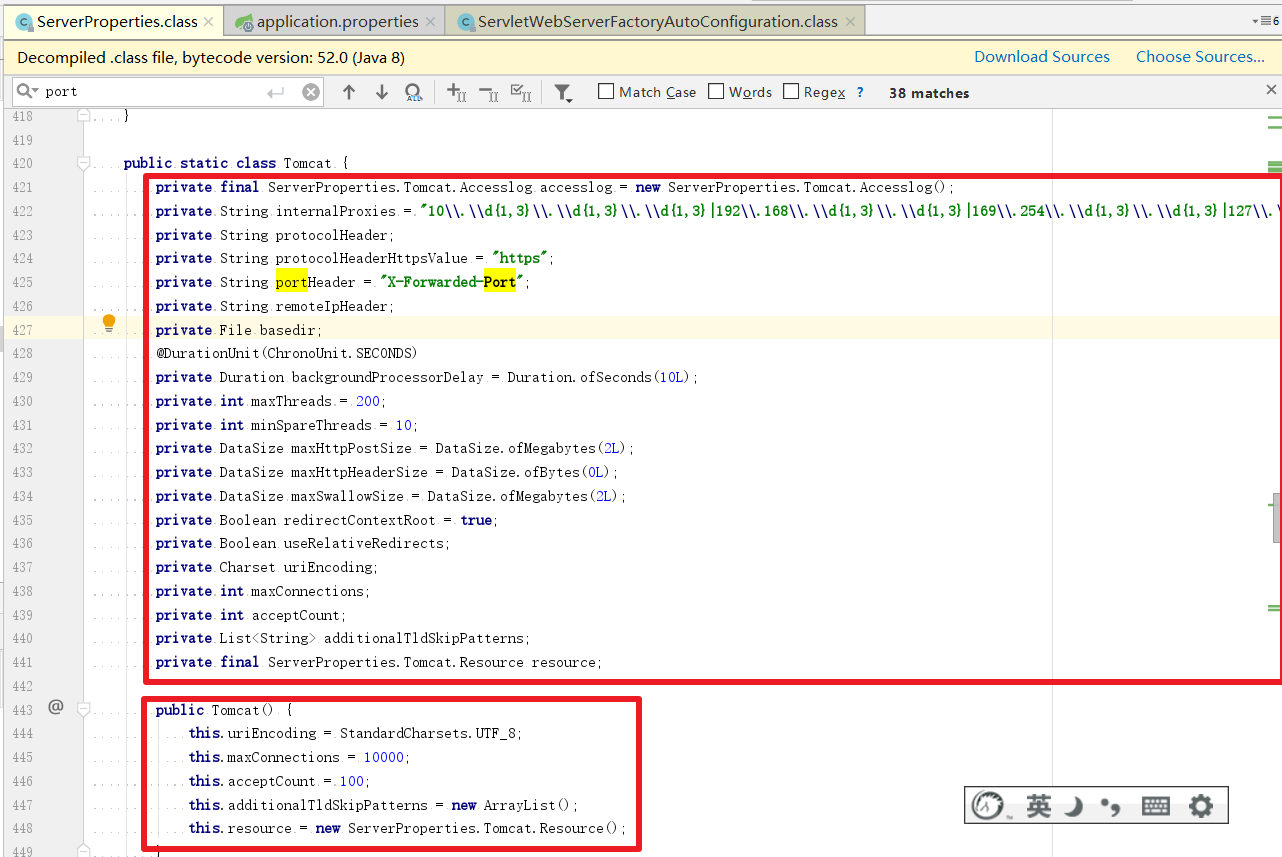
有了自动配置,那么基本全部采用默认配置。当然也可以更改默认配置,怎么改?
官网的自动配置的地址: https://docs.spring.io/spring-boot/docs/2.1.6.RELEASE/reference/html/common-application-properties.html
三个原理分析小节:
- Starter:是一套依赖关系的整理和封装
- 让我们更加专注于业务开发,无需关心依赖导入,依赖冲突,及依赖的版本
- 在pom文件导入starter既可使用对应的功能
- 依赖管理:依赖管理是对依赖坐标的抽取和复用,统一管理依赖坐标的版本。
- 实现了依赖坐标的版本管理
- starter随用随取
- 避免了继承所有父类starter的依赖的臃肿
- 避免了记忆所有starter的麻烦。
- 自动配置:预先写入配置类,封装到AutoConfiguration的jar包中,按需求加载配置信息。
- 基于约定大于配置的设计思想
- 极大的降低了Spring应用配置的复杂度
- 代码实现原理:@SpringBootApplication–>@EnableAutoConfiguration–>@AutoConfigurationPackage(spring-boot-autoconfigure-2.1.7.RELEASE.jar)
- 原理的核心在于:spring-boot-autoconfigure-2.1.7.RELEASE.jar包
四、SpringBoot的配置文件
三种配置文件:
- properties:参考资料中配置
1 | |
- xml (Markup Language):
1 | |
- yml/yaml:
1 | |
我们知道SpringBoot是约定大于配置的,所以很多配置都有默认值。如果想修改默认配置,可以使用application.properties或application.yml(application.yaml)自定义配置。SpringBoot默认从Resource目录加载自定义配置文件。application.properties是键值对类型(一直在用)。application.yml是SpringBoot中一种新的配置文件方式。
4.1 application.yml配置文件
YML文件格式是YAML(YAML Aint Markup Language)编写的文件格式。可以直观被电脑识别的格式。容易阅读,容易与脚本语言交互。可以支持各种编程语言(C/C++、Ruby、Python、Java、Perl、C#、PHP)。以数据为核心,比XML更简洁。扩展名为.yml或.yaml;
官网地址:https://yaml.org/
1 | |
4.2 配置文件语法
- 大小写敏感
- 数据值前边必须有空格,作为分隔符
- 使用缩进表示层级关系
- 缩进不允许使用tab,只允许空格
- 缩进的空格数不重要,只要相同层级的元素左对齐即可
- ‘#’表示注释,从这个字符一直到行尾,都会被解析器忽略。
- 数组和集合使用 “- ”表示数组每个元素
1 | |
YAML案例:
单个:
1 | |
对象(map):键值对的集合:
1 | |
数组:一组按次序排列的值
1 | |
集合:
1 | |
配置引用:
1 | |
配置随机数:
1 | |
融合所有写法:
1 | |
4.3 SpringBoot配置信息的查询
修改配置时,配置项目查询方式
第一种:
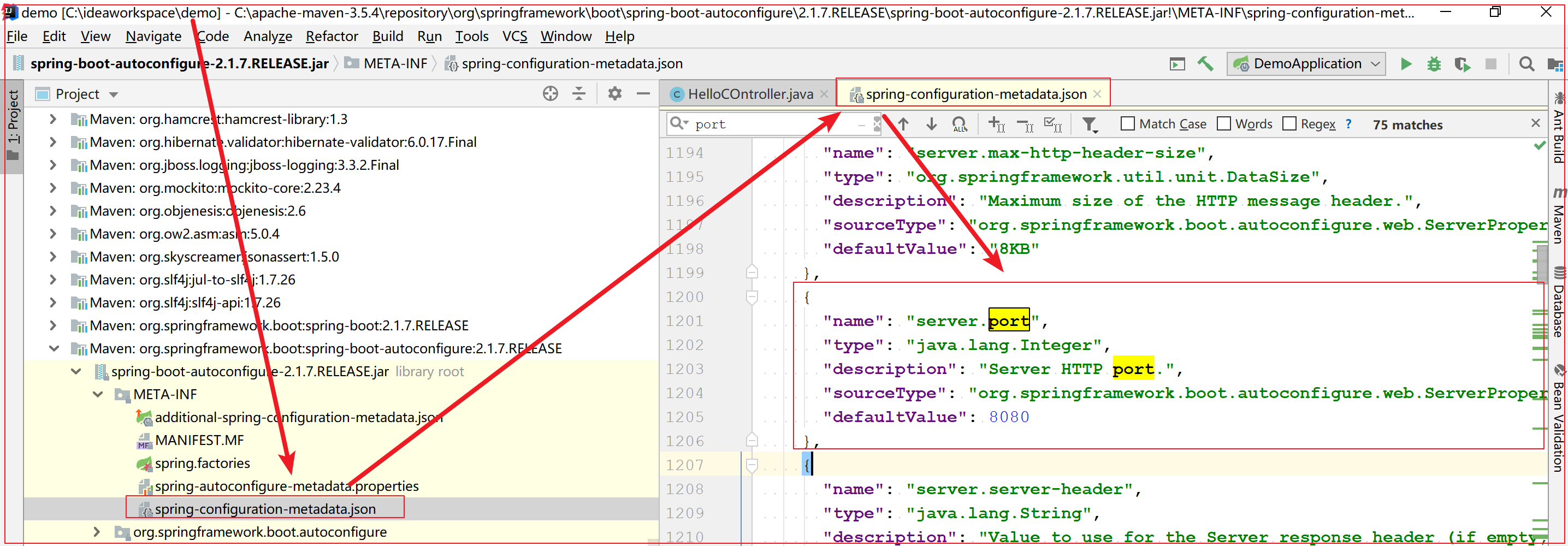
第二种:
常用配置:
1 | |
可以通过修改application.properties或者application.yml来修改SpringBoot的默认配置
例如:
application.properties文件
1 | |
application.yml文件
1 | |
扩展点
- properties文件转换为yml文件: https://www.toyaml.com/index.html
4.4 配置文件属性注入Bean
1、使用注解@Value映射
@value注解将配置文件的值映射到Spring管理的Bean属性值
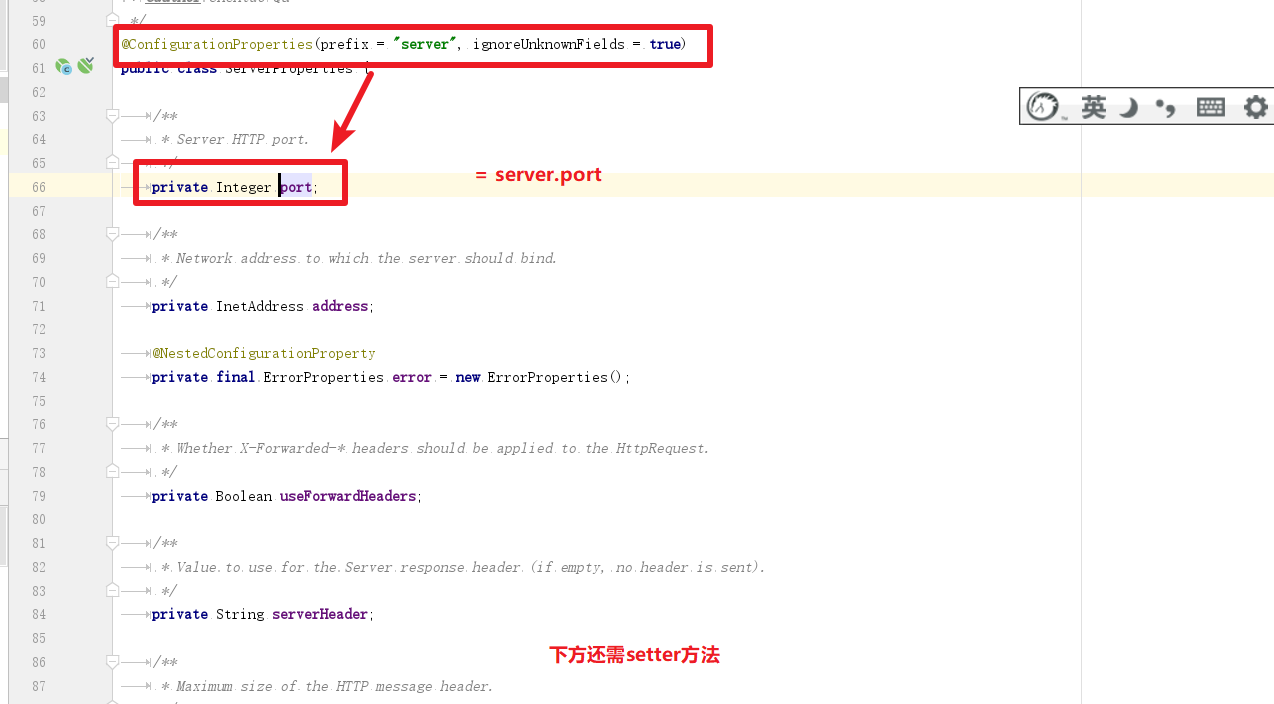
2、使用注解@ConfigurationProperties映射
通过注解@ConfigurationProperties(prefix=’’配置文件中的key的前缀”)可以将配置文件中的配置自动与实体进行映射。
使用@ConfigurationProperties方式必须提供Setter方法,使用@Value注解不需要Setter方法。
3、使用Environment对象获取
注入Environment对象,即可从对象中获取配置文件中的值

五、SpringBoot与其他技术集成
5.1 集成MyBatis
使用SpringBoot整合MyBatis,完成查询所有功能。
实现步骤:
- 创建SpringBoot工程,勾选依赖坐标
- 创建User表、创建实体User
- 编写三层架构:Mapper、Service、controller,编写查询所有的方法findAll()
- 编写Mapper接口中的方法findAll()的SQL语句
- 配置文件:数据库连接信息
- 访问测试地址http://localhost:8080/queryUsers
实现过程:
创建SpringBoot工程,day01_springboot_mybatis;
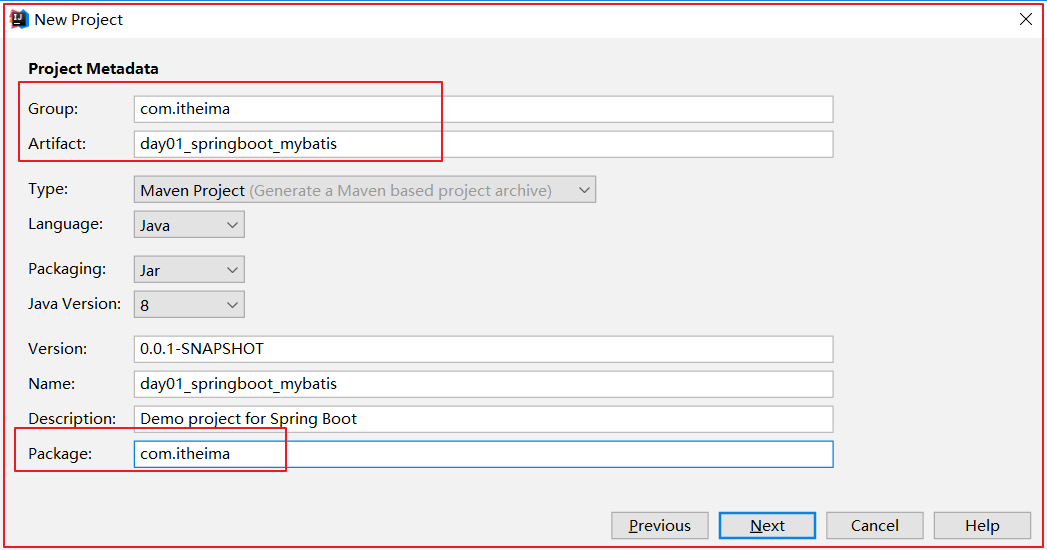
勾选依赖坐标
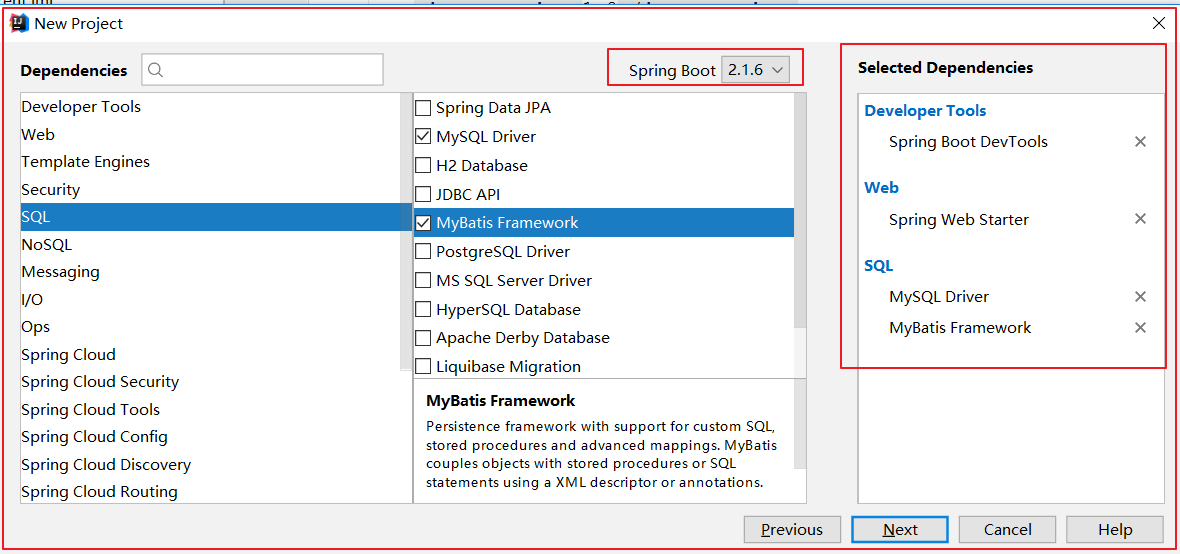
创建User表—>创建实体UserBean
创建表
1
2
3
4
5
6
7
8
9
10
11
12
13
14
15
16-- ----------------------------
-- Table structure for `user`
-- ----------------------------
DROP TABLE IF EXISTS `user`;
CREATE TABLE `user` (
`id` int(11) NOT NULL AUTO_INCREMENT,
`username` varchar(50) DEFAULT NULL,
`password` varchar(50) DEFAULT NULL,
`name` varchar(50) DEFAULT NULL,
PRIMARY KEY (`id`)
) ENGINE=InnoDB AUTO_INCREMENT=3 DEFAULT CHARSET=utf8;
-- ----------------------------
-- Records of user
-- ----------------------------
INSERT INTO `user` VALUES ('1', 'zhangsan', '123', '张三');
INSERT INTO `user` VALUES ('2', 'lisi', '123', '李四');创建实体
1
2
3
4
5
6
7
8public class User {
private Integer id;
private String username;//用户名
private String password;//密码
private String name;//姓名
//getter setter...
//toString
}
编写用户Controller,编写UserService
UserController
1
2
3
4
5
6
7
8
9
10
11@RestController
@RequestMapping("user")
public class UserController {
@Autowired
private UserService userService;
@RequestMapping("findAll")
public List<User> findAll(){
return userService.findAll();
}UserService
1
2
3public interface UserService {
List<User> findAll();
}UserServiceImpl
1
2
3
4
5
6
7
8
9
10
11@Service
public class UserServiceImpl implements UserService {
@Autowired
private UserMapper userMapper;
@Override
public List<User> findAll() {
return userMapper.findAll();
}
}
编写Mapper:使用@Mapper标记该类是一个Mapper接口,可以被SpringBoot自动扫描
1
2
3
4
5@Mapper
public interface UserMapper {
@Select("select * from user;")
List<User> findAll();
}还有一种办法,可以在配置类中配置Mapper扫描
1
2
3
4
5
6
7
8
9
10
11
12
13
14
15
16
17
18/**
* @MapperScan(basePackages = "com.itheima.mapper")
* 扫描指定包下的所有Mapper接口,将动态代理的实现类对象注入Spring容器中
* basePackages属性:指定扫描的包路径地址
* 作用相当于:
* <bean class="org.mybatis.spring.mapper.MapperScannerConfigurer">
* <property name="basePackage" value="com.itheima.dao"/>
* </bean>
*/
@SpringBootApplication
@MapperScan(basePackages = "com.itheima.mapper")
public class SpringbootMybatisApplication {
public static void main(String[] args) {
SpringApplication.run(SpringbootMybatisApplication.class, args);
}
}
在application.properties中添加数据库连接信息
1
2
3
4
5
6# DB 配置
spring.datasource.url=jdbc:mysql://127.0.0.1:3306/test?useUnicode=true&characterEncoding=UTF-8&serverTimezone=UTC
spring.datasource.password=root
spring.datasource.username=root
# spring.datasource.driver-class-name=com.mysql.cj.jdbc.Driver- 数据库连接地址后加
?useUnicode=true&characterEncoding=UTF-8&serverTimezone=UTC,不然会报错
- 数据库连接地址后加
5.2 集成Spring Data Redis
SpringBoot整合了Redis之后,做用户数据查询缓存。
实现步骤:
- 添加Redis起步依赖
- 在application.properties中配置redis端口、地址
- 注入RedisTemplate操作Redis缓存查询所有用户数据
- 测试缓存
实现过程:
添加Redis起步依赖
1
2
3
4
5<!--spring data redis 依赖-->
<dependency>
<groupId>org.springframework.boot</groupId>
<artifactId>spring-boot-starter-data-redis</artifactId>
</dependency>配置Redis连接信息
1
2
3# Redis 配置(不填也是可以的)
spring.redis.host=localhost
spring.redis.port=6379注入RedisTemplate测试Redis操作
1
2
3
4
5
6
7
8
9
10
11
12
13
14
15
16@Test
public void testRedis() throws JsonProcessingException {
String users = (String) redisTemplate.boundValueOps("user.findAll").get();
if (users == null) {
List<User> userList = userMapper.queryUserList();
ObjectMapper jsonFormat = new ObjectMapper();
users = jsonFormat.writeValueAsString(userList);
redisTemplate.boundValueOps("user.findAll").set(users);
System.out.println("==============从数据库中获取用户数据===================");
}else {
System.out.println("==============从Redis缓存中获取用户数据===================");
}
System.out.println(users);
}5.3 集成定时器
需求:使用SpringBoot开发定时器,每隔5秒输出一个当前时间。
实现步骤:
开启定时器注解
1
2
3
4
5
6
7
8@SpringBootApplication
@EnableScheduling//开启定时器
public class Day01SpringbootIntergrationApplication {
public static void main(String[] args) {
SpringApplication.run(Day01SpringbootIntergrationApplication.class, args);
}
}配置定时器方法
1
2
3
4
5
6
7
8@Component
public class TimerUtil {
@Scheduled(initialDelay = 1000,fixedRate = 1000)
public void mytask(){
System.out.println(LocalDateTime.now());
}
}测试定时器。

5.4 发送HTTP请求
1、Spring的RestTemplate
- RestTemplate是Rest的HTTP客户端模板工具类
- 对基于Http的客户端进行封装
- 实现对象与JSON的序列化与反序列化
- 不限定客户端类型,目前常用的3种客户端都支持:HttpClient、OKHttp、JDK原生URLConnection(默认方式)
2、RestTemplate案例
目标需求:发送Http请求
实现步骤:
- 创建一个springboot的工程
- 配置RestTemplate的对象Bean到Spring容器中
- 在测试类中用@Autowired注入Spring容器中的RestTemplate对象
- 通过RestTemplate对象的getForObject发送请求
- 运行测试类的测试方法
实现过程:
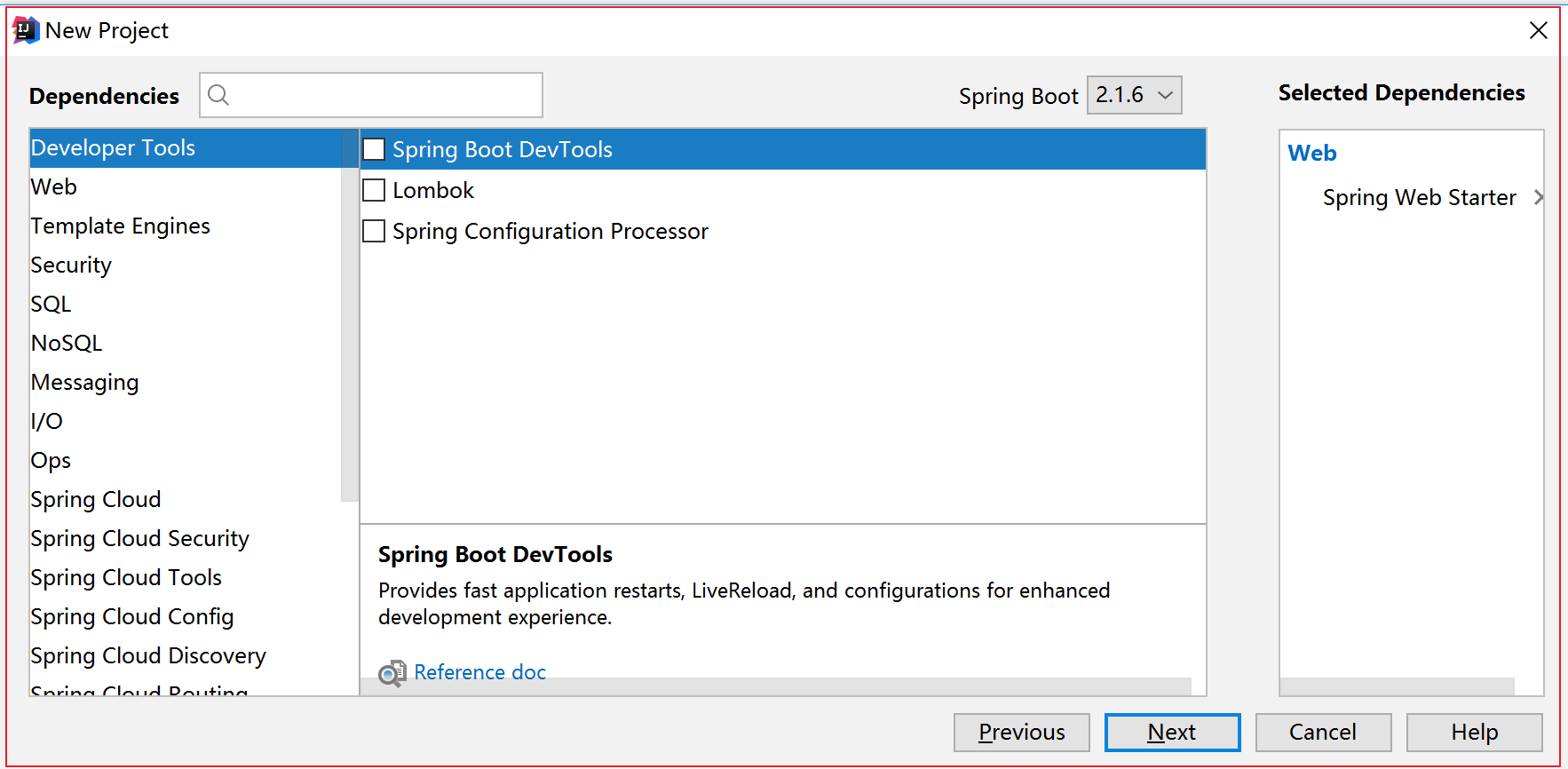
创建一个springboot的工程,勾选Web的Starter
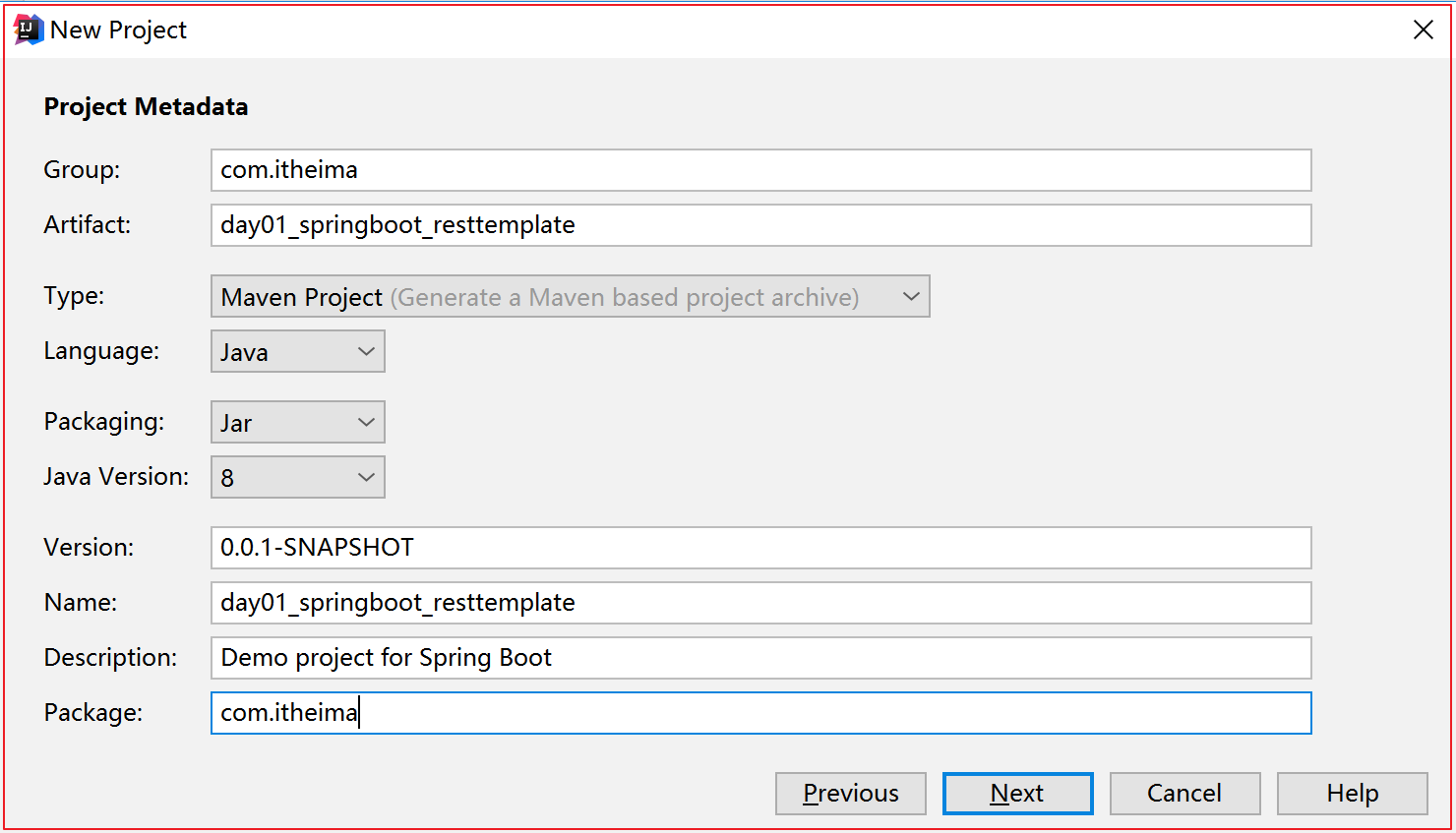
勾选web开发的Starter
在项目启动类位置中注册一个RestTemplate对象
1
2
3
4
5
6
7
8@Configuration
public class MyConfiguration {
@Bean
public RestTemplate restTemplate(){
return new RestTemplate();
}
}在测试类ApplicationTests中
@Autowired注入RestTemplate通过RestTemplate的getForObject()方法,传递url地址及实体类的字节码
1
2
3
4
5
6
7
8
9
10
11
12
13@RunWith(SpringRunner.class)
@SpringBootTest
public class ApplicationTests {
@Autowired
private RestTemplate restTemplate;
@Test
public void testREST() {
String url = "http://baidu.com";
String json = restTemplate.getForObject(url, String.class);
System.out.println(json);
}
}- RestTemplate会自动发起请求,接收响应
- 并且帮我们对响应结果进行反序列化
运行测试类中的testREST方法;
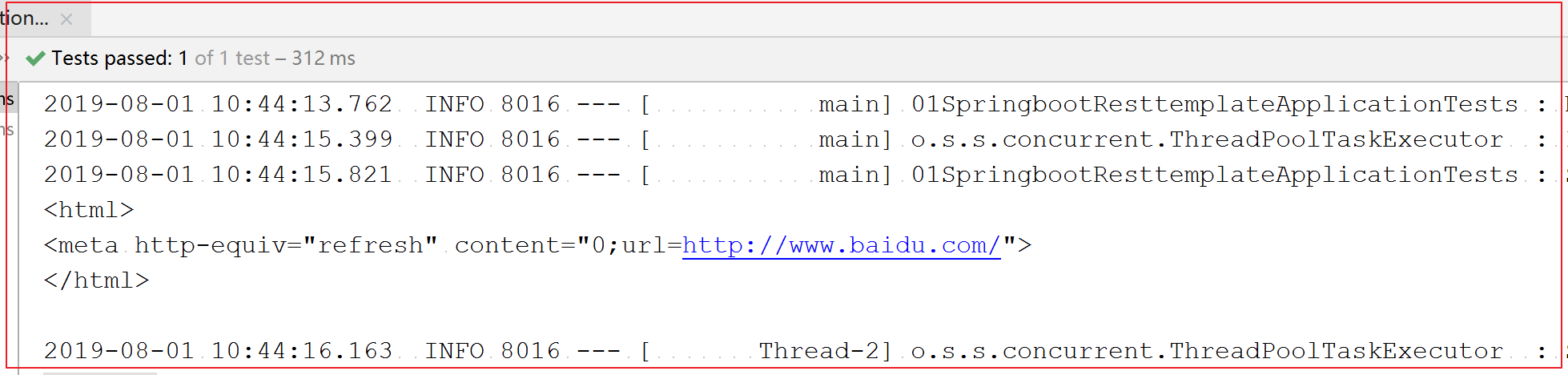
5.5 扩展了解:除此之外还可以整合什么?
- 集成 MongoDB
- 集成 ElasticSearch
- 集成 Memcached
- 集成邮件服务:普通邮件、模板邮件、验证码、带Html的邮件
- 集成RabbitMQ消息中间件
- 集成Freemarker或者Thymeleaf
六 、SpringBoot如何代码测试
目标:SpringBoot集成JUnit测试功能,进行查询用户接口测试
实现步骤:
添加Junit起步依赖(默认就有)
1
2
3
4
5
6<!--spring boot测试依赖-->
<dependency>
<groupId>org.springframework.boot</groupId>
<artifactId>spring-boot-starter-test</artifactId>
<scope>test</scope>
</dependency>编写测试类:
SpringRunner继承SpringJUnit4ClassRunner,使用哪一个Spring提供的测试引擎都可以。指定运行测试的引擎
@SpringBootTest的属性值指的是引导类的字节码对象
注意:最新版的2.2.0.RELEASE中,springboot测试类不再需要@Runwith的注解
1
2
3
4
5
6
7
8
9
10
11
12
13
14@RunWith(SpringRunner.class)
@SpringBootTest
public class ApplicationTests {
@Autowired
private UserMapper userMapper;
@Test
public void test() {
List<User> users = userMapper.queryUserList();
System.out.println(users);
}
}
控制台打印信息
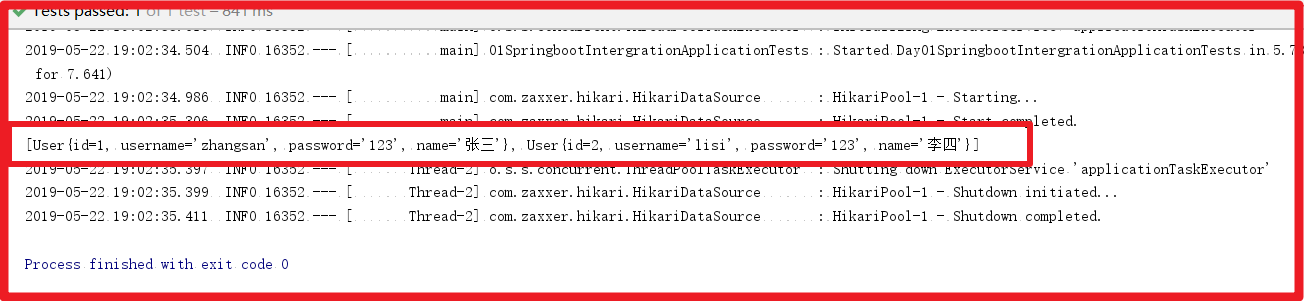
七、Spring Boot 如何打包部署
启动方式有两种,一种是打成jar直接执行,另一种是打包成war包放到Tomcat服务下,启动Tomcat。
6.1 打成Jar包部署
执行maven打包命令或者使用IDEA的Maven工具打包
1 | |
需要注意项目pom.xml文件中的打包类型
1 | |
启动命令:启动之前先检查自己的pom.xml文件中是否有springboot的maven插件
1 | |
启动命令的时候配置jvm参数也是可以的。然后查看一下Java的参数配置结果
1 | |
6.2 打成war包部署
- 执行maven打包命令或者使用IDEA的Maven工具打包,需要修改pom.xml文件中的打包类型。
1 | |
- 注册启动类
- 创建 ServletInitializer.java,继承 SpringBootServletInitializer ,覆盖 configure(),把启动类 Application 注册进去。外部 Web 应用服务器构建 Web Application Context 的时候,会把启动类添加进去。
1 | |
- 然后执行打包操作。同6.1 小节打包是一样的
- 拷贝到Tomcat的webapp下,启动Tomcat访问即可
- 因为访问地址不再是根目录了,所有路径中需要加入项目名称:http://localhost:8080/day01_springboot_demo01-1.0-SNAPSHOT/hello
总结:
- 能够理解SpringBoot的设计初衷,开发环境要求
- 能够搭建SpringBoot的开发工程
- 能够理解SpringBoot的配置文件常见配置
- 能够使用SpringBoot整合MyBatis,整合Redis进行缓存,整合RestTemplate发送Http请求
- 能够使用SpringBoot进行简单代码测试
- 能够打包部署SpringBoot项目