Mybatis-02 12、mybatis的参数传递 参数的传递指的是 mapper 接口中方法的参数值,如何传递到 mapper.xml配置文件的 #{} 占位符中
12.1、一个普通数据类型 Mapper接口
1
2
3
4
5
public interface UserMapper public User queryUserById (Integer id)
mapper.xml配置文件:
1 2 3 4 5 6 7 8 9 10 11 <mapper namespace ="com.atguigu.mapper.UserMapper" > <select id ="queryUserById" resultType ="com.atguigu.pojo.User" > </select > </mapper >
测试的代码:
1
2
3
4
5
6
7
8
9
10
11
12
13
14
15
16
17
18
19
20
21
22
23
24
25
26
27
28
29
30
31
32
33
34
35
36
37
38
package com.atguigu.mapper.test;import com.atguigu.mapper.UserMapper;import com.atguigu.pojo.User;import org.apache.ibatis.io.Resources;import org.apache.ibatis.session.SqlSession;import org.apache.ibatis.session.SqlSessionFactory;import org.apache.ibatis.session.SqlSessionFactoryBuilder;import org.junit.Before;import org.junit.Test;import static org.junit.Assert.*;public class UserMapperTest static SqlSessionFactory sqlSessionFactory;@Before public void setUp () throws Exception new SqlSessionFactoryBuilder().build(Resources.getResourceAsStream("mybatis-config.xml" ));@Test public void queryUserById () try {1 );finally {
12.2、多个普通数据类型 Mapper接口
1 2 3 4 5 6 7 public List<User> queryUsersByNameOrSex (String name,Integer sex)
mapper.xml配置文件:
1 2 3 4 5 6 7 8 9 10 11 12 13 14 15 16 17 18 19 20 21 22 <select id ="queryUsersByNameOrSex" resultType ="com.atguigu.pojo.User" > </select >
测试的代码:
1
2
3
4
5
6
7
8
9
10
11
12
13
14
15
16
@Test public void queryUsersByNameOrSex () try {for (User user : mapper.queryUsersByNameOrSex("wzg168" , 1 )) {finally {
@Param注解命名参数 Mapper接口:
1 2 3 4 5 6 7 8 9 10 public List<User> queryUsersByNameOrSex ( @Param("name") String name, @Param("sex") Integer sex )
mapper.xml配置文件:
1 2 3 4 5 6 7 8 9 10 11 12 13 14 15 16 17 18 19 20 <select id ="queryUsersByNameOrSex" resultType ="com.atguigu.pojo.User" > </select >
测试代码:
1
2
3
4
5
6
7
8
9
10
11
12
13
14
15
16
@Test public void queryUsersByNameOrSex () try {for (User user : mapper.queryUsersByNameOrSex("wzg168" , 1 )) {finally {
12.3、传递一个Map对象作为参数 Mapper接口:
1 2 3 4 5 6 public List<User> queryUsersByMap (Map<String,Object> paramMap)
Mapper.xml配置文件:
1 2 3 4 5 6 7 8 9 10 11 12 13 14 15 16 17 18 19 20 21 22 23 <select id ="queryUsersByMap" resultType ="com.atguigu.pojo.User" > </select >
测试代码:
1
2
3
4
5
6
7
8
9
10
11
12
13
14
15
16
17
@Test public void queryUsersByMap () try {new HashMap<>();"name" ,"wzg168" );"sex" , 1 );for (User user : mapper.queryUsersByMap(paramMap)) {finally {
12.4、一个Pojo数据类型 Mapper接口:
1 public int saveUser(User user );
Mapper.xml配置文件:
1 2 3 4 5 6 7 8 9 10 11 12 13 <insert id ="saveUser" parameterType ="com.atguigu.pojo.User" > </insert >
测试代码:
1
2
3
4
5
6
7
8
9
10
11
12
13
14
@Test public void saveUser () try {new User(null ,"bbj168" ,0 ));finally {
12.5、模糊查询 需求:现在要根据用户名查询用户对象。 也就是希望查询如下: select * from t_user where last_name like ‘%张%’
Mapper接口:
1 2 3 4 5 public List<User> queryUsersLikeName (@Param("name") String name)
Mapper.xml配置文件:
1 2 3 4 5 6 7 8 9 10 11 12 13 14 15 16 17 18 19 <select id ="queryUsersLikeName" resultType ="com.atguigu.pojo.User" > </select >
测试的代码:
1 2 3 4 5 6 7 8 9 10 11 12 13 14 15 16 17 18 19 20 21 22 @Test public void queryUsersLikeName () try {"b" ;for (User user : mapper.queryUsersLikeName(name )) {finally {
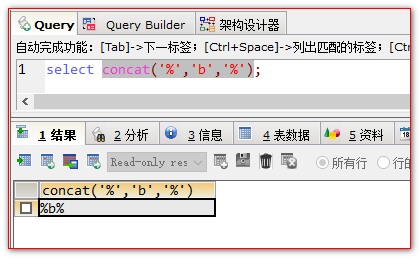
12.6、MySQL的字符串拼接,concat函数实现。
1 2 3 4 5 6 7 8 9 10 11 12 13 14 15 16 17 18 19 <select id ="queryUsersLikeName" resultType ="com.atguigu.pojo.User" > </select >
13、自定义结果集 13.1、<resultMap>的作用。 它可以把查询得到的结果集映射成为需要的数据返回.
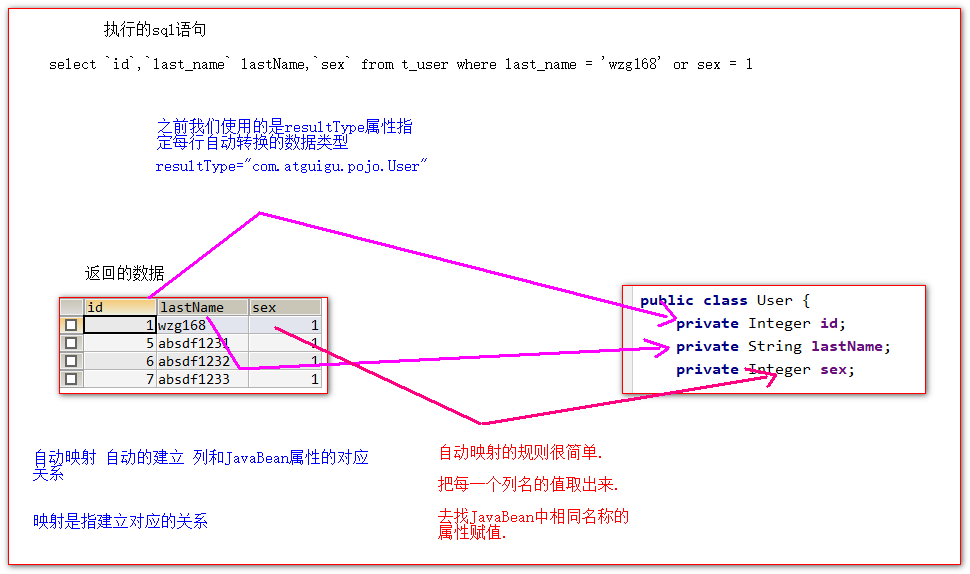
resultMap 可以将查询回来的列和JavaBean中的属性做映射( 建立他们的对应关系 )
在使用resultMap标签之前,我们都是使用的resultType属性.指定返回值的类型.这个时候Mybatis的底层是做的自动映射.
自动映射示意图:
resultMap标签手动映射结果集 Mapper接口:
1
2
3
public interface UserMapper {public List<User> queryUsers();
}
Mapper.xml配置文件:
1 2 3 4 5 6 7 8 9 10 11 12 13 14 15 16 17 18 19 20 21 22 <resultMap id ="resultMap1" type ="com.atguigu.pojo.User" > <id column ="id" property ="id" /> <result column ="last_name" property ="lastName" /> <result column ="sex" property ="sex" /> </resultMap > <select id ="queryUsers" resultMap ="resultMap1" > </select >
测试的代码:
1
2
3
4
5
6
7
8
9
10
11
12
13
14
@Test public void queryUsers () try {for (User queryUser : mapper.queryUsers()) {finally {
一般情况下.我们的resultMap并不是应用在简单的JavaBean对象上.
而是应用在复杂的JavaBean对象上做手动映射会达到很好的效果.
简单的JavaBean对象就是它的属性都是普通的类型
复杂的Bean对象,它的属性还有Bean对象类型的情况,或者是集合类型,集合中每个元素又是Bean对象的情况,叫复杂Bean对象.
13.2、创建一对一数据库表 1 2 3 4 5 6 7 8 9 10 11 12 13 14 15 16 17 18 19 20 21 22 23 24 25 26 ## 一对一数据表create table t_lock(int primary key auto_increment,varchar (50 )create table t_key(int primary key auto_increment,varchar (50 ),int ,foreign key (`lock_id`) references t_lock(`id`)insert into t_lock(`name`) values ('阿里巴巴' );insert into t_lock(`name`) values ('华为' );insert into t_lock(`name`) values ('联想' );insert into t_key(`name`,`lock_id`) values ('马云' ,1 );insert into t_key(`name`,`lock_id`) values ('任正非' ,2 );insert into t_key(`name`,`lock_id`) values ('柳传志' ,3 );
13.3、创建实体对象 1 2 3 4 5 6 7 8 9 10 public class Lock private Integer id;private String name;public class Key private Integer id;private String name;private Lock lock;
Mapper接口
1 2 3 4 5 6 7 public interface KeyMapper public Key queryKeyById (Integer id)
Mapper.xml配置文件:
1 2 3 4 5 6 7 8 9 10 11 12 13 14 15 16 17 18 19 20 21 22 23 24 25 26 27 28 29 30 <resultMap id ="resultMap1" type ="com.atguigu.pojo.Key" > <id column ="id" property ="id" /> <result column ="name" property ="name" /> <result column ="lock_id" property ="lock.id" /> <result column ="lock_name" property ="lock.name" /> </resultMap > <select id ="queryKeyById" resultMap ="resultMap1" > </select >
13.4.2、<association /> 嵌套结果集映射配置 1 2 3 4 5 6 7 8 9 10 11 12 13 14 15 16 17 18 19 <resultMap id ="resultMap1" type ="com.atguigu.pojo.Key" > <id column ="id" property ="id" /> <result column ="name" property ="name" /> <association property ="lock" javaType ="com.atguigu.pojo.Lock" > <result column ="lock_id" property ="id" /> <result column ="lock_name" property ="name" /> </association > </resultMap >
13.4.3、<association /> 定义分步查询立即加载 Mapper接口
1 2 3 4 5 6 7 public interface LockMapper public Lock queryLockById (Integer id)
LockMapper.xml配置文件:
1 2 3 4 5 6 7 8 9 10 11 <mapper namespace ="com.atguigu.mapper.LockMapper" > <select id ="queryLockById" resultType ="com.atguigu.pojo.Lock" > </select > </mapper >
KeyMapper接口:
1 2 3 4 5 6 7 8 9 10 11 public interface KeyMapper public Key queryKeyByIdForSimple (Integer id)
KeyMapper.xml配置文件:
1 2 3 4 5 6 7 8 9 10 11 12 13 14 15 16 17 18 19 20 21 22 23 24 25 <resultMap id ="resultMap2" type ="com.atguigu.pojo.Key" > <id column ="id" property ="id" /> <result column ="name" property ="name" /> <association property ="lock" column ="lock_id" select ="com.atguigu.mapper.LockMapper.queryLockById" /> </resultMap > <select id ="queryKeyByIdForSimple" resultMap ="resultMap2" > </select >
测试代码:
1 2 3 4 5 6 7 8 9 10 11 12 13 14 15 @Test public void queryKeyByIdForSimple () try {1 );finally {
13.5、延迟加载 延迟加载在一定程序上可以减少很多没有必要的查询。给数据库服务器提升性能上的优化。
要启用延迟加载,需要在mybatis-config.xml配置文件中,添加如下两个全局的settings配置。
1 2 3 4 5 <setting name ="lazyLoadingEnabled" value ="true" /> <setting name ="aggressiveLazyLoading" value ="false" />
13.6、多对一、一对多的使用示例 13.6.1、创建一对多数据库 1 2 3 4 5 6 7 8 9 10 11 12 13 14 15 16 17 18 19 20 21 22 23 24 25 26 27 28 ## 一对多数据表create table t_clazz(int primary key auto_increment,varchar (50 )insert into t_clazz(`name`) values ('javaEE' );insert into t_clazz(`name`) values ('C++' );insert into t_clazz(`name`) values ('H5' );insert into t_clazz(`name`) values ('LUA' );create table t_student(int primary key auto_increment,varchar (50 ),int ,foreign key (`clazz_id`) references t_clazz(`id`)insert into t_student(`name`,`clazz_id`) values ('javaEE_1' ,1 );insert into t_student(`name`,`clazz_id`) values ('javaEE_2' ,1 );insert into t_student(`name`,`clazz_id`) values ('java_EE_3' ,1 );insert into t_student(`name`,`clazz_id`) values ('C++_1' ,2 );insert into t_student(`name`,`clazz_id`) values ('C++_2' ,2 );insert into t_student(`name`,`clazz_id`) values ('H5_1' ,3 );
13.6.2、<collection/> 一对多,立即加载 1 2 3 4 5 6 7 8 9 public class Student private Integer id;private String name;public class Clazz private Integer id;private String name;private List<Student> studentList;
Mapper接口:
1 2 3 4 5 public interface ClazzMapper public Clazz queryClazzById (Integer id)
Mapper.xml配置文件:
1 2 3 4 5 6 7 8 9 10 11 12 13 14 15 16 17 18 19 20 21 22 23 24 25 26 27 28 29 30 31 32 33 34 35 36 37 38 39 40 41 <?xml version="1.0" encoding="UTF-8" ?> <!DOCTYPE mapper PUBLIC "-//mybatis.org//DTD Mapper 3.0//EN" "http://mybatis.org/dtd/mybatis-3-mapper.dtd" > <mapper namespace ="com.atguigu.mapper.ClazzMapper" > <resultMap id ="resultMap1" type ="com.atguigu.pojo.Clazz" > <id column ="id" property ="id" /> <result column ="name" property ="name" /> <collection property ="studentList" ofType ="com.atguigu.pojo.Student" > <id column ="stu_id" property ="id" /> <result column ="stu_name" property ="name" /> </collection > </resultMap > <select id ="queryClazzById" resultMap ="resultMap1" > </select > </mapper >
测试代码:
1 2 3 4 5 6 7 8 9 10 11 12 13 @Test public void queryClazzById () try {1 );finally {
13.6.3、一对多,分步查询,赖加载 StudentMapper接口
1 2 3 4 5 6 7 public interface StudentMapper public List<Student> queryStudentsByClazzId (Integer clazzId)
StudentMapper.xml配置文件:
1 2 3 4 5 6 7 8 9 10 11 <mapper namespace ="com.atguigu.mapper.StudentMapper" > <select id ="queryStudentsByClazzId" resultType ="com.atguigu.pojo.Student" > </select > </mapper >
ClazzMapper接口:
1 2 3 4 5 6 7 8 public interface ClazzMapper public Clazz queryClazzByIdForTwoStep (Integer id)
ClazzMapper.xml配置文件:
1 2 3 4 5 6 7 8 9 10 11 12 13 14 15 16 17 18 19 20 21 22 <resultMap id ="resultMap2" type ="com.atguigu.pojo.Clazz" > <id column ="id" property ="id" /> <result column ="name" property ="name" /> <collection property ="studentList" column ="id" select ="com.atguigu.mapper.StudentMapper.queryStudentsByClazzId" /> </resultMap > <select id ="queryClazzByIdForTwoStep" resultMap ="resultMap2" > </select >
测试代码:
1 2 3 4 5 6 7 8 9 10 11 12 13 14 15 16 17 18 19 @Test public void queryClazzByIdForTwoStep () throws InterruptedException try {1 );6666 );finally {
从个参数,值传递
StudentMapper接口
1 2 3 4 5 6 7 public List<Student> queryStudentsByClazzIdAndLikeName ( @Param("clazzId") Integer clazzId, @Param("name") String name )
StudentMapper.xml配置文件:
1 2 3 4 5 6 7 8 9 10 11 12 13 14 15 16 17 18 <select id ="queryStudentsByClazzIdAndLikeName" resultType ="com.atguigu.pojo.Student" > </select >
修改ClazzMapper.xml配置文件:
1 2 3 4 5 6 7 8 9 10 11 12 13 14 15 16 17 18 19 20 21 22 23 24 25 26 27 28 29 30 31 32 33 34 35 36 37 38 39 40 41 <resultMap id ="resultMap2" type ="com.atguigu.pojo.Clazz" > <id column ="id" property ="id" /> <result column ="name" property ="name" /> <collection property ="studentList" column ="{clazzId=id,name=name}" select ="com.atguigu.mapper.StudentMapper.queryStudentsByClazzIdAndLikeName" /> </resultMap > <select id ="queryClazzByIdForTwoStep" resultMap ="resultMap2" > </select >
测试代码:
1 2 3 4 5 6 7 8 9 10 11 12 13 14 15 16 17 18 19 @Test public void queryClazzByIdForTwoStep () throws InterruptedException try {1 );6666 );finally {
一对一
一对多看着很多
一对一或一对多拆解之后.
其实都是两个单表的查询
select属性 调用第二次的查询( 查询子对象,子集合对象 )
column 属性指定将哪个列的值做为调用的方法的参数值使用.