day08【集合】
今日内容
- Map集合特点
- Map集合的遍历方式
- 方法可变参数
- 斗地主案例排序
- 集合的嵌套
目标
第一章 Map集合
1.1 概述
现实生活中,我们常会看到这样的一种集合:IP地址与主机名,身份证号与个人,系统用户名与系统用户对象等,这种一一对应的关系,就叫做映射。Java提供了专门的集合类用来存放这种对象关系的对象,即java.util.Map接口。
我们通过查看Map接口描述,发现Map接口下的集合与Collection接口下的集合,它们存储数据的形式不同,如下图。
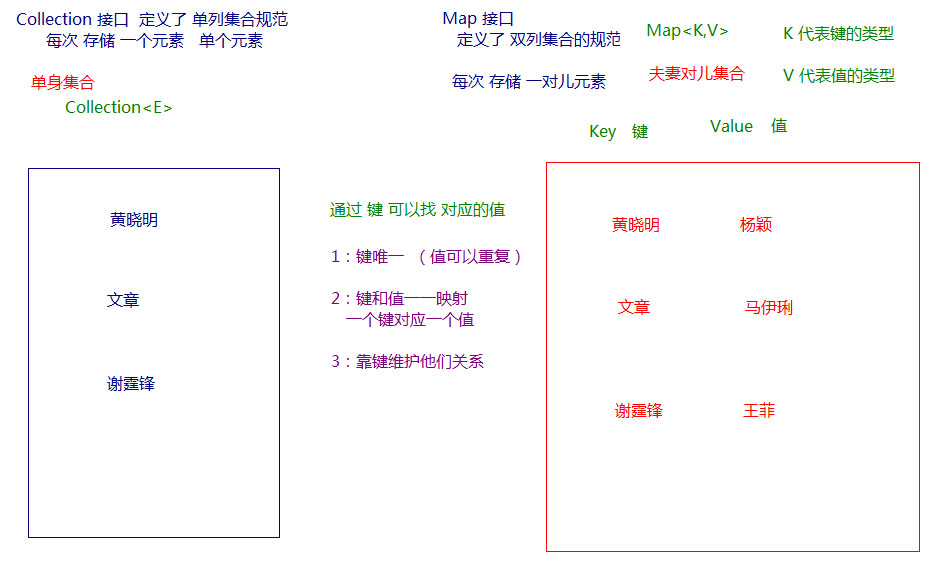
Collection中的集合,元素是孤立存在的(理解为单身),向集合中存储元素采用一个个元素的方式存储。Map中的集合,元素是成对存在的(理解为夫妻)。每个元素由键与值两部分组成,通过键可以找对所对应的值。Collection中的集合称为单列集合,Map中的集合称为双列集合。- 需要注意的是,
Map中的集合不能包含重复的键,值可以重复;每个键只能对应一个值。
1.2 Map接口中的常用方法
public V put(K key, V value): 把指定的键与指定的值添加到Map集合中。public V remove(Object key): 把指定的键 所对应的键值对元素 在Map集合中删除,返回被删除元素的值。public V get(Object key) 根据指定的键,在Map集合中获取对应的值。public Set<K> keySet(): 获取Map集合中所有的键,存储到Set集合中。public Set<Map.Entry<K,V>> entrySet(): 获取到Map集合中所有的键值对对象的集合(Set集合)。public boolean containKey(Object key):判断该集合中是否有此键。public Collection<V> values() 返回Map集合中的所有值到Collection集合。
1
2
3
4
5
6
7
8
9
10
11
12
13
14
15
16
17
18
19
20
21
22
23
| public static void main(String[] args) {
HashMap<String, String> map = new HashMap<String, String>();
map.put("黄晓明", "杨颖");
map.put("文章", "马伊琍");
map.put("邓超", "孙俪");
System.out.println(map);
System.out.println(map.remove("邓超"));
System.out.println(map);
System.out.println(map.get("黄晓明"));
System.out.println(map.get("邓超"));
Collection<String> coll = map.values();
for(String value : coll){
System.out.println(value);
}
}
|
注意:使用put方法时,若指定的键(key)在集合中没有,则没有这个键对应的值,返回null,并把指定的键值添加到集合中; 若指定的键(key)在集合中存在,则返回值为集合中键对应的值(该值为替换前的值),并把指定键所对应的值,替换成指定的新值。
1.3 Map集合遍历
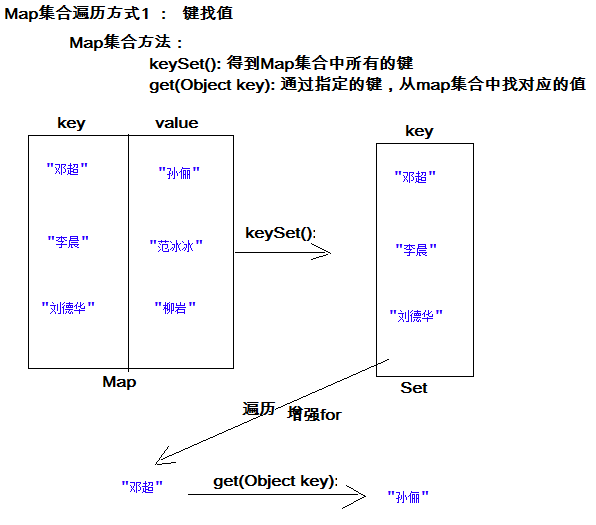
方式1:键找值方式
通过元素中的键,获取键所对应的值
分析步骤:
- 获取Map中所有的键,由于键是唯一的,所以返回一个Set集合存储所有的键。方法提示:
keyset()
- 遍历键的Set集合,得到每一个键。
- 根据键,获取键所对应的值。方法提示:
get(K key)
遍历图解:
方式2:键值对方式
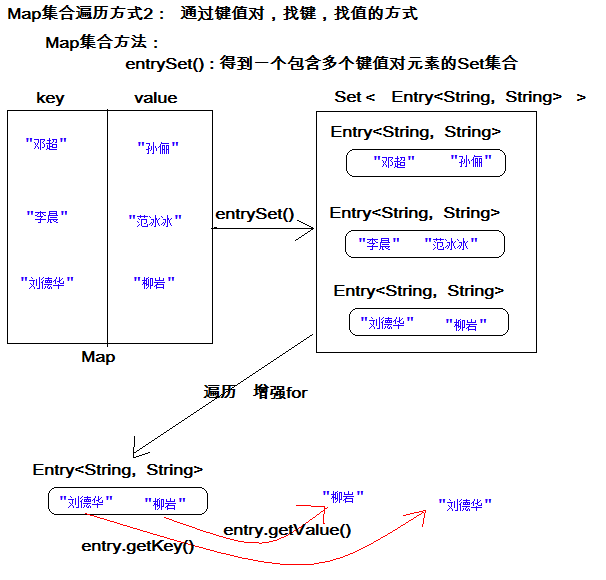
即通过集合中每个键值对(Entry)对象,获取键值对(Entry)对象中的键与值。
Entry键值对对象:
我们已经知道,Map中存放的是两种对象,一种称为key(键),一种称为value(值),它们在在Map中是一一对应关系,这一对对象又称做Map中的一个Entry(项)。Entry将键值对的对应关系封装成了对象。即键值对对象,这样我们在遍历Map集合时,就可以从每一个键值对(Entry)对象中获取对应的键与对应的值。
在Map集合中也提供了获取所有Entry对象的方法:
public Set<Map.Entry<K,V>> entrySet(): 获取到Map集合中所有的键值对对象的集合(Set集合)。
获取了Entry对象 , 表示获取了一对键和值,那么同样Entry中 , 分别提供了获取键和获取值的方法:
public K getKey():获取Entry对象中的键。
public V getValue():获取Entry对象中的值。
操作步骤与图解:
- 获取Map集合中,所有的键值对(Entry)对象,以Set集合形式返回。方法提示:
entrySet()。
- 遍历包含键值对(Entry)对象的Set集合,得到每一个键值对(Entry)对象。
- 通过键值对(Entry)对象,获取Entry对象中的键与值。 方法提示:
getkey() getValue()
遍历图解:
1.4 HashMap集合
Map接口实现类HashMap类特点:
- 底层哈希表结构。
- 不允许重复键。
- 用作键的对象,应该重写hashCode()方法和equals()方法。
- 此集合可以使用null值和null键。
- 线程不安全,运行速度快。
1.5 HashMap存储自定义对象
练习:每位学生(姓名,年龄)都有自己的家庭住址。那么,既然有对应关系,则将学生对象和家庭住址存储到map集合中。学生作为键, 家庭住址作为值。
注意,学生姓名相同并且年龄相同视为同一名学生。
编写学生类:
1
2
3
4
5
6
7
8
9
10
11
12
13
14
15
16
17
18
19
20
21
| public class Student {
private String name;
private int age;
@Override
public boolean equals(Object o) {
if (this == o)
return true;
if (o == null || getClass() != o.getClass())
return false;
Student student = (Student) o;
return age == student.age && Objects.equals(name, student.name);
}
@Override
public int hashCode() {
return Objects.hash(name, age);
}
}
|
测试类:
1
2
3
4
5
6
7
8
9
10
11
12
13
14
15
| public static void main(String[] args) {
Map<Student,String> map = new HashMap<Student,String>();
map.put(new Student("lisi",28), "上海");
map.put(new Student("wangwu",22), "北京");
map.put(new Student("wangwu",22), "南京");
Set<Student> keySet = map.keySet();
for(Student key: keySet){
String value = map.get(key);
System.out.println(key.toString()+"....."+value);
}
}
|
- 当给HashMap中存放自定义对象时,如果自定义对象作为key存在,这时要保证对象唯一,必须复写对象的hashCode和equals方法(如果忘记,请回顾HashSet存放自定义对象)。
- 如果要保证map中存放的key和取出的顺序一致,可以使用
java.util.LinkedHashMap集合来存放。
1.6 LinkedHashMap介绍
我们知道HashMap保证成对元素唯一,并且查询速度很快,可是成对元素存放进去是没有顺序的,那么我们要保证有序,还要速度快怎么办呢?
在HashMap下面有一个子类LinkedHashMap,底层是哈希表双向链表,保证迭代的顺序。
1
2
3
4
5
6
7
8
9
10
| public static void main(String[] args) {
LinkedHashMap<String, String> map = new LinkedHashMap<String, String>();
map.put("邓超", "孙俪");
map.put("李晨", "范冰冰");
map.put("刘德华", "朱丽倩");
Set<Entry<String, String>> entrySet = map.entrySet();
for (Entry<String, String> entry : entrySet) {
System.out.println(entry.getKey() + " " + entry.getValue());
}
}
|
1.7 Properties集合
Map接口实现类Hashtable的子类Properties类。Properties也是Map接口实现类,是存储键值对的双列集合,由于此类能和IO流结合使用,数据可以持久化,使用量很大。(IO部分后面课程详解)
Properties集合特点:
- 继承Hashtable,底层数据结构是哈希表。
- 线程安全,运行速度慢。
- 不允许null值,null键。
- 此集合存储键值对数据类型固定为String。
- 可以和IO流结合使用,从流中加载数据。
Properties集合特有方法:
Object setPropery(String key,String value),向集合中存储键值对。String getProperty(String key),获取集合中键对应的值,无此键返回null。Set<String> stringPropertyNames(),集合中的所有键存储到Set集合。void load(输入流对象) ,IO部分讲解。
1
2
3
4
5
6
7
8
9
10
11
12
13
14
15
16
17
| public static void main(String[] args){
Properties properties = new Properties();
properties.setProperty("k1","v1");
properties.setProperty("k2","v2");
properties.setProperty("k3","v3");
properties.setProperty("k4","v4");
System.out.println(properties);
String value = properties.getProperty("k2");
System.out.println(value);
Set<String> set = properties.stringPropertyNames();
for(String key : set){
System.out.println(key+"=="+properties.getProperty(key));
}
}
|
1.8 Map集合练习
需求:
计算一个字符串中每个字符出现次数。
分析:
- 获取一个字符串对象
- 创建一个Map集合,键代表字符,值代表次数。
- 遍历字符串得到每个字符。
- 判断Map中是否有该键。
- 如果没有,第一次出现,存储次数为1;如果有,则说明已经出现过,获取到对应的值进行++,再次存储。
- 打印最终结果
方法介绍
public boolean containKey(Object key):判断该集合中是否有此键。
1
2
3
4
5
6
7
8
9
10
11
12
13
14
15
16
17
18
19
20
21
22
23
24
25
26
27
| public static void main(String[] args) {
System.out.println("请录入一个字符串:");
String line = new Scanner(System.in).nextLine();
findChar(line);
}
private static void findChar(String line) {
HashMap<Character, Integer> map = new HashMap<Character, Integer>();
for (int i = 0; i < line.length(); i++) {
char c = line.charAt(i);
if (!map.containsKey(c)) {
map.put(c, 1);
} else {
Integer count = map.get(c);
map.put(c, ++count);
}
}
System.out.println(map);
}
|
第二章 可变参数
2.1 可变参数
在JDK1.5之后,如果我们定义一个方法需要接受多个参数,并且多个参数类型一致,我们可以对其简化.
格式:
1
| 修饰符 返回值类型 方法名(参数类型... 形参名){ }
|
代码演示:
1
2
3
4
5
6
7
8
9
10
11
| public static void main(String[] args) {
int sum = getSum(6, 7, 2, 12, 2121);
System.out.println(sum);
}
public static int getSum(int... arr) {
int sum = 0;
for (int a : arr) {
sum += a;
}
return sum;
}
|
注意:
- 可变参数的本质是数组。
- 不传递参数,数组的长度是0.
- 传递几个参数,数组的长度就是几。
- 一个方法中只能有一个可变参数。
- 如果方法中有多个参数,可变参数只能写在最后一位。
2.2 可变参数应用
在Collections中也提供了添加一些元素方法:
public static <T> boolean addAll(Collection<T> c, T... elements) :往集合中添加一些元素。
1
2
3
4
5
6
7
8
9
10
11
| public static void main(String[] args) {
ArrayList<Integer> list = new ArrayList<Integer>();
Collections.addAll(list, 5, 222, 1,2);
System.out.println(list);
}
|
第三章 斗地主案例排序
3.1 案例介绍
按照斗地主的规则,完成洗牌发牌的动作。

具体规则:
- 组装54张扑克牌将。
- 54张牌顺序打乱。
- 三个玩家参与游戏,三人交替摸牌,每人17张牌,最后三张留作底牌。
- 查看三人各自手中的牌(按照牌的大小排序)、底牌。
规则:手中扑克牌从大到小的摆放顺序:大王,小王,2,A,K,Q,J,10,9,8,7,6,5,4,3。
3.2 案例需求分析
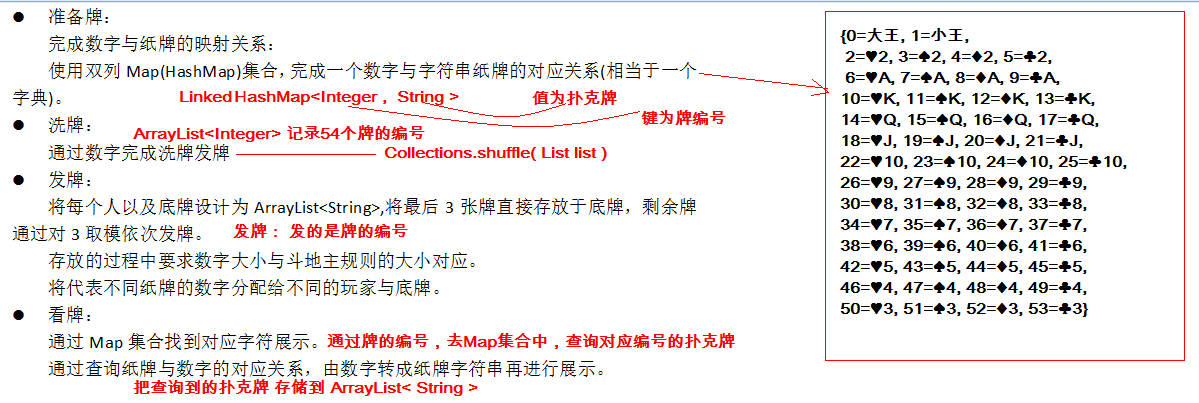
- 准备牌:
完成数字与纸牌的映射关系:
使用双列Map(HashMap)集合,完成一个数字与字符串纸牌的对应关系(相当于一个字典)。
- 洗牌:
通过数字完成洗牌发牌
- 发牌:
将每个人以及底牌设计为ArrayList,将最后3张牌直接存放于底牌,剩余牌通过对3取模依次发牌。
存放的过程中要求数字大小与斗地主规则的大小对应。
将代表不同纸牌的数字分配给不同的玩家与底牌。
- 看牌:
通过Map集合找到对应字符展示。
通过查询纸牌与数字的对应关系,由数字转成纸牌字符串再进行展示。
3.3 代码实现
1
2
3
4
5
6
7
8
9
10
11
12
13
14
15
16
17
18
19
20
21
22
23
24
25
26
27
28
29
30
31
32
33
34
35
36
37
38
39
40
41
42
43
44
45
46
47
48
49
50
51
52
53
54
55
56
57
58
59
60
61
62
63
64
65
66
67
68
69
70
71
72
| public static void main(String[] args) {
HashMap<Integer, String> pookerMap = new HashMap<Integer, String>();
ArrayList<Integer> pookerList = new ArrayList<Integer>();
String[] colors = "♥-♠-♦-♣".split("-");
String[] nums = "2-A-K-Q-J-10-9-8-7-6-5-4-3".split("-");
int index = 2;
for(String num : nums){
for(String color : colors){
String thisPooker = color+num;
pookerMap.put(index, thisPooker);
pookerList.add(index);
index++;
}
}
pookerMap.put(0, "大王");
pookerMap.put(1, "小王");
pookerList.add(0);
pookerList.add(1);
Collections.shuffle(pookerList);
ArrayList<Integer> player1 = new ArrayList<Integer>();
ArrayList<Integer> player2 = new ArrayList<Integer>();
ArrayList<Integer> player3 = new ArrayList<Integer>();
ArrayList<Integer> diPai = new ArrayList<Integer>();
for(int i = 0 ;i < pookerList.size() ;i++){
Integer pookerNum = pookerList.get(i);
if(i>=51)
diPai.add(pookerNum);
}else if(i % 3 == 0){
player1.add(psookerNum);
}else if(i % 3 == 1){
player2.add(pookerNum);
}else if(i % 3 == 2){
player3.add(pookerNum);
}
}
Collections.sort(player1);
Collections.sort(player2);
Collections.sort(player3);
Collections.sort(diPai);
show("柳岩",player1,pookerMap);
show("唐嫣",player2,pookerMap);
show("金莲",player3,pookerMap);
show("底牌",diPai,pookerMap);
}
public static void show(String name,ArrayList<Integer> player,HashMap<Integer, String> pookerMap ){
System.out.print(name+":");
for(Integer pookerNum : player){
String thisPooker = pookerMap.get(pookerNum);
System.out.print(thisPooker+" ");
}
System.out.println();
}
|
第四章 集合练习(新增)
4.1 List嵌套List集合
需求:创建3个List集合,每个集合中分别存储一些字符串,将3个List集合存储到另一个List集合中。
1
2
3
4
5
6
7
8
9
10
11
12
13
14
15
16
17
18
19
20
21
22
23
24
25
26
27
28
29
30
31
32
33
| public static void main(String[] args) {
List<List<String>> bigList = new ArrayList<List<String>>();
List<String> little1 = new ArrayList<String>();
List<String> little2 = new ArrayList<String>();
List<String> little3 = new ArrayList<String>();
little1.add("张三1");
little1.add("李四1");
little2.add("王五2");
little2.add("赵六2");
little3.add("田七3");
little3.add("马八3");
bigList.add(little1);
bigList.add(little2);
bigList.add(little3);
Iterator<List<String>> iterator = bigList.iterator();
while (iterator.hasNext()){
List<String> little = iterator.next();
Iterator<String> littleIterator = little.iterator();
while (littleIterator.hasNext()){
System.out.println(littleIterator.next());
}
}
}
|
4.2 List嵌套Map
需求:1班级有第三名同学,学号和姓名分别为:001=张三,002=李四,003=王五,2班有三名同学,学号和姓名分别为:001=黄晓明,002=杨颖,003=刘德华,004=朱丽倩,请将同学的信息以键值对的形式存储到2个Map集合中,在将2个Map集合存储到List集合中。
1
2
3
4
5
6
7
8
9
10
11
12
13
14
15
16
17
18
19
20
21
22
23
24
25
26
27
28
29
30
31
32
33
| public static void main(String[] args) {
List<Map<String,String>> bigList = new ArrayList<Map<String, String>>();
Map<String,String> map1 = new HashMap<String, String>();
Map<String,String> map2 = new HashMap<String, String>();
map1.put("001","张三");
map1.put("002","李四");
map2.put("001","黄晓明");
map2.put("002","杨颖");
map2.put("003","刘德华");
map2.put("004","朱丽倩");
bigList.add(map1);
bigList.add(map2);
Iterator<Map<String,String>> iterator = bigList.iterator();
while (iterator.hasNext()){
Map<String,String> map = iterator.next();
Set<Map.Entry<String,String>> entrySet = map.entrySet();
Iterator<Map.Entry<String,String>> iteratorSet = entrySet.iterator();
while (iteratorSet.hasNext()){
Map.Entry<String,String> entry = iteratorSet.next();
System.out.println(entry.getKey()+"="+entry.getValue());
}
}
}
|
4.3 Map嵌套Map
需求:有以下数据结构,使用集合存储。
1
2
3
4
5
6
7
8
9
10
11
12
13
14
15
16
17
18
19
20
21
22
23
24
25
26
27
28
29
30
31
32
33
34
35
36
37
38
39
40
41
42
43
44
45
46
47
48
49
50
51
52
53
54
55
56
57
58
59
60
61
62
63
64
65
66
67
68
69
70
71
72
73
74
75
76
77
| public static void main(String[] args) {
HashMap<String,String> javase = new HashMap<String, String>();
javase.put("001", "张三");
javase.put("002", "李四");
HashMap<String,String> javaee = new HashMap<String, String>();
javaee.put("001", "王五");
javaee.put("002", "赵柳");
HashMap<String,HashMap<String,String>> czbk = new HashMap<String, HashMap<String,String>>();
czbk.put("基础班", javase);
czbk.put("就业班", javaee);
entrySet0(czbk);
}
public static void entrySet0(HashMap<String,HashMap<String,String>> czbk){
Set<Map.Entry<String, HashMap<String,String>>> set = czbk.entrySet();
Iterator<Map.Entry<String, HashMap<String,String>>> it = set.iterator();
while(it.hasNext()){
Map.Entry<String, HashMap<String,String>> entryClassName = it.next();
String className = entryClassName.getKey();
HashMap<String,String> classMap = entryClassName.getValue();
Set<Map.Entry<String, String>> setClass = classMap.entrySet();
Iterator<Map.Entry<String, String>> itClass = setClass.iterator();
while(itClass.hasNext()){
Map.Entry<String, String> entryClass = itClass.next();
String number = entryClass.getKey();
String name = entryClass.getValue();
System.out.println(className+".."+number+".."+name);
}
}
}
public static void keySet0(HashMap<String,HashMap<String,String>> czbk){
Set<String> setClassName = czbk.keySet();
Iterator<String> itClassName = setClassName.iterator();
while(itClassName.hasNext()){
String className = itClassName.next();
HashMap<String,String> classMap = czbk.get(className);
Set<String> setNumber = classMap.keySet();
Iterator<String> itNumber = setNumber.iterator();
while(itNumber.hasNext()){
String number = itNumber.next();
String name = classMap.get(number);
System.out.println(className+".."+number+".."+name);
}
}
}
|