LUCENE.NET的使用,添加词库,实现搜索,使用队列添加词库
OA项目第七天
LUCENE.NET
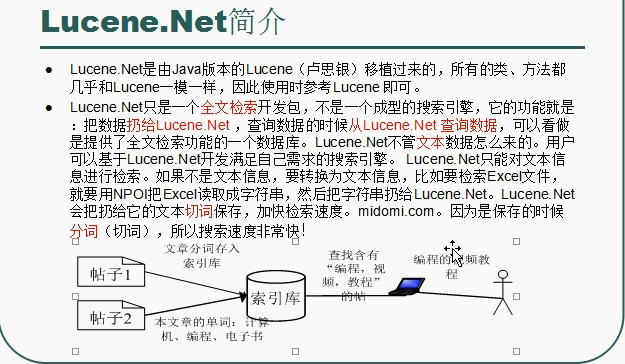
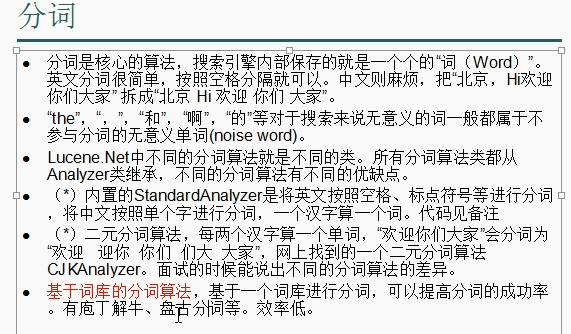
我们可以在官网找到最新的“卢司令”,也可以在negut包下载。卢司令自带一级分词,也就是文本全分单个单词。但是我们这里用的是盘古分词,比一般的分词更加智能,而且可以自己自定义添加分词。
用卢司令的一级分词,具体的可以看这里:http://www.zhuzhusoft.com/article.php?id=151(2.0版本和3.0后的版本有点api的差异)
1
2
3
4
5
6
7
8
9
10
11
12
13
14
15
16
17
18
19
20
21
| static void Token()
{
Console.WriteLine("测试一元分词");
Analyzer analyzer = new StandardAnalyzer(Lucene.Net.Util.Version.LUCENE_30);
string str = "my name is julian.zhu,欢迎访问我的个人网站www.zhuzhusoft.com";
StringReader reader = new System.IO.StringReader(str);
TokenStream ts = analyzer.TokenStream(str, reader);
bool hasNext = ts.IncrementToken();
Lucene.Net.Analysis.Tokenattributes.ITermAttribute ita;
while (hasNext)
{
ita = ts.GetAttribute<Lucene.Net.Analysis.Tokenattributes.ITermAttribute>();
Console.Write(ita.Term + "|");
hasNext = ts.IncrementToken();
}
Console.WriteLine();
ts.CloneAttributes();
reader.Close();
analyzer.Close();
}
|
盘古分词用法也是一样,只需要改成
1
2
3
| Console.WriteLine("测试盘古分词分词");
Analyzer analyzer = new PanGuAnalyzer();
....
|
添加词库测试
这下面的代码考虑的只是单人操作,因此它在添加的时候是加了锁的,但是还没有写完,这时候又来一个请求,那么就解锁了,不适合并发。我们在后面会对代码进行修改(队列的考虑:什么时候再队列里写数据,写的是什么数据。在什么情况下取出来写到文件上)
1
2
3
4
5
6
7
8
9
10
11
12
13
14
15
16
17
18
19
20
21
22
23
24
25
26
27
28
29
30
31
32
| private void button1_Click(object sender, EventArgs e)
{
string indexPath = @"F:\vsproject\FenCiTest\WindowsFormsApp1\lucenedir";
FSDirectory directory = FSDirectory.Open(new DirectoryInfo(indexPath), new NativeFSLockFactory());
bool isUpdate = IndexReader.IndexExists(directory);
if (isUpdate)
{
if (IndexWriter.IsLocked(directory))
{
IndexWriter.Unlock(directory);
}
}
IndexWriter writer = new IndexWriter(directory, new PanGuAnalyzer(), !isUpdate, Lucene.Net.Index.IndexWriter.MaxFieldLength.UNLIMITED);
for (int i = 1; i <= 3; i++)
{
string txt = File.ReadAllText(@"F:\vsproject\FenCiTest\WindowsFormsApp1\书籍" + i + ".txt", System.Text.Encoding.Default);
Document document = new Document();
document.Add(new Field("number", i.ToString(), Field.Store.YES, Field.Index.NOT_ANALYZED));
document.Add(new Field("body", txt, Field.Store.YES, Field.Index.ANALYZED, Lucene.Net.Documents.Field.TermVector.WITH_POSITIONS_OFFSETS));
writer.AddDocument(document);
}
writer.Dispose();
directory.Dispose();
}
|
搜索测试
1
2
3
4
5
6
7
8
9
10
11
12
13
14
15
16
17
18
19
20
21
22
23
24
25
26
27
28
29
30
31
32
33
34
| private void button2_Click(object sender, EventArgs e)
{
string indexPath = @"F:\vsproject\FenCiTest\WindowsFormsApp1\lucenedir";
string kw = "面向对象";
FSDirectory directory = FSDirectory.Open(new DirectoryInfo(indexPath), new NoLockFactory());
IndexReader reader = IndexReader.Open(directory, true);
IndexSearcher searcher = new IndexSearcher(reader);
PhraseQuery query = new PhraseQuery();
query.Add(new Term("body", kw));
query.Slop = 100;
TopScoreDocCollector collector = TopScoreDocCollector.Create(1000, true);
searcher.Search(query, null, collector);
ScoreDoc[] docs = collector.TopDocs(0, collector.TotalHits).ScoreDocs;
this.listBox1.Items.Clear();
for (int i = 0; i < docs.Length; i++)
{
int docId = docs[i].Doc;
Document doc = searcher.Doc(docId);
this.listBox1.Items.Add(doc.Get("number") + "\n");
this.listBox1.Items.Add(doc.Get("body") + "\n");
this.listBox1.Items.Add("-----------------------\n");
}
}
|
实现搜索
首先我们新建一个Search的控制器,前端的view视图如下,添加了一些简单的样式。
1
2
3
4
5
6
7
8
9
10
11
12
13
14
15
16
17
18
19
20
21
22
23
24
25
26
27
28
29
30
31
32
33
34
35
36
37
38
39
40
| <head>
<meta name="viewport" content="width=device-width" />
<title>Index</title>
<style type="text/css">
.search-text2{ display:block; width:528px; height:26px; line-height:26px; float:left; margin:3px 5px; border:1px solid gray; outline:none; font-family:'Microsoft Yahei'; font-size:14px;}
.search-btn2{width:102px; height:32px; line-height:32px; cursor:pointer; border:0px; background-color:#d6000f;font-family:'Microsoft Yahei'; font-size:16px;color:#f3f3f3;}
.search-list-con{width:640px; background-color:#fff; overflow:hidden; margin-top:0px; padding-bottom:15px; padding-top:5px;}
.search-list{width:600px; overflow:hidden; margin:15px 20px 0px 20px;}
.search-list dt{font-family:'Microsoft Yahei'; font-size:16px; line-height:20px; margin-bottom:7px; font-weight:normal;}
.search-list dt a{color:#2981a9;}
.search-list dt a em{ font-style:normal; color:#cc0000;}
</style>
</head>
<body>
<div>
<form method="post" action="/Search/SearchContent">
<input type="text" name="searchtxt" class="search-text2" />
<input type="submit" value="搜一搜" class="search-btn2" >
<input type="submit" value="生成词库">//这里不能这样直接用一个点击按钮生成词库
</form>
<br/>
<div class="search-list-con">
@{
List<ViewModelContent> ls = (List<ViewModelContent>) ViewData["list"];
if (ls != null)
{
foreach (ViewModelContent ViewModelContent in ls)
{
<dl class="search-list">
<dt><a href="javascript:void(0)" >@MvcHtmlString.Create(ViewModelContent.Title)</a></dt>
<dt>@MvcHtmlString.Create(ViewModelContent.Content)</dt>
</dl>
}
}
}
</div>
</div>
</body>
|
控制器的方法:
1
2
3
4
5
6
7
8
9
10
11
12
13
14
15
16
17
18
19
20
21
22
23
24
25
26
27
28
29
30
31
32
33
34
35
36
37
38
39
40
41
42
43
44
45
46
47
48
49
50
51
52
53
54
55
56
57
58
59
60
61
62
63
64
65
66
67
| public class SearchController : Controller
{
private IBLL.IBooksService bll { get; set; }
public ActionResult Index()
{
return View();
}
public ActionResult SearchContent()
{
if (string.IsNullOrEmpty(Request["searchtxt"]))
{
CreateSerachContent();
}
else
{
List<ViewModelContent> ls= ShowSearchContent();
ViewData["list"] = ls;
return View("Index");
}
return Content("OK");
}
private List<ViewModelContent> ShowSearchContent()
{
string indexPath = Request.MapPath("/lucenedir"); ;
List<string> lists = Common.WebCommon.PanGuSplitWord(Request["searchtxt"]);
FSDirectory directory = FSDirectory.Open(new DirectoryInfo(indexPath), new NoLockFactory());
IndexReader reader = IndexReader.Open(directory, true);
IndexSearcher searcher = new IndexSearcher(reader);
PhraseQuery query = new PhraseQuery();
foreach (string word in lists)
{
query.Add(new Term("Content", word));
}
query.Slop = 100;
TopScoreDocCollector collector = TopScoreDocCollector.Create(1000, true);
searcher.Search(query, null, collector);
ScoreDoc[] docs = collector.TopDocs(0, collector.TotalHits).ScoreDocs;
List<ViewModelContent> list = new List<ViewModelContent>();
for (int i = 0; i < docs.Length; i++)
{
ViewModelContent vm = new ViewModelContent();
int docId = docs[i].Doc;
Document doc = searcher.Doc(docId);
vm.Id= Convert.ToInt32(doc.Get("Id"));
vm.Title = doc.Get("Title");
vm.Content = WebCommon.CreateHightLight(Request["searchtxt"], doc.Get("Content"));
list.Add(vm);
}
return list;
}
private void CreateSerachContent()
{
}
}
|
T4模板的简单提示
navigationProperties 导航属性
BeginNamespace 导入命名空间
关于文件并发

在上方的生成词库我们发现了一个多线程并发的问题,就是如果索引目录被锁定,现在正在写着已经加锁了,但是还没有写完,这时候又来一个请求,那么不就解锁了吗?这就需要我们用队列来解决。(队列的考虑:什么时候再队列里写数据,写的是什么数据。在什么情况下取出来写到文件上)
IndexManager类改写词库的生成(添加词库),注意一点!!!!!其他类访问web程序文件夹可以使用HttpRuntime.AppDomainAppPath+“//需要的文件夹”,,记得转义
1
2
3
4
5
6
7
8
9
10
11
12
13
14
15
16
17
18
19
20
21
22
23
24
25
26
27
28
29
30
31
32
33
34
35
36
37
38
39
40
41
42
43
44
45
46
47
48
49
50
51
52
53
54
55
56
57
58
59
60
61
62
63
64
65
66
67
68
69
70
71
72
73
74
75
76
77
78
79
80
81
82
83
84
85
86
87
88
89
90
91
92
93
94
95
96
| public sealed class IndexManager
{
#region 单例模式
static readonly IndexManager indexManager = new IndexManager();
private IndexManager()
{
}
public static IndexManager GetInstance => indexManager;
#endregion
Queue<ViewModelContent> queue = new Queue<ViewModelContent>();
public void AddQueue(int id, string title, string content)
{
ViewModelContent vm = new ViewModelContent();
vm.Id = id;
vm.Title = title;
vm.Content = content;
vm.EmumType = LuceneTypeEnum.Add;
queue.Enqueue(vm);
}
public void DeleteQueue(int id)
{
ViewModelContent viewModel = new ViewModelContent();
viewModel.Id = id;
viewModel.EmumType = LuceneTypeEnum.Delete;
queue.Enqueue(viewModel);
}
public void StartThread()
{
Thread thread = new Thread(WriteIndexContent);
thread.IsBackground = true;
thread.Start();
}
private void WriteIndexContent()
{
while (true)
{
if (queue.Count > 0)
{
CreateIndexContent();
}
else
{
Thread.Sleep(3000);
}
}
}
private void CreateIndexContent()
{
string indexPath = HttpContext.Current.Request.MapPath("/lucenedir");
FSDirectory directory = FSDirectory.Open(new DirectoryInfo(indexPath), new NativeFSLockFactory());
bool isUpdate = IndexReader.IndexExists(directory);
if (isUpdate)
{
if (IndexWriter.IsLocked(directory))
{
IndexWriter.Unlock(directory);
}
}
IndexWriter writer = new IndexWriter(directory, new PanGuAnalyzer(), !isUpdate, Lucene.Net.Index.IndexWriter.MaxFieldLength.UNLIMITED);
while(queue.Count > 0)
{
ViewModelContent viewModel = queue.Dequeue();
writer.DeleteDocuments(new Term("Id",viewModel.Id.ToString()));
if (viewModel.EmumType==LuceneTypeEnum.Delete)
{
continue;
}
Document document = new Document();
document.Add(new Field("Id", viewModel.Id.ToString(), Field.Store.YES, Field.Index.NOT_ANALYZED));
document.Add(new Field("Title", viewModel.Title, Field.Store.YES, Field.Index.NOT_ANALYZED));
document.Add(new Field("Content", viewModel.Content, Field.Store.YES, Field.Index.ANALYZED, Lucene.Net.Documents.Field.TermVector.WITH_POSITIONS_OFFSETS));
writer.AddDocument(document);
}
writer.Dispose();
directory.Dispose();
}
}
|
涉及到的ViewModelContent类,这个是我们文档的添加时所用到的,里面包含我们需要写进的数据
1
2
3
4
5
6
7
| public class ViewModelContent
{
public int Id { get; set; }
public string Title { get; set; }
public string Content { get; set; }
public LuceneTypeEnum EmumType { get; set; }
}
|
我们在Application_Start函数里面开启线程去扫描LuceneNet对应的数据队列
1
2
3
4
5
6
7
8
9
| public class MvcApplication : SpringMvcApplication
{
protected void Application_Start()
{
log4net.Config.XmlConfigurator.Configure();
IndexManager.GetInstance.StartThread();
.........
}
}
|
最后让我们来测试下,创建一个Test控制器
1
2
3
4
5
6
7
8
9
10
11
12
13
14
15
16
17
18
19
20
21
22
23
24
25
26
27
| public class TestController : Controller
{
public ActionResult Index()
{
return View();
}
public ActionResult TestSearch()
{
OAProject.Modle.Books model = new Books();
model.AurhorDescription = "jlkfdjf";
model.Author = "asfasd";
model.CategoryId = 1;
model.Clicks = 1;
model.ContentDescription = "Ajax高级编程";
model.EditorComment = "adfsadfsadf";
model.ISBN = "111111111111111111";
model.PublishDate = DateTime.Now;
model.PublisherId = 72;
model.Title = "Ajax";
model.WordsCount = 1234;
IndexManager.GetInstance.AddQueue(9999, model.Title, model.ContentDescription);
return Content("ok");
}
}
|
最后我们发现结果是可以搜索到我们新添加的书
高级(了解)

